Descrição
PowerTimeline+ (PTL+) is a Connect IQ data field that displays Power and Heart Rate trends while riding.
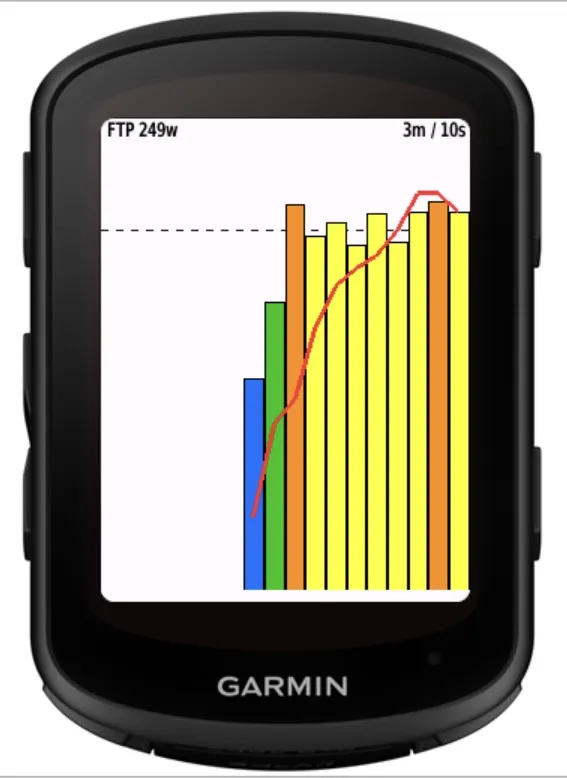
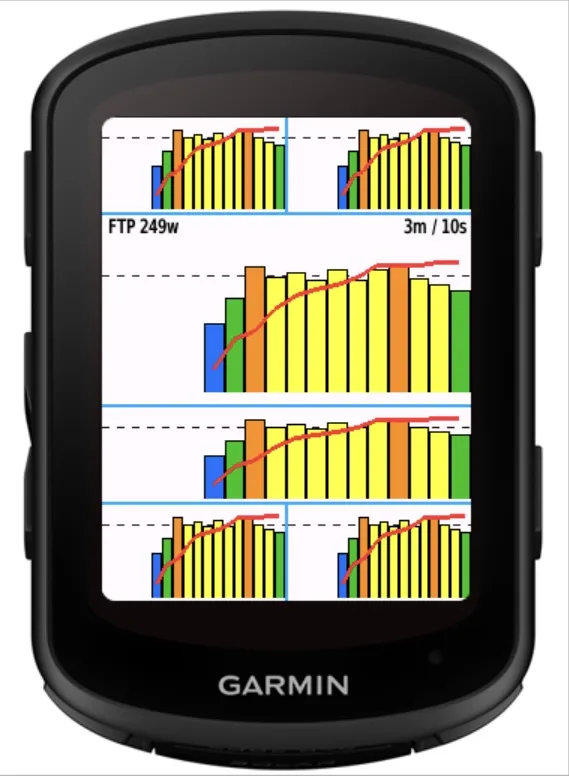
In Normal Graph mode, Power is shown as a bar chart using either 10-second averages for the past 3 minutes or 30-second averages for the past 9 minutes. Bars are color-coded by FTP-based Power Zone, with Heart Rate overlaid as a line graph. Current Power/Heart Rate values and an FTP reference line can also be displayed.
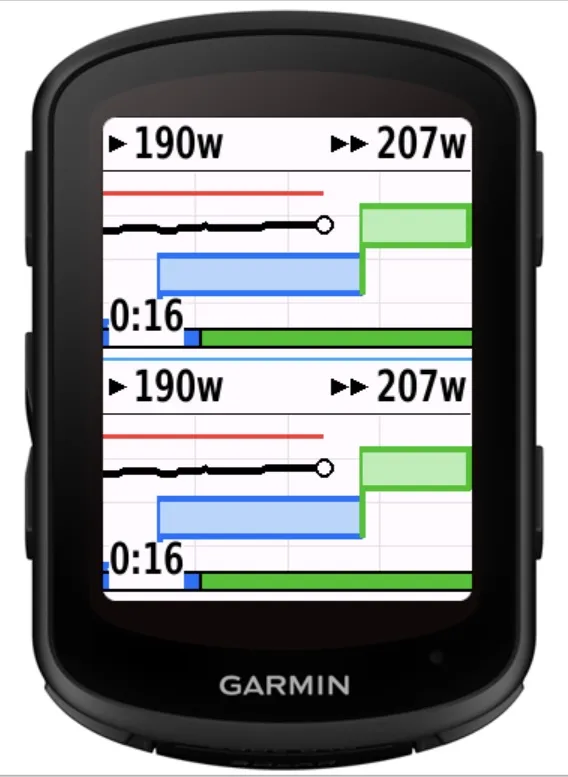
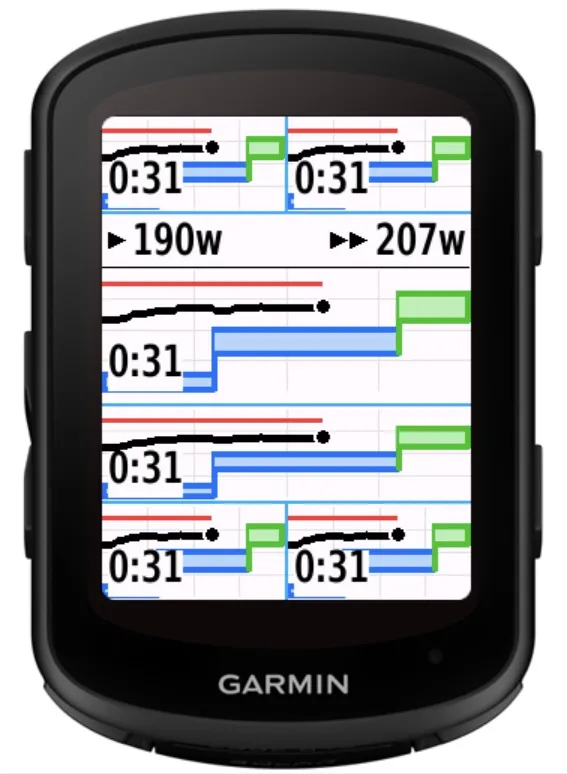
When a workout is detected, PTL+ automatically switches to Workout Mode. It shows the current and next Power targets, target ranges, actual Power and Heart Rate trends, remaining step time or distance, and workout progress on one screen.
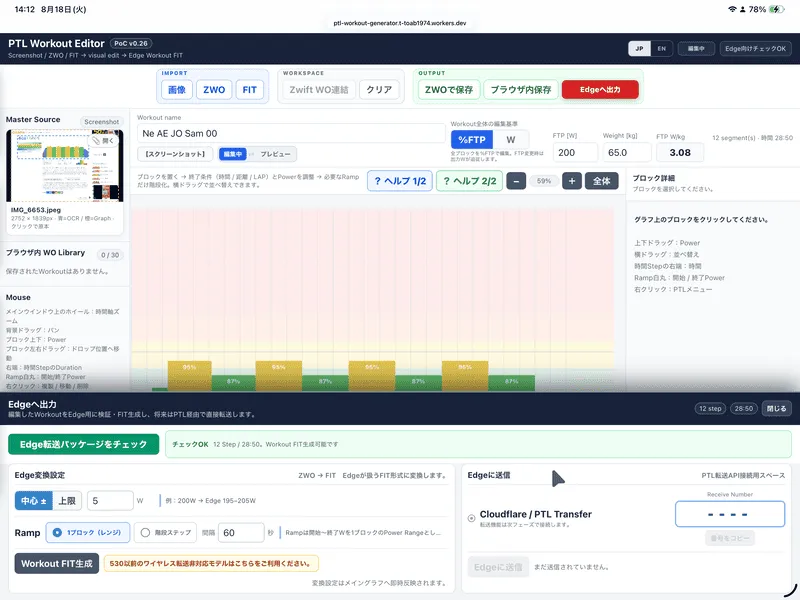
PTL Workout Editor
This browser-based tool lets you create and edit workouts visually. You can import images, ZWO files, and Workout FIT files, then edit step duration, distance, Power target, intensity, and order.
Workouts can be saved in the browser, exported as ZWO, or sent to PTL+ using a four-digit receive number. Windows Connector can import and save ZWO files in your Zwift Workout folder. Edge Workout FIT files can be imported as read-only data.
Editor:
https://ptl-workout-generator.t-toab1974.workers.dev/
Enter the number generated by the Editor in “PTL receive number,” then display PTL+. When “PTL WORKOUT READY / PRESS START” appears, press START to apply the workout to the current Cycling Activity. Recording does not start automatically.
Japanese Manual:
https://toab.lovestoblog.com/manual/PowerTimeline_Plus_JP.html
English Manual:
https://toab.lovestoblog.com/manual/PowerTimeline_Plus_EN.html
Website:
https://toab.lovestoblog.com/index.html
Main Features
- 3-minute/10-second or 9-minute/30-second Power timeline
- FTP Zone colors, FTP line, and Heart Rate graph
- Selectable Power average
- Automatic Workout Mode
- Current/next Power targets and progress
- Remaining step time or distance
- Automatic Workout Zoom
- Configurable colors, graph range, values, positions, and fonts
- Customizable startup and READY displays
- Four-digit workout transfer
- Image, ZWO, and Workout FIT import
- Zwift folder integration via Windows Connector
Trial and Purchase
PTL+ includes a seven-day free trial. Continued use requires a US$5 KiezelPay license.
https://kiezelpay.com/
If the purchase code does not appear, check the Garmin Connect Mobile connection and restart your Edge. Use a single-field layout if the six-digit code is difficult to read.
Data Handling
PTL+ does not send Power, Heart Rate, location, or activity FIT data to the PTL server. Imported files are processed in your browser and the originals are not uploaded.
For four-digit transfers, only the required workout data is stored for up to 24 hours and deleted after reception or expiration. Cloudflare handles security and rate limiting. KiezelPay handles trial, purchase, and license information.
Notes
- Add PTL+ to a Cycling Activity data screen.
- Compatible Power and Heart Rate sensors are required.
- Set FTP correctly for accurate zones and targets.
- Workout Mode requires access to the current Edge Workout Step.
- Four-digit transfer supports up to 128 time- or distance-based steps. LAP-button steps are not supported.
- Numbers are single-use, require a network connection, and remain valid for up to 24 hours.
- Received workouts are applied to the current activity and are not saved in the Edge workout list.
- Verify image-imported workouts before sending.
- Always prioritize traffic laws and safety.
Novidades
v1.51d
- Linked workout (WO) remaining time to the Edge activity timer, fixing an issue where the countdown continued while paused.
- Fixed an issue where the step start time was reset when returning to the same WO step from the pause screen or similar screens.
- Improved remaining-time synchronization by detecting changes in step details in addition to step completion notifications.
- Added Extra Fast to ERG Response for faster application of new power targets during step transitions while ERG control is active. Initial starts and resumes continue to begin at a low setpoint.
v1.51
- Added entry of the four-digit Workout receive number from PTL’s on-device settings.
- Trainer connection On/Off, Value Display, Workout Zoom, and Workout Power Average can now be changed from the same on-device settings menu.
- Added Very Fast to ERG Response for faster convergence to the target power.
v1.50
- Added direct smart trainer connection and control via Bluetooth or ANT+.
- Added settings for ERG response speed, power deadband, and maximum power correction.
- Added trainer power recording. Pair a separate power meter with Edge and enable trainer power recording to record both power sources in the same FIT file.
- Added a READY screen tap option to turn the trainer connection On/Off. Choose this or the existing graph display action in settings.
- On non-touch devices such as Edge 540/550, use PTL’s on-device settings to turn the connection On/Off when selecting or repositioning the data field.
- Changed the default numerical power display to Off.
Note: When using PTL alongside Zwift or another app, let only one app control trainer resistance.
v1.41
- Fixed an issue where the pointer’s lap average was not reset by Auto Lap at a Workout Step transition.
v1.40
- Added tap controls to leave READY, open the normal graph, and change the value display.
- Tap the normal graph to cycle through PWR/HR, PWR, and hidden. The selection is saved.
- In Workout Mode, choose Power Average or Workout Zoom as the tap action.
- Power Average cycles through 3s, 10s, 30s, 60s, and lap average. Workout Zoom cycles through 80W, 60W, 40W, and Off.
- Added on-screen confirmation messages for tap changes.
v1.39
- Changed the Workout graph to a fixed time axis showing 60 seconds of history and 40 seconds ahead, with the current position at 60% of the screen width.
- Time-based step boundaries approach the current position during the final 40 seconds. Distance-based steps use estimates from up to 20 seconds of recent distance data.
- Step boundaries stay at the right edge while stopped or when an estimate is unavailable. Vertical grid lines are spaced 20 seconds apart.
v1.38
- Added 30-second, 60-second, and lap averages to Workout Mode.
- Lap average resets at each new lap. The selected average is used for the power pointer and history line.
v1.37
- Improved Workout Zoom by setting the graph scale from the target power range at each step’s start and keeping it fixed during the step.
- Removed automatic switches to Overview. Out-of-range power lines and the pointer stop at the graph edges.
- Removed the 120W zoom option. Available options are Off, 80W, 60W, and 40W.
v1.33
- Added workout downloads from PTL Workout Editor using a four-digit receive code, with application to the current cycling activity when START is pressed.
- Added duplicate-download protection, download and error status messages, validation against incomplete workouts, and automatic deletion of temporary server data after successful application.
- Adjusted current and next power targets to fit each Edge device and data field layout.
- Improved display and workout download stability.
Capturas de tela
Idiomas compatíveis (2)
Dispositivos compatíveis (7)
Tendência das métricas
Nota
Avaliações
Datas dos snapshots
2026-10-27 → 2026-10-31