Descrição
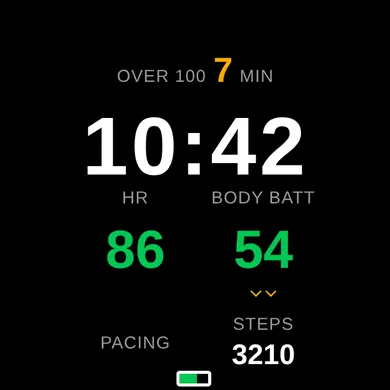
Chargewise Activity Screen shows your Chargewise figures during Garmin's Pacing activity, so you don't leave the activity to look:
- minutes above your heart-rate limit today
- heart rate, green below your limit, amber from your caution line, red above it
- Body Battery, with arrows when it is falling
- steps, the time and the watch battery
Add it to the Pacing activity's data screens. The first time, it shows a code: type it into Chargewise (Settings, then Device, under Activity Screen). From then on it takes your heart-rate limit and caution line from Chargewise when the activity starts and every 15 minutes, through the Garmin Connect app on your phone, so a new limit or a Slow down reaches it on its own. With no connection it keeps the last limit it had and shows when that came. Unpair it in Chargewise at any time.
It sends nothing else. The watch's own heart-rate alert is unchanged.
Leave the app setting "Server" on Chargewise.
Requires a Chargewise account and the Garmin Connect app.
For information only. It is not a medical device and does not give medical advice.
Support: [email protected]
Capturas de tela
Idioma compatível (1)
Dispositivos compatíveis (62)
Approach® S50
Approach® S70 (42mm)
Approach® S70 (47mm)
D2™ Air X10
D2™ Air X15
D2™ Mach 1
D2™ Mach 1 Pro
D2™ Mach 2
D2™ Mach 2 Pro
Descent™ G2
Descent™ MK3 - 43mm
Descent™ MK3i - 51mm
epix™ (Gen 2)
epix™ (Gen 2)
epix™ Pro (42mm)
epix™ Pro (47mm)
epix™ Pro (51mm)
fēnix® 8 AMOLED (43mm)
fēnix® 8 AMOLED (47mm/51mm)
fēnix® 8 Pro
fenix® 9 - 43 mm
fenix® 9 – 47 mm
fenix® 9 Pro - 43 mm
fenix® 9 Pro - 47 mm
fenix® 9 Pro - 51 mm
fēnix® E
Forerunner® 165
Forerunner® 165 Music
Forerunner® 170
Forerunner® 170 Music
Forerunner® 265
Forerunner® 265S
Forerunner® 570 - 42mm
Forerunner® 570 - 47mm
Forerunner® 70
Forerunner® 70
Forerunner® 965
Forerunner® 970
Instinct® 3 – 45 mm, AMOLED
Instinct® 3 – 50 mm, AMOLED
Instinct® Crossover AMOLED
MARQ® (Gen 2)
MARQ® Commander (Gen 2) – Carbon Edition
MARQ™ Aviator (Gen 2)
Mercedes-Benz Venu® 2
Mercedes-Benz Venu® 2
Mercedes-Benz Venu® 2S
Mercedes-Benz Venu® 2S
tactix® 7 – AMOLED Edition
tactix® 8 – 47 mm, AMOLED
Venu® 2
Venu® 2
Venu® 2 Plus
Venu® 2 Plus
Venu® 2S
Venu® 2S
Venu® 3
Venu® 3S
Venu® 4 – 41 mm
Venu® 4 – 45 mm
vívoactive® 5
vívoactive® 6
Tendência das métricas
Nota
Avaliações
Datas dos snapshots
2026-11-17 → 2026-11-28