Descrição
CardFlash stores loyalty and membership barcodes directly on your watch to scan at checkout—no phone needed. Add cards on your watch or via the Garmin Connect IQ app.
[Key Features]
- 2 Ways to Add - Register cards on your watch screen or via the Connect IQ phone app.
- Smart Input - 12 or 13-digit numbers auto-register as EAN-13 [JAN]. On-watch registration shows a live preview to compare with your physical card before saving.
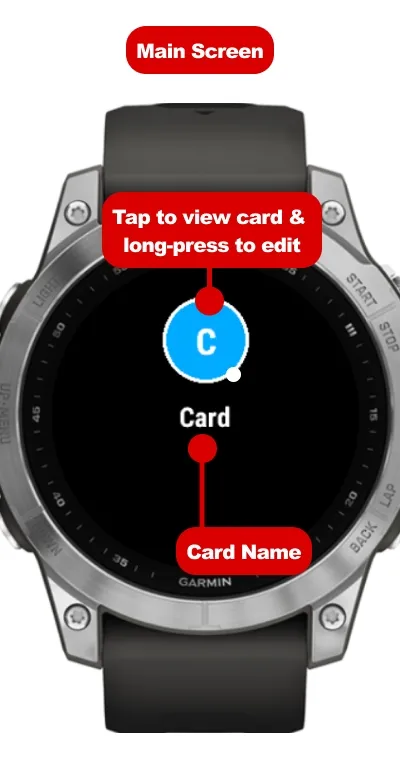
- Intuitive Ring Layout - Up to 12 color-coded circles on the home screen let you find cards at a glance.
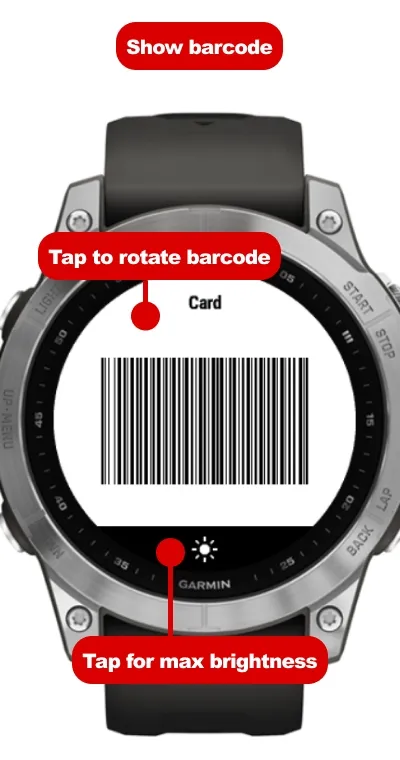
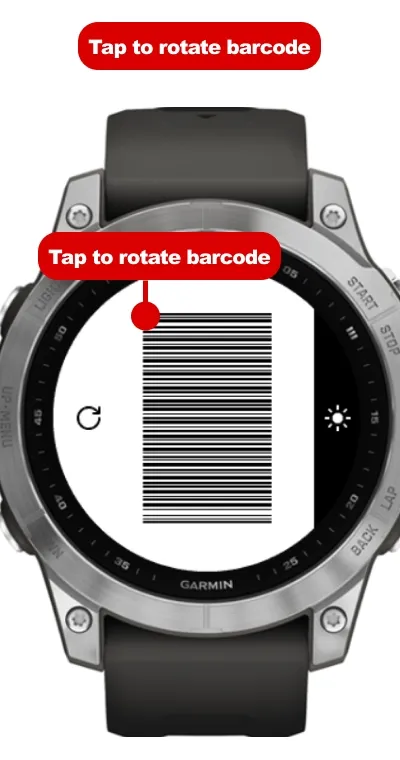
- Checkout Optimized - 90-degree rotation for easy cashier scanning, max brightness toggle, and always-on backlight while viewing.
[How to Use]
[1] Add on Watch
Long-press a circle [or press MENU] and select [Add Card].
- Name - Enter card name.
- Type - Select [CODE128 - EAN-13].
- Code Value - Enter the number printed below the barcode.
- Color - Pick from 12 preset colors.
- Preview and Confirm - Verify the barcode matches your card and save.
* vivoactive 4 - 4S and Venu [Gen 1] do not support on-watch text input; please register via phone.
[2] Add on Phone
Open CardFlash settings in the Connect IQ app, enter [Name], [Code Value - alphanumeric only], [Type], and [Color], then save. Fields reset after saving so you can add the next card right away.
[3] Home Screen
- Open Card - Tap a circle, or select with UP - DOWN and press START.
- Switch Pages - Swipe up - down or use UP - DOWN [up to 6 cards per page].
- Menu - Long-press or press MENU to add, edit, delete cards, or set wrist side.
[4] Presenting Barcodes
- 90-Deg Rotate - Tap screen [or press START] to rotate. Change direction under [Wrist Side] in the menu.
- Max Brightness - Tap the bottom light icon [or press MENU] to toggle max brightness.
- Switch Cards - Swipe up - down [or press UP - DOWN] to cycle cards.
- Stay Awake - Backlight stays on during display [watch gesture settings may still turn off the screen when turning your wrist].
[Formats and Notes]
- EAN-13 [JAN] - 13 or 12-digit retail barcodes [12 digits auto-calculate the check digit].
- CODE128 - Alphanumeric barcodes.
- QR codes are not supported.
- Data is stored on the watch only. Reinstalling the app or resetting your watch requires re-registration.
[Free Trial and Purchase]
Includes a 7-day unrestricted free trial [remaining days shown on home screen and menu], followed by a one-time lifetime purchase.
1. After the trial, open the app to view your code and QR code [requires Garmin Connect phone connection].
2. Scan the QR code or visit kzl.io/code to enter the code and pay.
3. Reopen the app on your watch to unlock.
[From the Developer]
Enjoying CardFlash? A 5-star review on the store is a huge encouragement for continued indie development.
Novidades
[Version 1.0.8]
- Fixed multiple bugs.
[Version 1.0.7]
- Fixed a minor bug.
[Version 1.0.6]
- Fixed a critical bug.
[Version 1.0.5]
- Fixed a critical bug.
[Version 1.0.4]
- Added support for the fenix 9 series.
[Version 1.0.3]
- You can now add cards from the GARMIN CONNECT IQ app.
- Improved usability.
[Version 1.0.2]
- Fixed multiple bugs.
[Version 1.0.1]
- Fixed multiple bugs.
[Version 1.0.0 - Official Release]
Capturas de tela
Idiomas compatíveis (6)
Dispositivos compatíveis (96)
Approach® S50
Approach® S70 (42mm)
Approach® S70 (47mm)
D2™ Air X10
D2™ Air X15
D2™ Mach 1
D2™ Mach 1 Pro
D2™ Mach 2
D2™ Mach 2 Pro
Descent™ G2
Descent™ MK3 - 43mm
Descent™ MK3i - 51mm
Enduro™ 2
Enduro™ 3
epix™ (Gen 2)
epix™ (Gen 2)
epix™ Pro (42mm)
epix™ Pro (47mm)
epix™ Pro (51mm)
fēnix® 7
fēnix® 7
fēnix® 7 Pro
fēnix® 7 Pro – Solar Edition (No Wi-Fi®)
fēnix® 7S
fēnix® 7S
fēnix® 7S Pro
fēnix® 7X
fēnix® 7X
fēnix® 7X Pro
fēnix® 7X Pro No Wi-Fi
fēnix® 8 AMOLED (43mm)
fēnix® 8 AMOLED (47mm/51mm)
fēnix® 8 Pro
fēnix® 8 Solar (47mm)
fēnix® 8 Solar (51mm)
fenix® 9 - 43 mm
fenix® 9 – 47 mm
fenix® 9 Pro - 43 mm
fenix® 9 Pro - 47 mm
fenix® 9 Pro - 51 mm
fenix® 9 Pro - Solar 47 mm
fenix® 9 Pro - Solar 51 mm
fēnix® E
Forerunner® 165
Forerunner® 165 Music
Forerunner® 170
Forerunner® 170 Music
Forerunner® 265
Forerunner® 265S
Forerunner® 570 - 42mm
Forerunner® 570 - 47mm
Forerunner® 70
Forerunner® 70
Forerunner® 955 Dual Power
Forerunner® 965
Forerunner® 970
MARQ® (Gen 2)
MARQ® Commander (Gen 2) – Carbon Edition
MARQ™ Aviator (Gen 2)
Mercedes-Benz Venu® 2
Mercedes-Benz Venu® 2
Mercedes-Benz Venu® 2S
Mercedes-Benz Venu® 2S
tactix® 7
tactix® 7 – AMOLED Edition
tactix® 8 – 47 mm, AMOLED
tactix® 8 – 51 mm, Solar
Venu®
Venu®
Venu® 2
Venu® 2
Venu® 2 Plus
Venu® 2 Plus
Venu® 2S
Venu® 2S
Venu® 3
Venu® 3S
Venu® 4 – 41 mm
Venu® 4 – 45 mm
Venu® Sq.
Venu® Sq.
Venu® Sq.
Venu® Sq.
Venu® Sq. 2
Venu® Sq. 2 Music
Venu® Sq. Music
Venu® Sq. Music
Venu® Sq. Music
Venu® Sq. Music
Venu® X1
vívoactive® 4
vívoactive® 4
vívoactive® 4S
vívoactive® 4S
vívoactive® 5
vívoactive® 6
Tendência das métricas
Nota
Avaliações
Datas dos snapshots
2026-10-27 → 2026-11-02