Opis
Essential data. A more focused you.
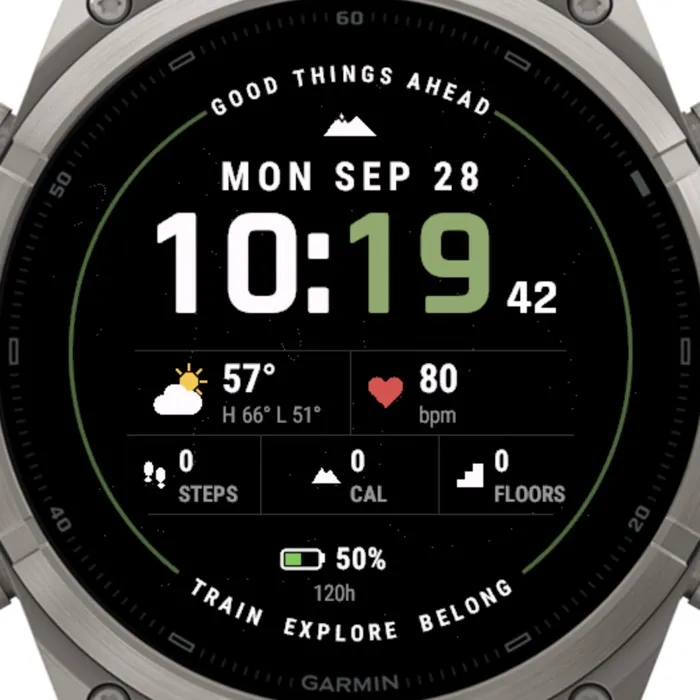
CORE strips the watch face back to what actually matters. Big, bold condensed digits with the minutes picked out in olive, the date spelled out above them, and a clean data grid below — nothing to decode, nothing to scroll. A thin olive ring frames it all with a quiet reminder: good things ahead.
Under the time, a compact grid shows the current weather with a proper icon, today's temperature and the high/low, and your live heart rate. The second row gives you steps, calories and floors climbed at a glance, and the bottom line keeps an eye on battery with the percentage and an estimate of the hours left.
Built for rugged, active days: high-contrast white on black, a small touch of olive and red where it counts, and an always-on mode that dims to just the time and date so your AMOLED screen stays easy on the battery. Everything is drawn with vector fonts, so it renders crisp on every supported size.
Out of the box it needs no setup, but everything on the grid is yours to change from the Connect IQ app: pick what the two large cells and the three small cells show (weather, sunrise and sunset, Body Battery, stress, a second time zone, notifications, active minutes, distance, floors and more), swap the olive accent for one of nine other colours, write your own words around the ring, and choose your time format, temperature unit and battery line. Put it on, train, explore, belong.
Free 7-day trial. After that a license key (USD 4.99) is required, available at https://allezfaces.lemonsqueezy.com/checkout/buy/e65a6f69-d821-491c-b70a-79fe003d0adf.
Features:
- Bold condensed time with olive minutes, seconds shown when the watch is awake
- Automatic 12 h / 24 h format from your device settings
- Letter-spaced date: weekday, month and day
- Live weather: condition icon, current temperature, condition text, daily high and low (°C or °F per your units)
- Heart rate (live sensor, falls back to the most recent reading)
- Steps, calories and floors climbed with thousands separators
- Battery percentage with a proportional fill and estimated hours remaining
- Radial "GOOD THINGS AHEAD" / "TRAIN EXPLORE BELONG" text around the olive ring
- Low-power always-on mode: time and date only, dimmed, no seconds
- Scales cleanly to 416, 454 and 466 px round AMOLED displays
- Fully customisable from the Connect IQ phone app (see Settings) — defaults reproduce the original design
Settings (Garmin Connect IQ app):
- Time format — Same as watch / 12 hour / 24 hour — Same as watch
- Leading zero on hour (12 h) — on / off — off
- Show seconds — on / off (seconds are never shown in always-on mode) — on
- Temperature unit — Same as watch / Celsius / Fahrenheit — Same as watch
- Accent color — Olive, Blue, Cyan, Green, Yellow, Orange, Red, Purple, Pink, White — colours the minutes; the ring takes a darker shade of the same colour — Olive
- Top ring text — free text, up to 20 characters, shown uppercase and letter-spaced — GOOD THINGS AHEAD
- Bottom ring text — free text, up to 22 characters; extra spaces between words widen the gaps — TRAIN EXPLORE BELONG
- Left cell — Weather / Sunrise-sunset (next event big, the other below) / Body Battery + Stress / Second time zone — Weather
- Second time zone — UTC offset in whole hours, -12 … +14 (used by the "Second time zone" cell) — 0 (UTC)
- Right cell — Heart rate / Body Battery / Stress / Notifications / Active minutes today — Heart rate
- Small cell 1, 2, 3 — Steps / Calories / Floors climbed / Distance (km or mi per watch units) / Body Battery / Stress / Active minutes / Heart rate — Steps / Calories / Floors
- Battery line — Percent + hours remaining / Percent only / Hidden — Percent + hours remaining
More photos, compatible watches and the rest of the collection:
https://allezfaces.pages.dev/watch-faces/core/?utm_source=connectiq&utm_medium=listing
Nowości
When the trial ends, the screen shows a large QR code: scan it with your phone camera to open this face's page and get a license key. Always-on mode keeps showing just the time and date.
Zrzuty ekranu
Obsługiwany język (1)
Zgodne urządzenia (63)
Approach® S70 (42mm)
Approach® S70 (47mm)
D2™ Air X15
D2™ Mach 1
D2™ Mach 1 Pro
D2™ Mach 2
D2™ Mach 2 Pro
Descent™ MK3 - 43mm
Descent™ MK3i - 51mm
Enduro™ 2
Enduro™ 3
epix™ (Gen 2)
epix™ (Gen 2)
epix™ Pro (42mm)
epix™ Pro (47mm)
epix™ Pro (51mm)
fēnix® 7
fēnix® 7
fēnix® 7 Pro
fēnix® 7 Pro – Solar Edition (No Wi-Fi®)
fēnix® 7S
fēnix® 7S
fēnix® 7S Pro
fēnix® 7X
fēnix® 7X
fēnix® 7X Pro
fēnix® 7X Pro No Wi-Fi
fēnix® 8 AMOLED (43mm)
fēnix® 8 AMOLED (47mm/51mm)
fēnix® 8 Pro
fēnix® 8 Solar (47mm)
fēnix® 8 Solar (51mm)
fenix® 9 - 43 mm
fenix® 9 – 47 mm
fenix® 9 Pro - 43 mm
fenix® 9 Pro - 47 mm
fenix® 9 Pro - 51 mm
fenix® 9 Pro - Solar 47 mm
fenix® 9 Pro - Solar 51 mm
fēnix® E
Forerunner® 165
Forerunner® 165 Music
Forerunner® 170
Forerunner® 170 Music
Forerunner® 265
Forerunner® 265S
Forerunner® 570 - 42mm
Forerunner® 570 - 47mm
Forerunner® 70
Forerunner® 70
Forerunner® 955 Dual Power
Forerunner® 965
Forerunner® 970
MARQ® (Gen 2)
MARQ® Commander (Gen 2) – Carbon Edition
MARQ™ Aviator (Gen 2)
tactix® 7
tactix® 7 – AMOLED Edition
tactix® 8 – 47 mm, AMOLED
tactix® 8 – 51 mm, Solar
Venu® 4 – 41 mm
Venu® 4 – 45 mm
vívoactive® 6