Opis
Control your Windows PC from your Garmin watch
What you can do
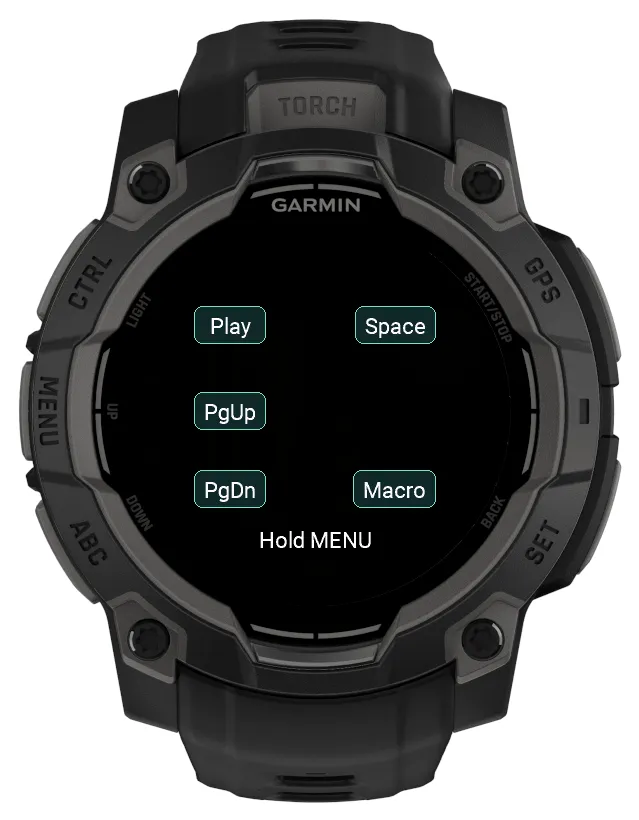
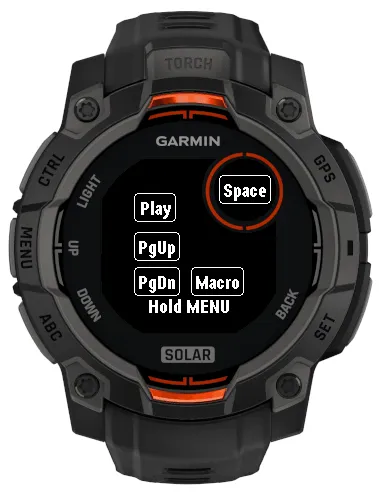
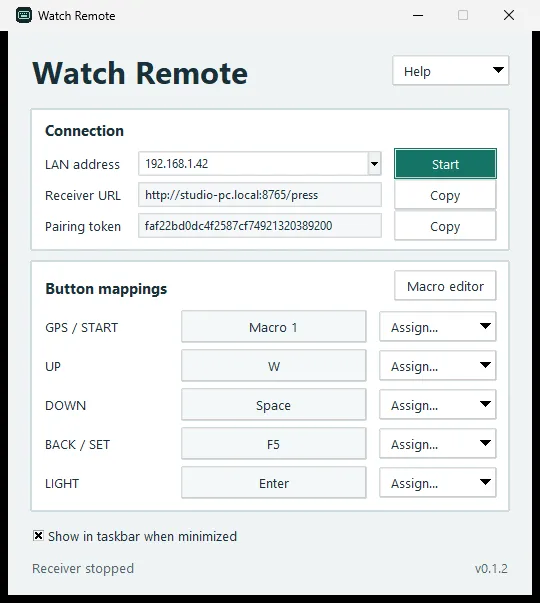
Assign a keyboard key, mouse click, or recorded macro to each supported watch button in the Windows receiver. The watch shows your assigned actions, and touchscreen models let you tap them directly.
Setup
1. Download and open the Windows listener. It’s a portable 64-bit Windows app with Python included:
https://apps.microsoft.com/store/detail/9PPG515LN7JQ?cid=DevShareMCLPCS
or
https://github.com/Asparaguss/garmin-pc-remote/releases/tag/v0.1.2
2. Put your phone and PC on the same local network. In the Windows receiver, select your PC’s local network address and click Start. If Windows asks, allow access on private networks.
on iOS:
1. On your iPhone, open the Connect IQ Store app and go to the Remote for PC → Settings. Paste the Receiver URL and Pairing token exactly as shown in the Windows receiver, then tap Save. Use these phone settings whenever you need to change either value.
2. Make sure your watch is connected to your phone in Garmin Connect, then open Watch Remote on the watch. If it shows Not connected, press START (GPS on Instinct) or tap Tap to connect on a touchscreen. Your assigned actions appear once connected.
on Android:
1. Install Port Forwarder by App Bolt:
https://play.google.com/store/apps/details?id=com.appbolt.portforwarder
2. Create a TCP rule from 127.0.0.1:8765 to your PC’s LAN IP on port 8765. Start the rule and leave the Windows receiver running.
2. In Connect IQ, set the Receiver URL to http://127.0.0.1:8765/press. Keep the same pairing token, save and sync.
Keep both the Windows listener and Android forwarding rule running during use. If your PC’s local IP changes, update the destination IP in Port Forwarder.
You can try your mappings without sending clicks or keystrokes to the active window by selecting Help → Test mode in the Windows receiver. To exit the watch app, hold MENU or tap the footer on a touchscreen, then select Exit app.
If you still can’t connect, check that the Windows receiver is running and include the error code from the watch when sending feedback.
Nowości
• Exit app is now at the top of the watch menu.
• The receiver URL and pairing token are now managed in the Connect IQ Store app on your phone.
• The watch shows how to reconnect and displays an error code if the connection fails.
Zrzuty ekranu
Obsługiwany język (1)
Zgodnych urządzeń (148)
Approach® S50
Approach® S70 (42mm)
Approach® S70 (47mm)
Approach® S72 - 43 mm
Approach® S72 - 47 mm
D2™ Air X10
D2™ Air X15
D2™ Mach 1
D2™ Mach 1 Pro
D2™ Mach 2
D2™ Mach 2 Pro
Descent™ G1
Descent™ G2
Descent™ MK2
Descent™ MK2
Descent™ Mk2S
Descent™ Mk2S
Descent™ MK3 - 43mm
Descent™ MK3i - 51mm
Enduro™
Enduro™
Enduro™ 2
Enduro™ 3
Enduro™ 4
epix™ (Gen 2)
epix™ (Gen 2)
epix™ Pro (42mm)
epix™ Pro (47mm)
epix™ Pro (51mm)
fēnix® 6
fēnix® 6
fēnix® 6 Dual Power
fēnix® 6 Pro
fēnix® 6 Pro
fēnix® 6 Pro Dual Power
fēnix® 6 Pro Solar
fēnix® 6 Solar
fēnix® 6S
fēnix® 6S
fēnix® 6S Dual Power
fēnix® 6S Pro
fēnix® 6S Pro
fēnix® 6S Pro Dual Power
fēnix® 6S Pro Solar
fēnix® 6S Solar
fēnix® 6X Pro
fēnix® 6X Pro
fēnix® 7
fēnix® 7
fēnix® 7 Pro
fēnix® 7 Pro – Solar Edition (No Wi-Fi®)
fēnix® 7S
fēnix® 7S
fēnix® 7S Pro
fēnix® 7X
fēnix® 7X
fēnix® 7X Pro
fēnix® 7X Pro No Wi-Fi
fēnix® 8 AMOLED (43mm)
fēnix® 8 AMOLED (47mm/51mm)
fēnix® 8 Pro
fēnix® 8 Solar (47mm)
fēnix® 8 Solar (51mm)
fenix® 9 - 43 mm
fenix® 9 – 47 mm
fenix® 9 Pro - 43 mm
fenix® 9 Pro - 47 mm
fenix® 9 Pro - 51 mm
fenix® 9 Pro - Solar 47 mm
fenix® 9 Pro - Solar 51 mm
fēnix® E
ForeAthlete 55
Forerunner® 165
Forerunner® 165 Music
Forerunner® 170
Forerunner® 170 Music
Forerunner® 255
Forerunner® 255 Music
Forerunner® 255S
Forerunner® 255S Music
Forerunner® 265
Forerunner® 265S
Forerunner® 55
Forerunner® 55
Forerunner® 570 - 42mm
Forerunner® 570 - 47mm
Forerunner® 70
Forerunner® 70
Forerunner® 945 LTE
Forerunner® 955 Dual Power
Forerunner® 965
Forerunner® 970
Instinct® 2
Instinct® 2S
Instinct® 2X
Instinct® 3 – 45 mm, AMOLED
Instinct® 3 – 45 mm, Solar
Instinct® 3 – 50 mm, AMOLED
Instinct® 3 – 50 mm, Solar
Instinct® Crossover
Instinct® Crossover AMOLED
Instinct® E – 40 mm
Instinct® E – 45 mm
MARQ® (Gen 2)
MARQ® Adventurer (Gen 3)
MARQ® Commander (Gen 2) – Carbon Edition
MARQ™ Adventurer
MARQ™ Adventurer
MARQ™ Athlete
MARQ™ Athlete
MARQ™ Aviator
MARQ™ Aviator
MARQ™ Aviator (Gen 2)
MARQ™ Captain
MARQ™ Captain
MARQ™ Commander
MARQ™ Commander
MARQ™ Driver
MARQ™ Driver
MARQ™ Expedition
MARQ™ Expedition
MARQ™ Golfer
MARQ™ Golfer
Mercedes-Benz Venu® 2
Mercedes-Benz Venu® 2
Mercedes-Benz Venu® 2S
Mercedes-Benz Venu® 2S
quatix® 6
quatix® 6X
tactix® 7
tactix® 7 – AMOLED Edition
tactix® 8 – 47 mm, AMOLED
tactix® 8 – 51 mm, Solar
Venu® 2
Venu® 2
Venu® 2 Plus
Venu® 2 Plus
Venu® 2S
Venu® 2S
Venu® 3
Venu® 3S
Venu® 4 – 41 mm
Venu® 4 – 45 mm
Venu® Sq. 2
Venu® Sq. 2 Music
Venu® X1
vívoactive® 5
vívoactive® 6
Ostatni trend metryk
Ocena
Opinie
Daty migawek
2026-11-14 → 2026-11-30