Keterangan
Your world in motion.
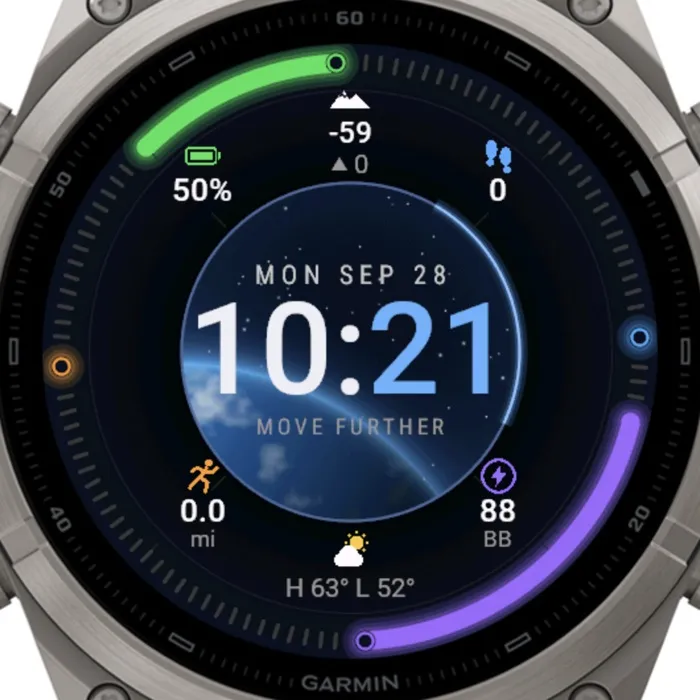
ORBIT turns your watch into an orbital dashboard. Four coloured arcs hug the bezel and fill up as your day progresses: steps toward your goal in blue, battery in green, today's distance in orange and Body Battery in purple. Inside, a glowing orbit ring frames a deep-space scene with a planet horizon and a scatter of stars, and a big two-tone time you can read at a glance, hours in white and minutes in blue.
Everything you check most often sits in its own quadrant with a clear icon: battery, steps, distance and Body Battery. The top of the dial shows your current altitude with floors climbed, and the bottom shows the current weather with the temperature and today's high and low. All values follow the units set on your watch (km/mi, m/ft, °C/°F) and the 12/24-hour clock setting.
Make it yours from the Connect IQ app on your phone: pick what each of the four arcs tracks (steps, battery, distance, Body Battery, stress, active minutes, floors or calories), set your daily distance goal, choose the colour of the minutes, write your own motto under the time, and swap the top and bottom of the dial for sunrise/sunset, notifications, heart rate or a second time zone. Time format and temperature unit can follow the watch or be forced to 12/24 h and °C/°F.
Designed for AMOLED displays, ORBIT uses a pure black rim and lit pixels only where they matter. In always-on mode it drops to a dim time and date on plain black to protect the screen and the battery. It works out of the box with no configuration: install it and go.
Free 7-day trial. After that a license key (USD 4.99) is required, available at https://allezfaces.lemonsqueezy.com/checkout/buy/81c49351-6fe3-4b77-a322-acc467416095.
Features:
- Four bezel arcs with progress dots, each configurable: steps / step goal, battery, distance / daily goal, Body Battery, stress, active minutes, floors, calories
- Deep-space scene inside the orbit ring: gradient sky, planet horizon, stars (awake mode)
- Large two-tone time (white hours, coloured minutes) with letter-spaced date and your own motto
- Four icon quadrants matching the arcs, with unit labels
- Top of the dial: altitude (m/ft) + floors, or sunrise / sunset, or notifications + alarms
- Bottom of the dial: weather (icon, temperature, high / low), or heart rate, or a second time zone
- Follows your watch units and 12/24-hour setting, or override them in the settings
- AMOLED-friendly always-on mode: dim time and date only
- Shows "--" when a value is not yet available
Settings (Garmin Connect IQ app):
- Time format — Same as watch / 12 hour / 24 hour — Same as watch
- Leading zero on hour — on / off — off
- Temperature unit — Same as watch / Celsius / Fahrenheit — Same as watch
- Minutes color — Blue, Green, Orange, Purple, Cyan, Yellow, Red, Pink, White (also tints the inner-ring arc and dot) — Blue
- Motto under the time — free text, up to 16 characters, shown in capitals; empty hides it — MOVE FURTHER
- Top-right / top-left / bottom-left / bottom-right arc — Steps (blue), Battery (green), Distance (orange), Body Battery (purple), Stress (red), Active minutes (cyan), Floors (yellow), Calories (pink); the quadrant below each arc shows the same metric — Steps / Battery / Distance / Body Battery
- Daily distance goal (km) — 1-100 — 10
- Top of the dial — Altitude and floors / Sunrise and sunset / Notifications and alarms — Altitude and floors
- Bottom of the dial — Weather / Heart rate / Second time zone — Weather
- Second time zone (UTC offset, hours) — -12..14 — 0 (UTC)
More photos, compatible watches and the rest of the collection:
https://allezfaces.pages.dev/watch-faces/orbit/?utm_source=connectiq&utm_medium=listing
Nota kemas kini
When the trial ends, the screen shows a large QR code: scan it with your phone camera to open this face's page and get a license key. Always-on mode keeps showing just the time and date.
Tangkapan skrin
Bahasa disokong (1)
Peranti serasi (63)
Approach® S70 (42mm)
Approach® S70 (47mm)
D2™ Air X15
D2™ Mach 1
D2™ Mach 1 Pro
D2™ Mach 2
D2™ Mach 2 Pro
Descent™ MK3 - 43mm
Descent™ MK3i - 51mm
Enduro™ 2
Enduro™ 3
epix™ (Gen 2)
epix™ (Gen 2)
epix™ Pro (42mm)
epix™ Pro (47mm)
epix™ Pro (51mm)
fēnix® 7
fēnix® 7
fēnix® 7 Pro
fēnix® 7 Pro – Solar Edition (No Wi-Fi®)
fēnix® 7S
fēnix® 7S
fēnix® 7S Pro
fēnix® 7X
fēnix® 7X
fēnix® 7X Pro
fēnix® 7X Pro No Wi-Fi
fēnix® 8 AMOLED (43mm)
fēnix® 8 AMOLED (47mm/51mm)
fēnix® 8 Pro
fēnix® 8 Solar (47mm)
fēnix® 8 Solar (51mm)
fenix® 9 - 43 mm
fenix® 9 – 47 mm
fenix® 9 Pro - 43 mm
fenix® 9 Pro - 47 mm
fenix® 9 Pro - 51 mm
fenix® 9 Pro - Solar 47 mm
fenix® 9 Pro - Solar 51 mm
fēnix® E
Forerunner® 165
Forerunner® 165 Music
Forerunner® 170
Forerunner® 170 Music
Forerunner® 265
Forerunner® 265S
Forerunner® 570 - 42mm
Forerunner® 570 - 47mm
Forerunner® 70
Forerunner® 70
Forerunner® 955 Dual Power
Forerunner® 965
Forerunner® 970
MARQ® (Gen 2)
MARQ® Commander (Gen 2) – Carbon Edition
MARQ™ Aviator (Gen 2)
tactix® 7
tactix® 7 – AMOLED Edition
tactix® 8 – 47 mm, AMOLED
tactix® 8 – 51 mm, Solar
Venu® 4 – 41 mm
Venu® 4 – 45 mm
vívoactive® 6