Keterangan
Sports: Ski Tour; SkiTour; Skiing; Hike, MTB, Bike, Moving Time, MovingTime
Tags: Vertical Speed; VerticalSpeed
!!! IT IS THE ONLY? DATA FIELD WITH VERTICAL SPEED [UpHill meters/hour] !!!
Idea: show most important (8) values on ONE data display with 4 values in BigFont for easy reading under bad conditions (and for my old eyes).
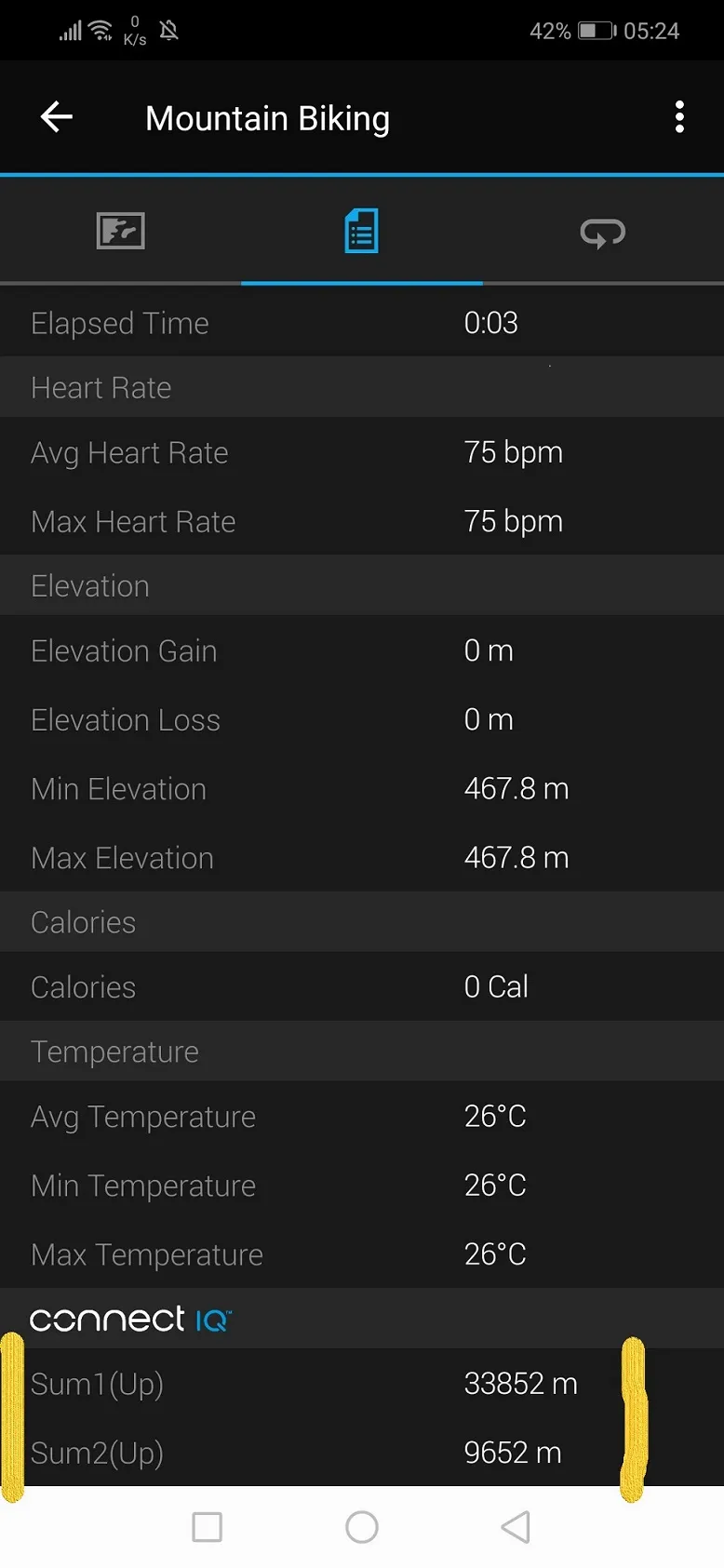
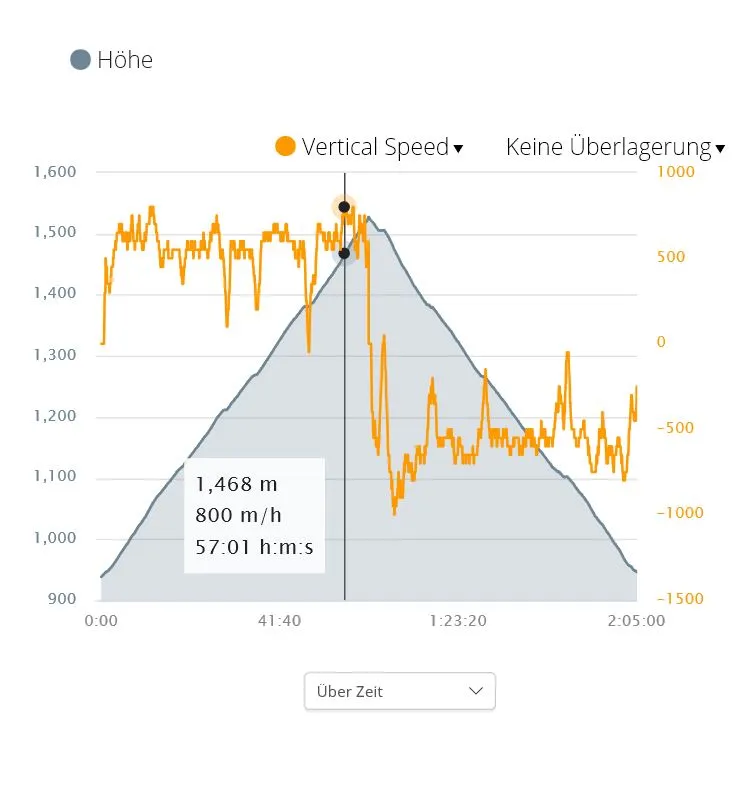
WRITES TO FIT file, so you can see a graph of vertical speed on the Garmin Connect!!
==============
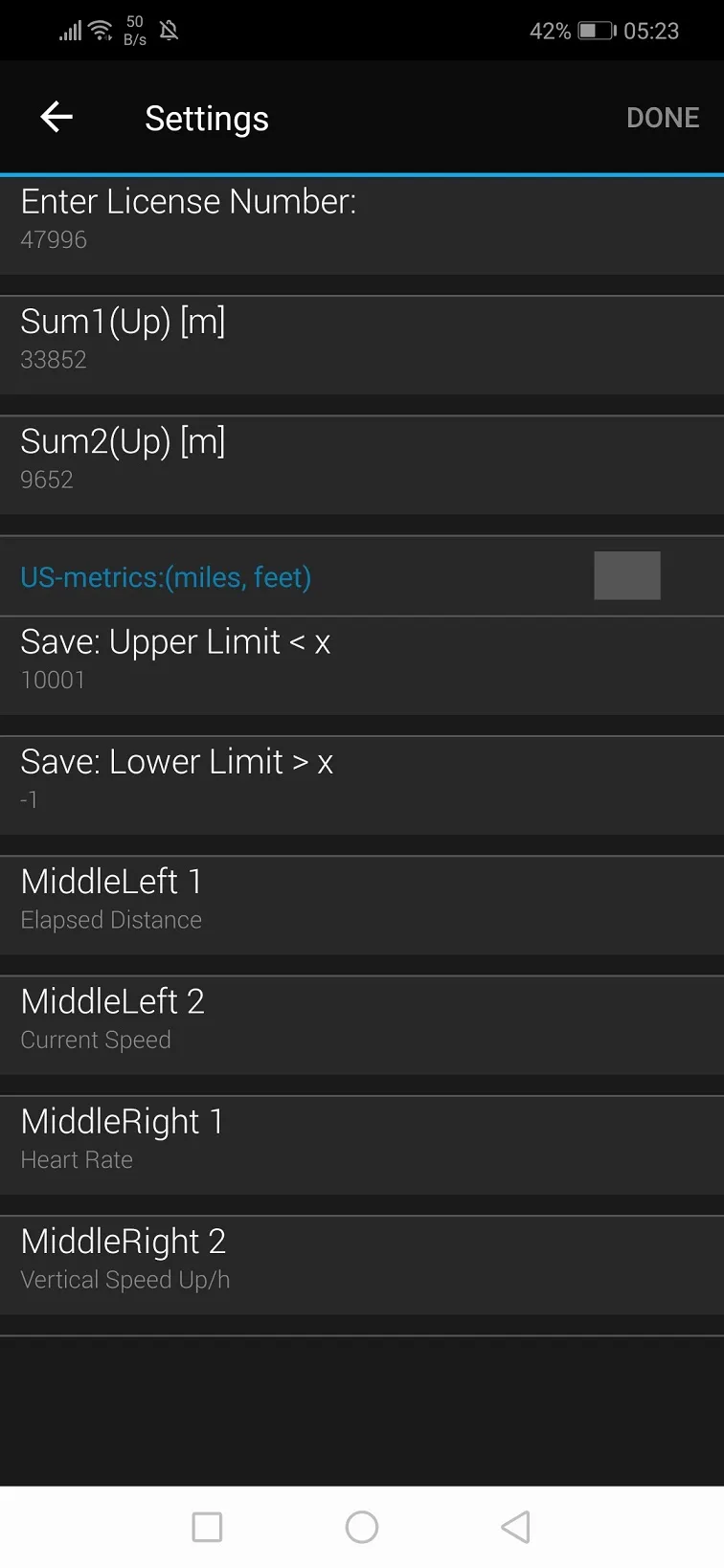
NEW: Has 2 SUMMARY Fields for Vertical Up in meters. Can be (re)set via Settings on Garmin Connect GC. The actual summaries are always shown on the activities in GC.
DETAIL of the idea: As a DataField does not know which kind of activity is done (shame on Garmin) I created/will 3 data fields (2020-03-22) with exactly same functionality.
I use (original) BigFont Mountaineering for Mountain Ski (backcountry touring), and new BigFont MT Bike für MTB and BigFont MT Hike.
This way I have 2 vertical up counters (one for live time of watch and other per year(set to 0 at start of each season manually via GC))for each of my 3 preferred sports. (all in meters).
I add them to the correspondent application of Garmin (Bike, Hike and another Hike for Skiing)
================
It is meant for hiking up a mountain, by foot, bike and ski.
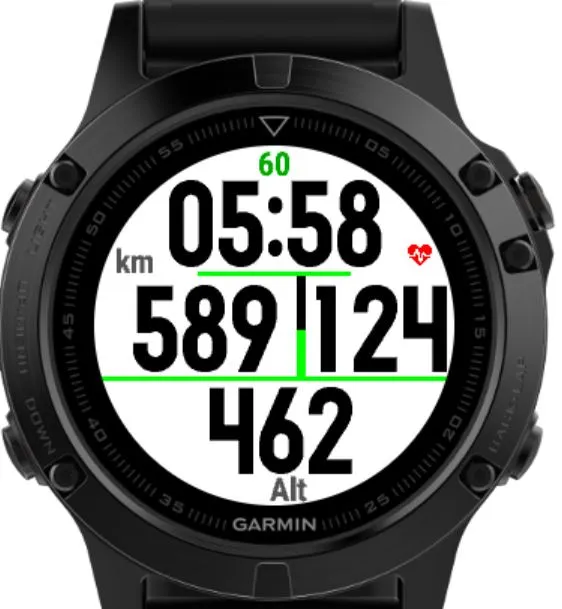
Shows on Top:
- Time and ElapsedTime
Shows in Middle Left or Right
- Vertical Speed Up/h in Meters/Hour (when US-metrics, ft/hour, uses then 4 digits, so please put it in the LEFT field)
- Heart Rate
- Heart Rate Icon: red: licensed; gray: no license
- Distance in km or miles
- Current Speed in km/h or miles/h
Shows at Bottom: Actual Altitude, Total Ascent. (Alt/Up) in meters or feet
Vertical bar: battery in percent, becomes blue when bluetooth is connected
Horizontal bars:
- red: activity is stopped
- yellow activity is started but no GPS signal
- green: activity is started (and GPS signal is OK)
- gray: activity is stopped and NO LICENSE purchased
As vertical speed is not available for programmers (like me), I had to implement it my own. It is the average over the last 60 seconds.
At the very top, you can see the exact time over which the average is calculated. (diff Altitude/diff seconds). The numbers are green (OK) for the range between 59-61 seconds, otherwise red.
Settings can be changed the license number entered via the Garmin Connect Mobile or Garmin Express UI. Here is how to do it: https://apps.garmin.com/settingsHelp.
It is a DataFiled, so you have to add it to one of your existing "Activity Applications" like "Hike". See also video https://www.youtube.com/watch?v=P5HYBabeB2s .
License: The application runs some time without any restriction, only the heart rate icon and the horizontal bars are remaining gray.
For a fee of 5 EUR, you get the unlimited time version. Then the heart icon will change from gray to red.
Please test the WatchFace before making the payment at https://paypal.me/Seli17/5EUR , then send me the displayed ID from the watch, the type of watch and your country. It is a manual process, but I reply as soon as possible (less than 24 hours). Thank you very much.
ENJOY
Nota kemas kini
2026-11-17: Added Fenix 9 Solar with 260 & 280 pixel
2025-01-05: Avoid Save Seiigings Error Message" Can not savee settings now. Please try
Added (some) Fenix 7Pro devices
SDK 7.4.3
2024-10-18: Formated Middle Items to space available. (ex for MiddleRight: 9.9 then 10)
2024-09-05: Added Fenix 8 (non-Amoled) SDK 7.3
2024-5-03: Avoid flickering by setting static view when NotStateted or Paused. Build with newest SDK 7.1.1.
2023-04-30: SDK 4.2.4
2022-03-18: Additional Setting "Use More Memory (additional FIT fields)" is for Vivoactive 4 as it crashed. Using NOT this feature, the SumAlt1 & 2 and SunDistance Fields are not used to save memory. (hope it helps)
2022-02-28: Bug of Garmin(?): "Out Of Memory Error " on Vivoactive 4. Therefore build with Garmin SDK 4.0.9
2020-10-11: Bug in MovingTime on Resume(Later). Now MovingTime is set when Application is started again.
2020-10-01: Added Moving Time in Green on Top field. Minimal Speed Time can be changed via Settings. Default = 1 kmh. (Moving Time is usually calculated after an activity is loaded UP via Garmin Connect with their algorithm. To show it on the watch, I had to determine it myself.
2020-04-10: when Vertical speed is more than 1000 or less than -1000, show it in Purple and divided by 10; For better readability.
2020-03-24: added one Sum field for kilometers (second one costs too much memory!)
2020-03-20: Bug in resume on Sum-fields.
2020-03-20: Added 2 Sum fields in Settings and FIT (Garmin Connect App) for Uphill in meters. They can be (re) set via Garmin Connect.
2020-03-18: First try of showing and storing Sum of Altitude_Up over all activities by this DataField.
2020-02-14: GPS Quality Yellow for Poor and lower. (before only lower than poor)
2019-09-14: Added FENIX 6, 6X and Vivoactive 4
2019-07-03: Horizontal lines in purple when state=paused (used on skiing)
2019-04-18 R2: Use Dark Green for better visibility. Show also altitude at buttom when Activity is stopped.
2019-04-17: Also for Edge1000, maybe uggly formating because of firmware font, but at least you get the graphic via the FIT file in Garmin Connect!
added TotalDescent in Red at the buttom. TotalAscent now in Green.
2019-04-02: Lower line in Yellow when GPS not available
2019-02-11: VerticalSpeed in feet again with 4 digits, but please put it in the LEFT field.
Compute Vertical Speed only when GPS is getting a signal. this avoids big values at startup.
As long as GPS is not ready, show lines in yellow.
2018-12-26: Bug: VertcalSpeed was divieded (or not) by 10.
2018-12-25: now also with US units.
-speed in mph
-distance in miles
- Vertical speed (Up/hour and Down/hour) in 10 feet/hour
- Altitude and TotalAscend (up) in feet.
the graphic of vertical speed is in feet/hour
deleted further history
Tangkapan skrin
Bahasa disokong (1)
Peranti serasi (76)
D2™ Charlie
D2™ Charlie
Descent™ MK2
Descent™ MK2
Edge® 1000
Edge® 1000
Edge® 1000
Edge® 1000
Edge® 1000
Edge® 1000
Edge® Explore 1000
Enduro™
Enduro™
Enduro™ 2
fēnix® 5
fēnix® 5
fēnix® 5 Plus
fēnix® 5 Plus
fēnix® 5X
fēnix® 5X
fēnix® 5X Plus
fēnix® 5X Plus
fēnix® 6
fēnix® 6
fēnix® 6 Dual Power
fēnix® 6 Pro
fēnix® 6 Pro
fēnix® 6 Pro Dual Power
fēnix® 6 Pro Solar
fēnix® 6 Solar
fēnix® 6S
fēnix® 6S
fēnix® 6S Dual Power
fēnix® 6S Solar
fēnix® 6X Pro
fēnix® 6X Pro
fēnix® 7
fēnix® 7
fēnix® 7 Pro
fēnix® 7 Pro – Solar Edition (No Wi-Fi®)
fēnix® 7X
fēnix® 7X
fēnix® 7X Pro
fēnix® 7X Pro No Wi-Fi
fēnix® 8 Solar (47mm)
fēnix® 8 Solar (51mm)
fenix® 9 Pro - Solar 47 mm
fenix® 9 Pro - Solar 51 mm
ForeAthlete 645
ForeAthlete 645 Music
ForeAthlete 935
Forerunner® 645
Forerunner® 645 Music
Forerunner® 935
Forerunner® 955 Dual Power
MARQ™ Adventurer
MARQ™ Adventurer
MARQ™ Athlete
MARQ™ Athlete
MARQ™ Aviator
MARQ™ Aviator
MARQ™ Captain
MARQ™ Captain
MARQ™ Commander
MARQ™ Commander
MARQ™ Driver
MARQ™ Driver
MARQ™ Expedition
MARQ™ Expedition
MARQ™ Golfer
MARQ™ Golfer
quatix® 6
quatix® 6X
tactix® 7
vívoactive® 4
vívoactive® 4
Trend metrik terkini
Penilaian
Ulasan
Tarikh snapshot
2026-11-18 → 2026-11-26