Keterangan
Running out of data fields on your Garmin Edge?
Power, heart rate, speed, lap metrics... There’s so much data you want to see, but only so much screen space.
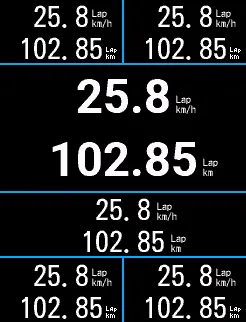
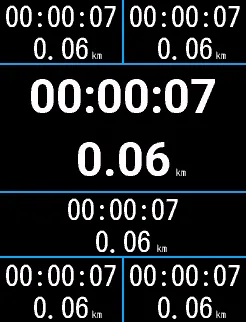
Dual Metrics Field lets you display two metrics in a single data field.
Choose from 22 different metrics and customize the top and bottom sections independently.
More data. Same screen space.
Stop choosing which metrics to leave out.
Dual Metrics Field lets you display two cycling metrics in a single Garmin Edge data field.
Choose independently from 22 available metrics for the top and bottom sections, making better use of limited screen space.
The clean, minimal layout features large, easy-to-read values with smaller unit labels, designed for clear visibility while riding.
【Available Metrics】
Power
・Instant Power
・3s Average Power
・10s Average Power
・30s Average Power
・Lap Average Power
・Lap Normalized Power (NP)
Training
・W′bal (Remaining %)
・Training Stress Score (TSS)
Sensors
・Heart Rate
・Cadence
Speed
・Speed
・Average Speed
・Lap Average Speed
Distance & Course
・Distance
・Lap Distance
・Elevation Gain
・Grade
Time
・Moving Time
・Lap Time
・Elapsed Time
・Time of Day
Other
・Calories
【Customization】
By default, the top section displays 3-second average power and the bottom section displays heart rate.
You can customize both sections using the Connect IQ app on your smartphone.
1. Add Dual Metrics Field to a data screen on your Edge
2. Open the data field settings in the Connect IQ app
3. Select your preferred top and bottom metrics
4. Sync your Edge to apply the settings
【W′bal & TSS】
FTP configuration is required for W′bal and TSS calculations.
On supported devices, the data field can automatically use your cycling FTP from your Garmin profile. Manual FTP configuration is also available.
For W′bal, configure your W′ capacity in joules. The default is 20,000 J (20 kJ).
W′bal is an estimated remaining capacity calculated from FTP and power data.
【Additional Features】
・Supports device-configured metric and imperial units for speed, distance, and elevation
・Optional inclusion of zero-power samples in short-term and lap average power calculations (excluded by default)
・Lap NP and TSS become available after a valid 30-second power window is established
・Data availability depends on connected sensors and information provided by your Edge device
Tangkapan skrin
Bahasa disokong (2)
Peranti serasi (16)
Trend metrik terkini
Penilaian
Ulasan
Tarikh snapshot
2026-11-17 → 2026-11-26