Keterangan
Know whether you're recovered before you train. The orthostatic test is a classic tool from endurance coaching: lie still for 2 minutes, stand up for 2 minutes, and see how your heart responds. When you're tired, overreached or coming down with something, the numbers often change before you feel it.
HOW IT WORKS
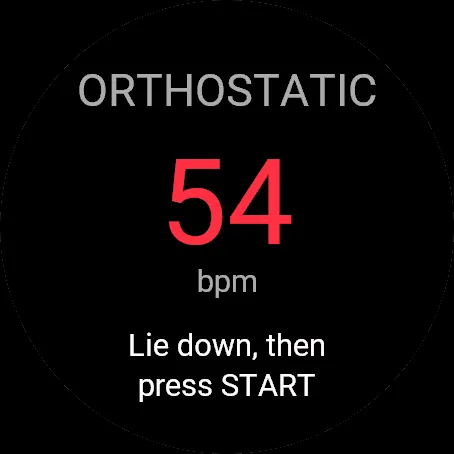
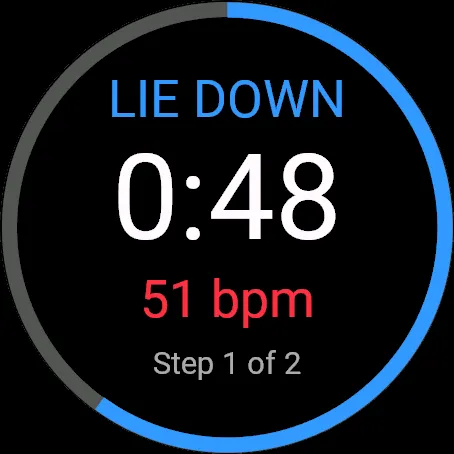
1. Lie down and press START.
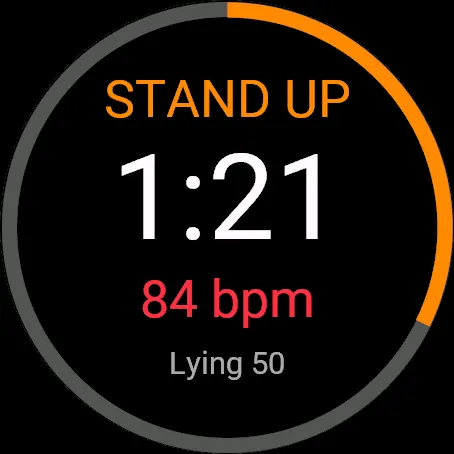
2. After 2:00 the watch vibrates: stand up and stay still for 2:00.
3. Answer two quick questions (how you slept, how sore you are), or skip them with BACK.
4. See your results and save the test as an activity.
Countdown pulses and vibration cues guide you, so you never need to look at the watch.
YOUR RESULTS
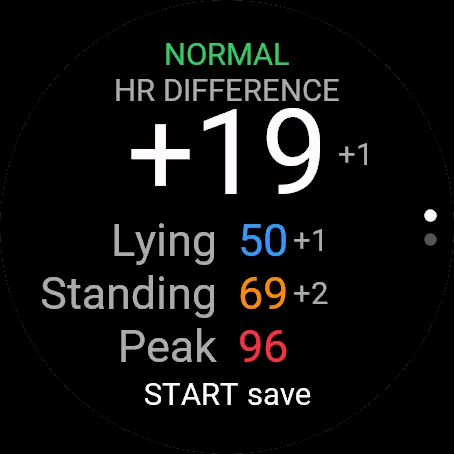
• HR difference: standing minus lying heart rate
• Lying and standing HR (average of the last 60 s of each phase)
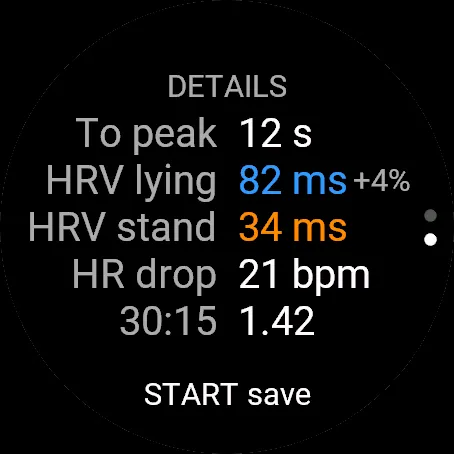
• Peak standing HR, time to peak, and how far HR drops after the peak
• HRV (RMSSD) lying and standing, and the 30:15 ratio (needs a chest strap, see below)
• Today: your sleep and soreness answers next to Garmin's Body Battery, stress and 7-day resting HR
PERSONAL BASELINE
Every saved test is kept on the watch. After 3 tests, each new result is compared with your baseline, the median of your last 7 reliable tests, so one odd morning barely moves it. Each test gets a verdict:
• NORMAL: in line with your baseline
• SLIGHTLY OFF: lying HR 4+ bpm higher, or HRV 12%+ lower
• CHECK RECOVERY: lying HR 7+ bpm higher, or HRV 25%+ lower
• LOW RESPONSE: unusually low lying HR with a weak response to standing, a possible sign of deep fatigue
Small numbers next to each value show the change from your baseline. You also get a note when you test 2+ hours earlier or later than usual.
QUALITY CHECKS
A bad test shouldn't spoil your baseline. Each test is checked for wrist movement while lying, HR that hadn't settled, a lying HR above standing, and gaps in the HR signal. A test that fails is still saved, but it tells you what went wrong and is left out of your baseline.
HISTORY
Graphs of your last 14 tests show heart rate, HR difference and HRV, with your baseline marked and unreliable tests shown hollow. Press DOWN on the start screen to see them without running a test. Hold UP for the menu to browse every saved test and delete any you know went wrong.
SETTINGS
On the watch (hold UP on the start screen) or in Garmin Connect:
• Lying and standing time: 2 to 5 minutes
• Tests in the baseline: 5, 7, 10 or 14
• The after-test questions: on or off
• Daily reminder: pick a time between 5:00 and 10:00 and the watch offers to open the app, unless you've already tested that day
IN GARMIN CONNECT
Each test is saved as an activity with two laps (lying, standing), so you get the full HR chart and per-lap averages. All results, including your sleep and soreness answers, are shown in the activity summary.
HRV NEEDS A CHEST STRAP
Many Garmin watches don't pass beat-to-beat data from the wrist sensor to apps. For HRV and the 30:15 ratio, pair a chest strap that sends beat-to-beat data to your watch as a heart rate sensor. Without one, those values show "HR strap" and everything else works from wrist heart rate.
TIPS FOR RELIABLE RESULTS
• Test every morning right after waking, before coffee or training.
• Keep the conditions and the phase lengths the same each time.
• Stay still and quiet during both phases.
Orthostatic is a training tool, not a medical device. See a doctor about dizziness, fainting or unusual heart rate readings.
Nota kemas kini
NEW
• History graphs: heart rate, HR difference and HRV for your last 14 tests, with your baseline marked. Press DOWN on the start screen to see them anytime.
• Quality checks: tests where you moved, your HR hadn't settled or the signal dropped out are flagged and kept out of your baseline.
• Today page: how you slept and how sore you are, next to Garmin's Body Battery, stress and 7-day resting HR.
• Note when you test at an unusual time of day.
• Optional daily reminder to take the test.
• Settings on the watch and in Garmin Connect: phase lengths, baseline size, the after-test questions and the reminder.
• Browse your saved tests and delete any that went wrong (hold UP on the start screen).
IMPROVED
• The baseline now uses the median of your recent tests, so one bad morning no longer throws it off. Earlier tests where lying HR was above standing HR are left out automatically.
This update asks for three new permissions: background (for the reminder), sensor history (Body Battery and stress) and user profile (resting HR).
Tangkapan skrin
Bahasa disokong (1)
Peranti serasi (75)
D2™ Air X15
D2™ Mach 1 Pro
Enduro™ 2
Enduro™ 3
Enduro™ 4
epix™ (Gen 2)
epix™ (Gen 2)
epix™ Pro (42mm)
epix™ Pro (47mm)
epix™ Pro (51mm)
fēnix® 7
fēnix® 7
fēnix® 7 Pro
fēnix® 7 Pro – Solar Edition (No Wi-Fi®)
fēnix® 7S
fēnix® 7S
fēnix® 7S Pro
fēnix® 7X
fēnix® 7X
fēnix® 7X Pro
fēnix® 7X Pro No Wi-Fi
fēnix® 8 AMOLED (43mm)
fēnix® 8 AMOLED (47mm/51mm)
fēnix® 8 Pro
fēnix® 8 Solar (47mm)
fēnix® 8 Solar (51mm)
fenix® 9 - 43 mm
fenix® 9 – 47 mm
fenix® 9 Pro - 43 mm
fenix® 9 Pro - 47 mm
fenix® 9 Pro - 51 mm
fenix® 9 Pro - Solar 47 mm
fenix® 9 Pro - Solar 51 mm
fēnix® E
Forerunner® 165
Forerunner® 165 Music
Forerunner® 170
Forerunner® 170 Music
Forerunner® 255
Forerunner® 255 Music
Forerunner® 255S
Forerunner® 255S Music
Forerunner® 265
Forerunner® 265S
Forerunner® 570 - 42mm
Forerunner® 570 - 47mm
Forerunner® 70
Forerunner® 70
Forerunner® 955 Dual Power
Forerunner® 965
Forerunner® 970
MARQ® (Gen 2)
MARQ® Adventurer (Gen 3)
MARQ® Commander (Gen 2) – Carbon Edition
MARQ™ Aviator (Gen 2)
Mercedes-Benz Venu® 2
Mercedes-Benz Venu® 2
Mercedes-Benz Venu® 2S
Mercedes-Benz Venu® 2S
tactix® 7
tactix® 7 – AMOLED Edition
tactix® 8 – 47 mm, AMOLED
tactix® 8 – 51 mm, Solar
Venu® 2
Venu® 2
Venu® 2 Plus
Venu® 2 Plus
Venu® 2S
Venu® 2S
Venu® 3
Venu® 3S
Venu® 4 – 41 mm
Venu® 4 – 45 mm
vívoactive® 5
vívoactive® 6
Trend metrik terkini
Penilaian
Ulasan
Tarikh snapshot
2026-10-27 → 2026-10-31