Deskripsi
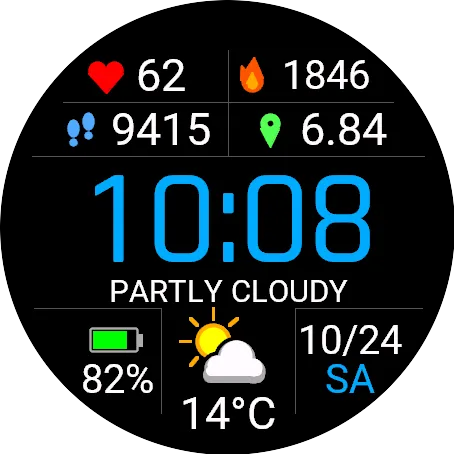
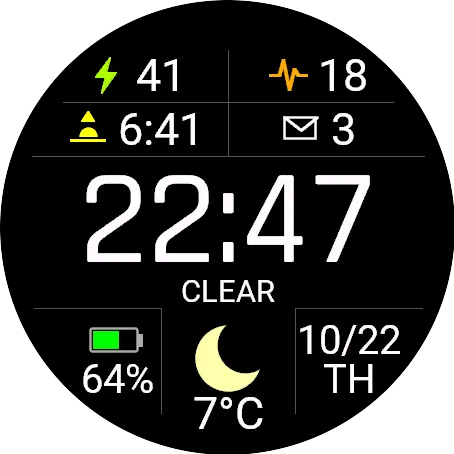
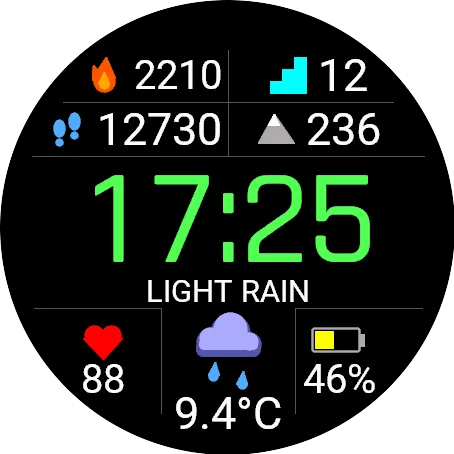
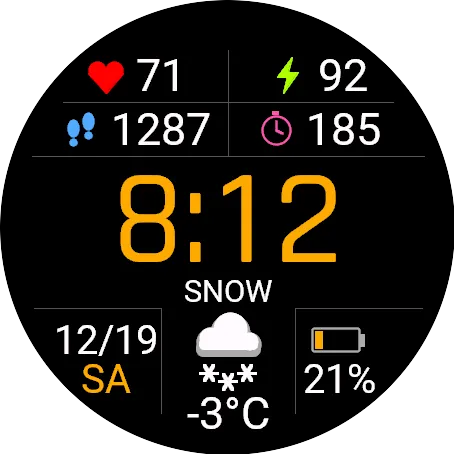
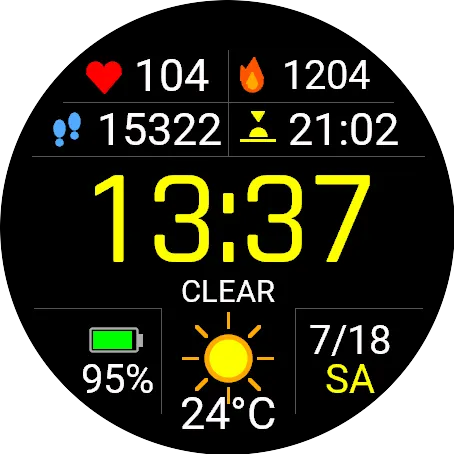
KopaFace - Optimal is a clean, easy-to-read watch face with weather and six data fields, designed to go as easy on your battery as possible.
BATTERY-FRIENDLY BY DESIGN
• No seconds and no per-second refresh by default – the face redraws once a minute.
• Seconds can be turned on in the settings (next to the time). Note: with seconds on, the face refreshes every second, which may increase battery use. On AMOLED screens seconds are shown only while the screen is active.
• Data and weather update once a minute; heart rate also refreshes when you raise your wrist.
• By default, weather comes from Garmin Connect on your phone – no extra battery or data use.
• On AMOLED screens, always-on mode shows only a dimmed time that shifts every minute (burn-in protection).
WEATHER WHERE YOU ARE
• Current conditions with a text description (e.g. PARTLY CLOUDY), a colour icon and temperature.
• Moon icon at night – night is based on sunrise and sunset times for your location.
• Choose your weather source:
– Garmin (default) – Garmin decides how often it updates,
– your own refresh every 5, 10, 15, 20, 30 or 60 minutes from Open-Meteo (no account or API key). You decide how often – and how much battery it is worth.
• Temperature in °C or °F (or follow the watch setting).
SIX CONFIGURABLE FIELDS
Four fields at the top (icon + value) and two at the bottom, on each side of the weather. Choose from:
heart rate, calories, steps, distance, floors, Body Battery, stress, altitude, sunrise/sunset, notifications, battery, date, active minutes (week) or empty.
Each position only offers data that fits there – e.g. the bottom fields next to the weather take short values (heart rate, Body Battery, battery, date…), so nothing gets cut off or shrunk.
Every field has its own colour icon: red heart, flame, footprints, Body Battery bolt and more.
LOOK
• Large time in one of 8 colours: blue, white, green, yellow, orange, red, purple, cyan.
• Battery colour changes with charge level: green, yellow, orange, red.
• Date with the day of the week (in the bottom field the day is shown in the time colour).
• Tidy layout: weather in the bottom centre column, battery and date aligned to the edge of the face.
• The layout adapts to the screen – from small MIP screens (240 px) to large AMOLED (466 px).
SETTINGS
In the Connect IQ app on your phone, or right on the watch in the watch face menu (hold UP → Watch Face → KopaFace - Optimal → Settings; menu names may vary slightly by model).
LANGUAGE
English or Polish – automatically, based on the watch language.
SUPPORTED WATCHES
fēnix 6 / 7 / 8 / 9 and E (all versions, including Pro and Solar), epix (Gen 2) and epix Pro, Enduro, Enduro 2 / 3 / 4, Forerunner 255 / 265 / 570 / 955 / 965 / 970, MARQ (Gen 1, 2 and 3), tactix 7 / 8, quatix 6 / 7 / 8, D2 Mach 1 Pro. The full list is shown on this page under "Compatible Devices".
PERMISSIONS
Location – for sunrise/sunset times and weather for your area. Background and communications – used only if you turn on your own weather refresh (only rounded coordinates are sent to Open-Meteo). Sensor history – Body Battery, stress and altitude.
Notes: weather requires the watch to be connected to your phone. Field availability (e.g. Body Battery, floors) depends on the watch model.
Questions, ideas or issues? Email [email protected] – I reply and I am happy to improve the watch face.
Catatan pembaruan
Optional seconds next to the time (Settings → Seconds, off by default). Turning seconds on may increase battery use.
Tangkapan layar
Bahasa yang didukung (2)
Perangkat kompatibel (88)
D2™ Mach 1 Pro
Enduro™
Enduro™
Enduro™ 2
Enduro™ 3
Enduro™ 4
epix™ (Gen 2)
epix™ (Gen 2)
epix™ Pro (42mm)
epix™ Pro (47mm)
epix™ Pro (51mm)
fēnix® 6
fēnix® 6
fēnix® 6 Dual Power
fēnix® 6 Pro
fēnix® 6 Pro
fēnix® 6 Pro Dual Power
fēnix® 6 Pro Solar
fēnix® 6 Solar
fēnix® 6S
fēnix® 6S
fēnix® 6S Dual Power
fēnix® 6S Pro
fēnix® 6S Pro
fēnix® 6S Pro Dual Power
fēnix® 6S Pro Solar
fēnix® 6S Solar
fēnix® 6X Pro
fēnix® 6X Pro
fēnix® 7
fēnix® 7
fēnix® 7 Pro
fēnix® 7 Pro – Solar Edition (No Wi-Fi®)
fēnix® 7S
fēnix® 7S
fēnix® 7S Pro
fēnix® 7X
fēnix® 7X
fēnix® 7X Pro
fēnix® 7X Pro No Wi-Fi
fēnix® 8 AMOLED (43mm)
fēnix® 8 AMOLED (47mm/51mm)
fēnix® 8 Pro
fēnix® 8 Solar (47mm)
fēnix® 8 Solar (51mm)
fenix® 9 - 43 mm
fenix® 9 – 47 mm
fenix® 9 Pro - 43 mm
fenix® 9 Pro - 47 mm
fenix® 9 Pro - 51 mm
fenix® 9 Pro - Solar 47 mm
fenix® 9 Pro - Solar 51 mm
fēnix® E
Forerunner® 255
Forerunner® 255 Music
Forerunner® 265
Forerunner® 265S
Forerunner® 570 - 42mm
Forerunner® 570 - 47mm
Forerunner® 955 Dual Power
Forerunner® 965
Forerunner® 970
MARQ® (Gen 2)
MARQ® Adventurer (Gen 3)
MARQ® Commander (Gen 2) – Carbon Edition
MARQ™ Adventurer
MARQ™ Adventurer
MARQ™ Athlete
MARQ™ Athlete
MARQ™ Aviator
MARQ™ Aviator
MARQ™ Aviator (Gen 2)
MARQ™ Captain
MARQ™ Captain
MARQ™ Commander
MARQ™ Commander
MARQ™ Driver
MARQ™ Driver
MARQ™ Expedition
MARQ™ Expedition
MARQ™ Golfer
MARQ™ Golfer
quatix® 6
quatix® 6X
tactix® 7
tactix® 7 – AMOLED Edition
tactix® 8 – 47 mm, AMOLED
tactix® 8 – 51 mm, Solar
Tren metrik terbaru
Peringkat
Ulasan
Tanggal snapshot
2026-10-30 → 2026-11-05