Opis
Velocity Outline
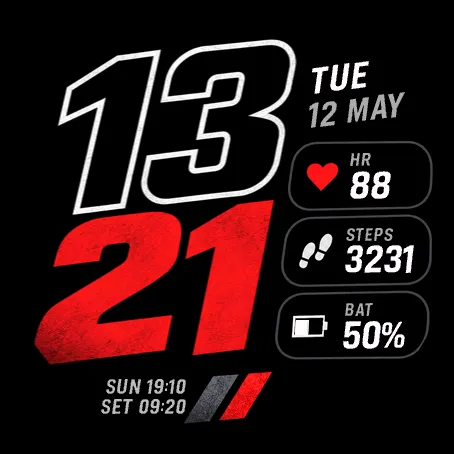
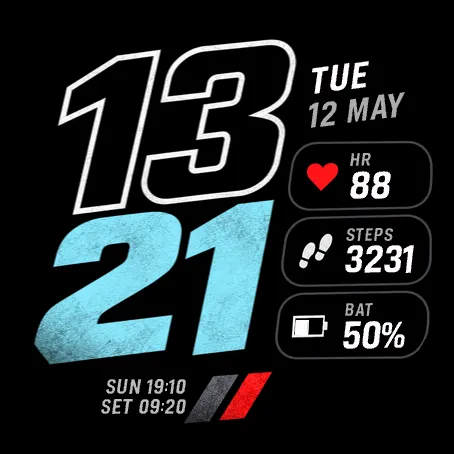
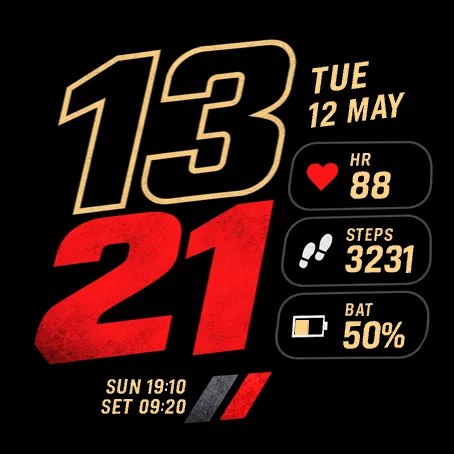
A bold digital watch face for Garmin: slanted outline hours, textured minutes, three customizable data panels and two always-on display styles.
Make every glance count. Velocity Outline pairs a racing-inspired design with the daily stats you choose. Large, staggered digits give the face its distinctive look, while an angled calendar and three compact panels keep useful information close.
YOUR STATS, YOUR LAYOUT
Choose a different complication for the top, middle and bottom panels:
• Steps
• Heart rate
• Watch battery percentage
• Daily calories, including resting calories
• Daily distance in km or miles, following your watch units
• Floors climbed
• Daily active minutes
Prefer a quieter layout? Set any panel to Off.
COLOR THAT FITS YOUR STYLE
Mix three text palettes—Original white, Ice blue and Gold—with four minute colors: Original red, Ice blue, Green and White. Use the classic red-and-white look or build your own combination. These are independent color settings, so you can match the display to your style.
ALWAYS-ON, STILL VELOCITY
On compatible AMOLED watches, Signature AOD carries the large outline clock, engraved minute digits, outlined panels and icons into a dimmer display. Minimal AOD keeps the clock and information placement while removing panel borders and icons. Choose Original, Red or Ice blue AOD color, adjust the visible calendar, labels, panels and sun times, or turn AOD off. Enable your watch's system always-on setting to use AOD. MIP watches retain their full-color face during sleep.
26 SETTINGS TO MAKE IT YOURS
• Follow the device time format or choose 12-hour or 24-hour time
• Show or hide AM/PM, weekday, day and month
• Control the clock, decorative borders, icons and labels
• Show or hide sunrise and sunset when Garmin weather-location data is available
• Customize AOD independently, including visibility for each panel
• Reset defaults from the watch settings menu
HOW TO CHANGE COMPLICATIONS
Phone: Open Connect IQ Store → My Device → My Watch Faces → Velocity Outline → Settings. Select Top panel, Middle panel or Bottom panel, choose a data field, then Save and allow your watch to sync.
Watch: On supported firmware, open Velocity Outline's watch-face settings. Select Top panel, Middle panel or Bottom panel, then choose a field. If your watch does not expose on-device settings, use the Connect IQ Store app.
To change colors, use Text palette and Minute color. To customize always-on, use Always-on display, AOD layout and AOD color, followed by the individual AOD visibility settings.
COMPATIBILITY AND DATA
Available for supported Garmin fēnix, epix, Forerunner, Venu, vívoactive, Approach, D2, Descent, Enduro, MARQ, quatix and tactix models. Check the store's compatible-device list for your exact watch. Data availability and refresh behavior depend on the device, sensors, firmware and Garmin services. Unsupported or unavailable readings remain blank. Sunrise and sunset use the Garmin weather observation location, which may differ from your current location.
Choose your color. Choose your data. Keep your time in focus.
Snimke zaslona
Podržani jezik (1)
Kompatibilnih uređaja (189)
Approach® S50
Approach® S60
Approach® S60
Approach® S62
Approach® S62
Approach® S70 (42mm)
Approach® S70 (47mm)
D2™ Air
D2™ Air X10
D2™ Air X15
D2™ Charlie
D2™ Charlie
D2™ Delta
D2™ Delta PX
D2™ Delta PX
D2™ Delta S
D2™ Mach 1
D2™ Mach 1 Pro
D2™ Mach 2
D2™ Mach 2 Pro
Darth Vader™
Darth Vader™
Descent™ G2
Descent™ Mk1
Descent™ Mk1
Descent™ MK2
Descent™ MK2
Descent™ Mk2S
Descent™ Mk2S
Descent™ MK3 - 43mm
Descent™ MK3i - 51mm
Enduro™
Enduro™
Enduro™ 2
Enduro™ 3
epix™ (Gen 2)
epix™ (Gen 2)
epix™ Pro (42mm)
epix™ Pro (47mm)
epix™ Pro (51mm)
fēnix® 5
fēnix® 5
fēnix® 5 Plus
fēnix® 5 Plus
fēnix® 5S Plus
fēnix® 5S Plus
fēnix® 5X
fēnix® 5X
fēnix® 5X Plus
fēnix® 5X Plus
fēnix® 6
fēnix® 6
fēnix® 6 Dual Power
fēnix® 6 Pro
fēnix® 6 Pro
fēnix® 6 Pro Dual Power
fēnix® 6 Pro Solar
fēnix® 6 Solar
fēnix® 6S
fēnix® 6S
fēnix® 6S Dual Power
fēnix® 6S Pro
fēnix® 6S Pro
fēnix® 6S Pro Dual Power
fēnix® 6S Pro Solar
fēnix® 6S Solar
fēnix® 6X Pro
fēnix® 6X Pro
fēnix® 7
fēnix® 7
fēnix® 7 Pro
fēnix® 7 Pro – Solar Edition (No Wi-Fi®)
fēnix® 7S
fēnix® 7S
fēnix® 7S Pro
fēnix® 7X
fēnix® 7X
fēnix® 7X Pro
fēnix® 7X Pro No Wi-Fi
fēnix® 8 AMOLED (43mm)
fēnix® 8 AMOLED (47mm/51mm)
fēnix® 8 Pro
fēnix® 8 Solar (47mm)
fēnix® 8 Solar (51mm)
fenix® 9 - 43 mm
fenix® 9 – 47 mm
fenix® 9 Pro - 43 mm
fenix® 9 Pro - 47 mm
fenix® 9 Pro - 51 mm
fenix® 9 Pro - Solar 47 mm
fenix® 9 Pro - Solar 51 mm
fēnix® E
First Avenger
First Avenger
ForeAthlete 245
ForeAthlete 245 Music
ForeAthlete 645
ForeAthlete 645 Music
ForeAthlete 745
ForeAthlete 935
Forerunner® 165
Forerunner® 165 Music
Forerunner® 170
Forerunner® 170 Music
Forerunner® 245
Forerunner® 245
Forerunner® 245 Music
Forerunner® 245 Music
Forerunner® 255
Forerunner® 255 Music
Forerunner® 255S
Forerunner® 255S Music
Forerunner® 265
Forerunner® 265S
Forerunner® 570 - 42mm
Forerunner® 570 - 47mm
Forerunner® 645
Forerunner® 645 Music
Forerunner® 70
Forerunner® 70
Forerunner® 745
Forerunner® 935
Forerunner® 945
Forerunner® 945
Forerunner® 945 LTE
Forerunner® 955 Dual Power
Forerunner® 965
Forerunner® 970
Instinct® 3 – 45 mm, AMOLED
Instinct® 3 – 50 mm, AMOLED
Instinct® Crossover AMOLED
MARQ® (Gen 2)
MARQ® Commander (Gen 2) – Carbon Edition
MARQ™ Adventurer
MARQ™ Adventurer
MARQ™ Athlete
MARQ™ Athlete
MARQ™ Aviator
MARQ™ Aviator
MARQ™ Aviator (Gen 2)
MARQ™ Captain
MARQ™ Captain
MARQ™ Commander
MARQ™ Commander
MARQ™ Driver
MARQ™ Driver
MARQ™ Expedition
MARQ™ Expedition
MARQ™ Golfer
MARQ™ Golfer
Mercedes-Benz Venu®
Mercedes-Benz Venu®
Mercedes-Benz Venu® 2
Mercedes-Benz Venu® 2
Mercedes-Benz Venu® 2S
Mercedes-Benz Venu® 2S
quatix® 6
quatix® 6X
tactix® 7
tactix® 7 – AMOLED Edition
tactix® 8 – 47 mm, AMOLED
tactix® 8 – 51 mm, Solar
Venu®
Venu®
Venu® 2
Venu® 2
Venu® 2 Plus
Venu® 2 Plus
Venu® 2S
Venu® 2S
Venu® 3
Venu® 3S
Venu® 4 – 41 mm
Venu® 4 – 45 mm
Venu® X1
vívoactive® 3
vívoactive® 3
vívoactive® 3
vívoactive® 3 Mercedes-Benz® Collection
vívoactive® 3 Mercedes-Benz® Collection
vívoactive® 3 Music
vívoactive® 3 Music
vívoactive® 3 Music
vívoactive® 4
vívoactive® 4
vívoactive® 4S
vívoactive® 4S
vívoactive® 5
vívoactive® 6
Nedavni trend metrike
Ocjena
Recenzije
Datumi snimaka
2026-11-06 → 2026-11-07