Description
Guide and changelog: https://www.petrrezek.net/en/garmin/skitour/
Route code generator: https://www.petrrezek.net/skitour-generator.html
Free version: https://apps.garmin.com/apps/0818a4b7-a48c-4068-aa34-16ff8b4efe74
SkiTour+ PRO is the extended edition of the SkiTour+ data field for ski touring, backcountry skiing and splitboarding. It does everything the free version does, and it also shows the slope angle of the terrain along your planned route, in colour bands, so you can see how the terrain changes as you go.
SLOPE ANGLE ALONG YOUR ROUTE
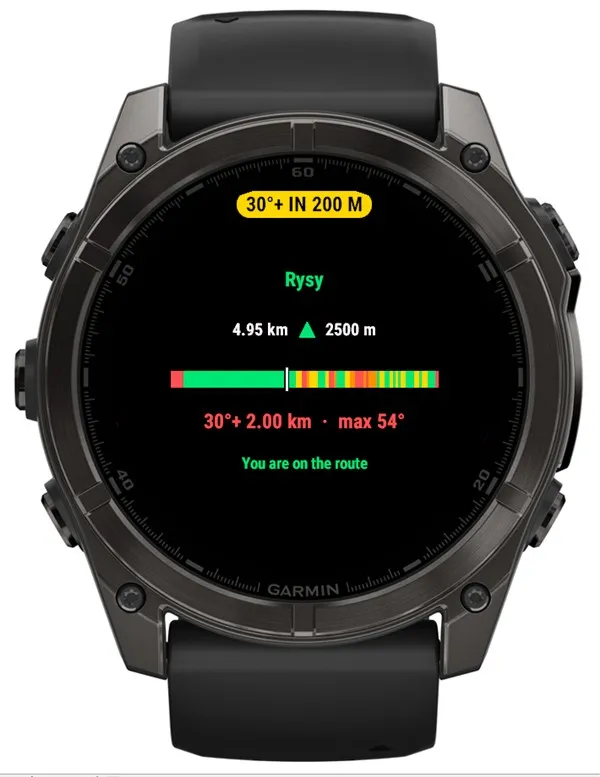
At home, drop your planned route (GPX from Mapy.com, Garmin Connect or Locus) into the web generator. It computes the terrain slope along the route from an elevation model and creates a short code that you paste into the field's settings in the Connect IQ app. On the tour, the watch shows the slope angle in four colour bands: green below 30°, yellow 30–35°, orange 35–40°, red above 40°. No phone and no signal needed.
SLOPE AHEAD, IF YOU WANT IT
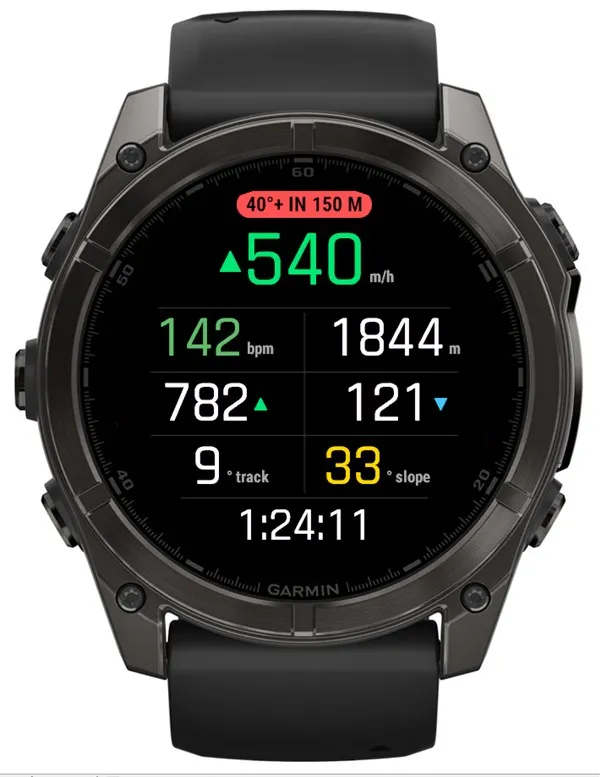
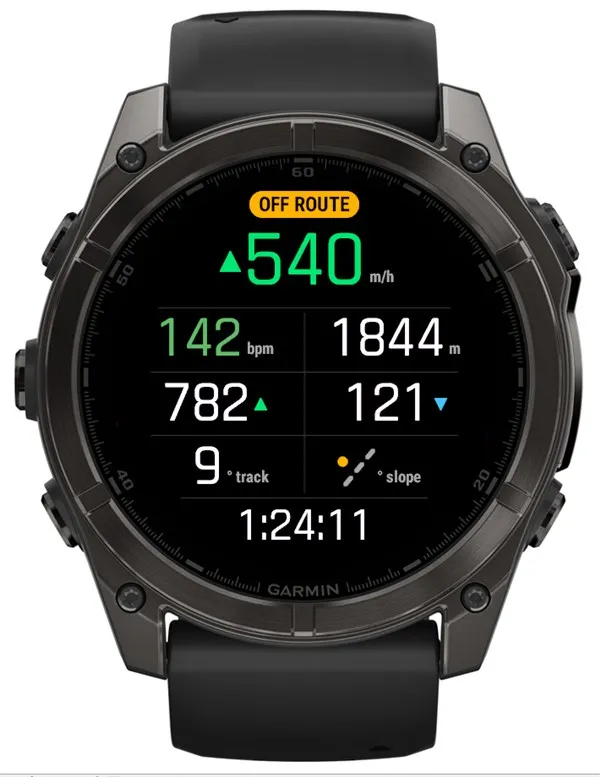
You decide whether the field tells you about a change in terrain ahead. In the settings, pick the angle that matters to you (30°, 35° or 40°); it is off until you choose. About 200 m before the route gets steeper than that, a coloured pill shows at the top, for example "40°+ IN 150 M". When you leave the route, the field shows that too.
ROUTE SUMMARY BEFORE THE START
Before you start the timer you see the route name, length, summit, a colour strip of the slope bands along the whole route and how far the start is. A wrong or damaged code shows up at the car park.
TRACK GRADE
How steeply you are climbing or descending right now, in degrees or percent, measured by the barometer and GPS. Useful when you are looking for a comfortable skin track or deciding on ski crampons.
MORE
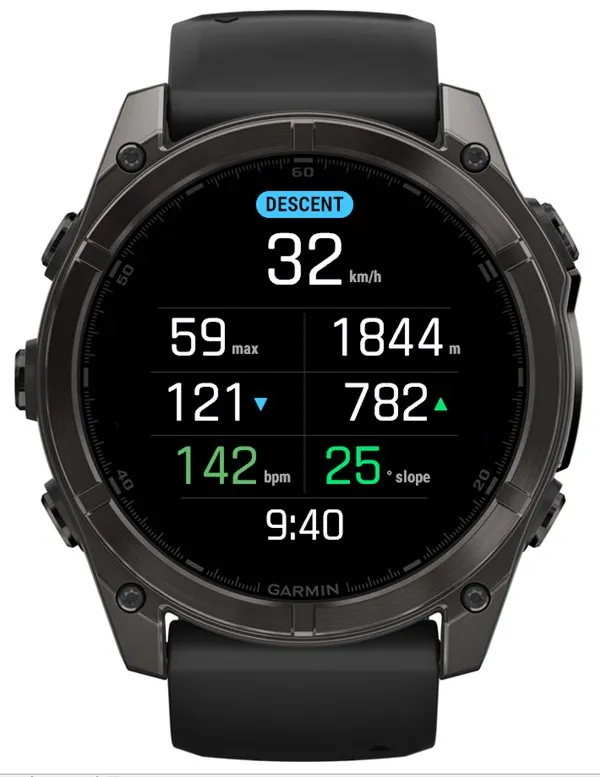
- Switches to a descent layout on its own (speed, maximum, altitude, D-) and back when you climb again. Optionally with the LAP button.
- Charts in Garmin Connect: track grade, slope angle and vertical speed for every tour.
- Small field: in layouts with 3 or more fields it can show just the slope angle, with a colour scale.
- To summit takes the summit altitude straight from the route code.
TRIAL AND PAYMENT
PRO is fully free for the first 14 days. After that, a 6-digit code appears before you start an activity. Enter it at kzl.io/code and pay once, 2.99 USD (payment handled by KiezelPay). The field unlocks for good within a few minutes and keeps working without the phone. Without payment all free-version metrics keep running; only the PRO features lock, so nothing disappears in the middle of a tour.
HOW THE SLOPE IS COMPUTED
Unlike an inclinometer, the field does not measure the slope where you stand: it reads it from an elevation model with about 30 m resolution, so short steep steps, gullies and cornices do not show.
WATCHES
48 Garmin watches with a round AMOLED display: fēnix 9 and fēnix 9 Pro, fēnix 8, fēnix 8 Pro and fēnix E, epix (Gen 2) and epix Pro, Forerunner 70, 165, 170, 265, 265S, 570, 965 and 970, Venu 2, 2S, 3 and 4, vívoactive 5 and 6, Instinct 3 AMOLED and Instinct Crossover AMOLED, Descent Mk3 and Descent G2, MARQ (Gen 2), D2 Mach 1, D2 Mach 2 and D2 Air X10, Approach S50 and S70.
Permissions: location (slope along the route, coordinates), user profile (heart rate zones), writing to the activity record (Connect charts), background and communications (licence check via the phone).
What is new
1.0.1 - 2026-09-28
- First release of SkiTour+ PRO: slope angle in colour bands along your route from a route code, an optional notice of a steeper slope ahead (you pick 30°, 35° or 40°), route summary before the start, track grade, automatic descent layout and charts in Garmin Connect.
Screenshots
Supported languages (18)
Compatible devices (63)
Approach® S50
Approach® S70 (42mm)
Approach® S70 (47mm)
D2™ Air X10
D2™ Air X15
D2™ Mach 1
D2™ Mach 1 Pro
D2™ Mach 2
D2™ Mach 2 Pro
Descent™ G2
Descent™ MK3 - 43mm
Descent™ MK3i - 51mm
epix™ (Gen 2)
epix™ (Gen 2)
epix™ Pro (42mm)
epix™ Pro (47mm)
epix™ Pro (51mm)
fēnix® 8 AMOLED (43mm)
fēnix® 8 AMOLED (47mm/51mm)
fēnix® 8 Pro
fenix® 9 - 43 mm
fenix® 9 – 47 mm
fenix® 9 Pro - 43 mm
fenix® 9 Pro - 47 mm
fenix® 9 Pro - 51 mm
fēnix® E
Forerunner® 165
Forerunner® 165 Music
Forerunner® 170
Forerunner® 170 Music
Forerunner® 265
Forerunner® 265S
Forerunner® 570 - 42mm
Forerunner® 570 - 47mm
Forerunner® 70
Forerunner® 70
Forerunner® 965
Forerunner® 970
Instinct® 3 – 45 mm, AMOLED
Instinct® 3 – 50 mm, AMOLED
Instinct® Crossover AMOLED
MARQ® (Gen 2)
MARQ® Adventurer (Gen 3)
MARQ® Commander (Gen 2) – Carbon Edition
MARQ™ Aviator (Gen 2)
Mercedes-Benz Venu® 2
Mercedes-Benz Venu® 2
Mercedes-Benz Venu® 2S
Mercedes-Benz Venu® 2S
tactix® 7 – AMOLED Edition
tactix® 8 – 47 mm, AMOLED
Venu® 2
Venu® 2
Venu® 2 Plus
Venu® 2 Plus
Venu® 2S
Venu® 2S
Venu® 3
Venu® 3S
Venu® 4 – 41 mm
Venu® 4 – 45 mm
vívoactive® 5
vívoactive® 6
Recent metric trend
Rating
Reviews
Snapshot dates
2026-10-27 → 2026-11-02