Description
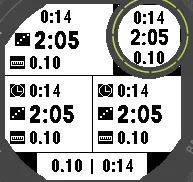
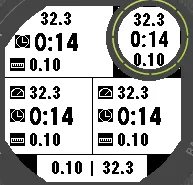
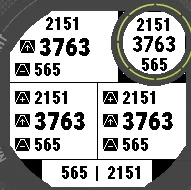
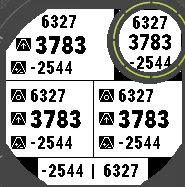
A configurable field that shows three values with icons. This is the timer-pace-distance variant, which shows timer, pace and distance by default. The same field is also published as Multi Altitude and Multi Heart Rate, so you can use and configure several instances of it individually.
Intended for hiking and walking. Might not be usable while running due to small font size.
Available fields through settings:
- timer (59:59, then 1h05m)
- pace, speed, speed with unit (km/h or mph)
- distance, distance with unit (km or mi)
- altitude (GPS)
- altitude min, altitude max
- altitude at start (reference), altitude change from start
- combined: altitude at start / change (e.g. 116/+15), altitude min / max
- heart rate, heart rate average, heart rate lap average, heart rate max
- empty (hides the value and its icon)
The middle value uses a large font; values with a unit and the combined altitude values fit only in the top and bottom values.
ALTITUDE
Altitude is taken from GPS only, so it isn't affected by barometer calibration (weather changes, elevator rides).
- GPS altitude can be far off for the first minutes after a fix, even when the watch reports a good signal. The starting altitude (reference) is therefore taken only after the GPS altitude has stayed within 5 m for 60 seconds.
- Tip: open the activity a minute or two before you start. The reference settles while you get ready, and pressing start fixes it at your starting point.
- Need a new reference along the way? Stop the timer, wait for the menu, choose Lap and resume. The current altitude becomes the new reference as soon as it has been steady for 10 seconds.
- Min and max follow the reference and are updated only while the timer runs. Short GPS jumps are ignored.
- Values show "--" until the reference is set.
HEART RATE
Heart rate, average and max come from the watch. The lap average is calculated by the field while the timer runs and starts over on each lap (Lap in the stop menu), so a new altitude reference also starts a new lap average.
SETTINGS (Connect IQ app or Garmin Express)
- Field type for each of the three values
- Background: same as the data screen, black, white, or opposite of the data screen (matches the heart rate eye)
Units (metric or statute) follow your watch settings.
Tested on Garmin Instinct 2X with the 4-field (B) and 5-field layouts. Connect IQ fields can't be placed in the round eye (subscreen).
What is new
v. 0.0.2: Backported fields and changes from BigData field. Updated icons. Added option for background color (20261028)
v. 0.0.1: Initial build (20261016)
Screenshots
Supported language (1)
Compatible device (1)
Recent metric trend
Rating
Reviews
Snapshot dates
2026-10-27 → 2026-10-30