Description
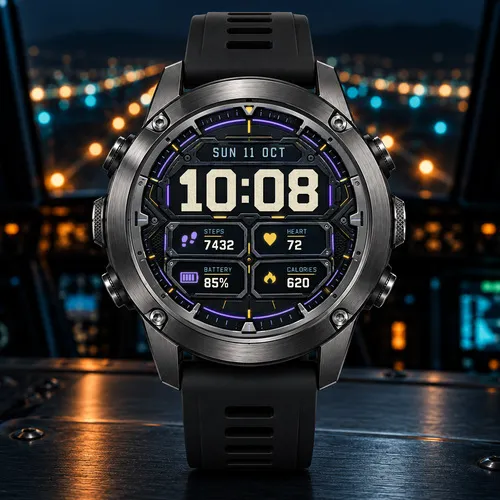
Skygrid — Every hour, cleared for takeoff.
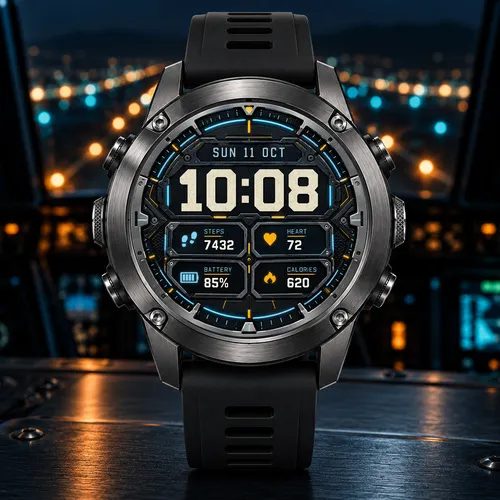
Glance down and you are back in the cockpit: a brushed-metal bezel held by screws, a ring of cyan light with an amber marker at 12, and big worn-ivory digits on a dark instrument panel. Four lit panels below keep your numbers in a clean grid, from the morning run to the late flight home.
Features
- Large ivory time that follows your 12/24-hour setting, always with a leading zero
- Date with weekday and month in your watch's language
- 4 customizable data fields: Steps, Heart rate, Battery, Calories, Distance, Floors climbed, Active minutes (week), Body Battery, Stress, Sunrise, Sunset or Off
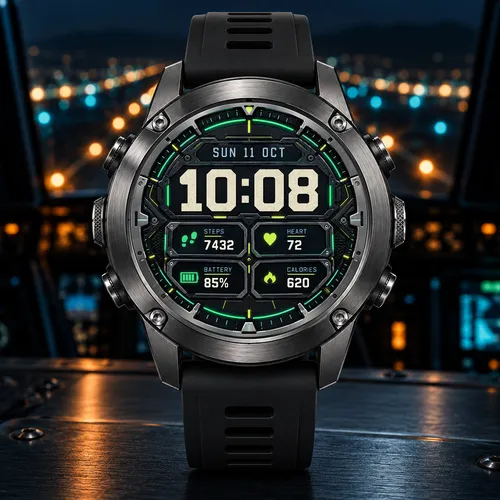
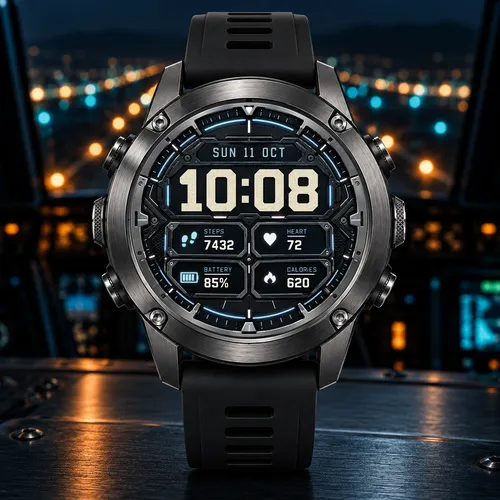
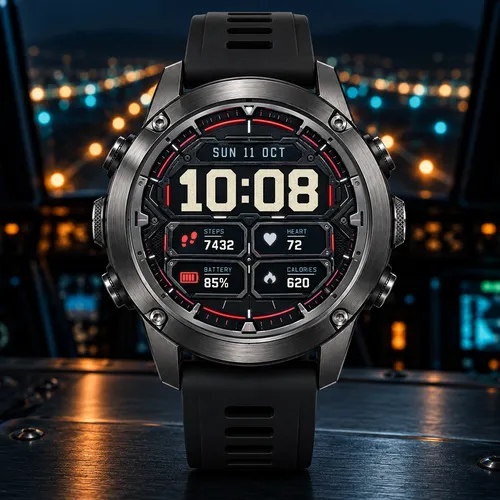
- 5 accent color pairs for the ring, icons and underlines: Cyan / Amber (default), Green / Lime, Red / Silver, Violet / Gold and Ice / White
- 4-bar battery icon that empties with your charge; turns red below 20% and blinks at 10% or less
- Always-On mode: outlined time, date and battery level that shift every minute
- 36 languages
How to customize
Long-press the watch face (or open Connect IQ on your phone) and choose Customize.
Compatibility
Made for 41 round AMOLED Garmin watches. Some data depends on your watch's sensors; unavailable values show two dashes. Sunrise and Sunset use the location from your weather or a recent GPS activity.
Every hour, cleared for takeoff.
What is new
1.0.0 — First release
- Cockpit-style face with worn-ivory time and a glowing cyan and amber ring
- 4 customizable data fields with 11 metrics and 5 accent color pairs
- Always-On mode and 36 languages
Screenshots
Supported language (1)
Compatible devices (54)
Approach® S50
Approach® S70 (42mm)
Approach® S70 (47mm)
D2™ Air X10
D2™ Air X15
D2™ Mach 1
D2™ Mach 1 Pro
D2™ Mach 2
D2™ Mach 2 Pro
Descent™ MK3 - 43mm
Descent™ MK3i - 51mm
epix™ (Gen 2)
epix™ (Gen 2)
epix™ Pro (42mm)
epix™ Pro (47mm)
epix™ Pro (51mm)
fēnix® 8 AMOLED (43mm)
fēnix® 8 AMOLED (47mm/51mm)
fēnix® 8 Pro
fenix® 9 - 43 mm
fenix® 9 – 47 mm
fenix® 9 Pro - 43 mm
fenix® 9 Pro - 47 mm
fenix® 9 Pro - 51 mm
fēnix® E
Forerunner® 170
Forerunner® 170 Music
Forerunner® 265
Forerunner® 265S
Forerunner® 570 - 42mm
Forerunner® 570 - 47mm
Forerunner® 965
Forerunner® 970
MARQ® (Gen 2)
MARQ® Commander (Gen 2) – Carbon Edition
MARQ™ Aviator (Gen 2)
Mercedes-Benz Venu® 2
Mercedes-Benz Venu® 2
Mercedes-Benz Venu® 2S
Mercedes-Benz Venu® 2S
tactix® 7 – AMOLED Edition
tactix® 8 – 47 mm, AMOLED
Venu® 2
Venu® 2
Venu® 2 Plus
Venu® 2 Plus
Venu® 2S
Venu® 2S
Venu® 3
Venu® 3S
Venu® 4 – 41 mm
Venu® 4 – 45 mm
vívoactive® 5
vívoactive® 6