Description
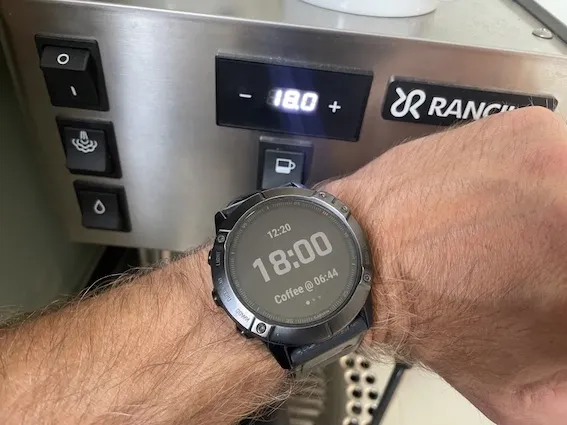
The Rancilio Silvia Pro X has a built in feature to preheat the machine. You configure in how many hours the machine should start. This app makes it easy to calculate the duration. You can add as many times you like and the app will show you the time to configure.You will always find the machine hot and ready!
You can access the apps menu by pressing "Up" for two seconds. There you can add more times or edit or delete configured times. You can also change the warmup time. The default warmup time is 14 minutes. As the rounding is 30 minutes (0.5h) there is very often additional heating time. If you have a different coffee machine with other rounding you can also change that in the app.
You can scroll between all the configured times using Up and Down.
To configure your Rancilio Silvia Pro X you push - and + on the display for three seconds. Then scroll to menu F.02. There, you enter the duration you read from the watch using - and +. Then confirm the duration with the coffee button and the machine will go into standby. The display will show a single dot. When time is up it will start to heat and be ready as planned.
Don't forget to prepare your Rancilio Silvia Pro X with a 60-minute standby time. Then it will not power off automatically before you have your coffee. Press the - and + display buttons for three seconds. Then use the + button and navigate to F.05. Change it to 60 minutes (or to your liking) and confirm with the coffee button below the display.
Enjoy your shots!!
Screenshots
Supported language (1)
Compatible devices (46)
Enduro™ 2
fēnix® 6
fēnix® 6
fēnix® 6 Dual Power
fēnix® 6 Pro
fēnix® 6 Pro
fēnix® 6 Pro Dual Power
fēnix® 6 Pro Solar
fēnix® 6 Solar
fēnix® 6S
fēnix® 6S
fēnix® 6S Dual Power
fēnix® 6S Pro
fēnix® 6S Pro
fēnix® 6S Pro Dual Power
fēnix® 6S Pro Solar
fēnix® 6S Solar
fēnix® 6X Pro
fēnix® 6X Pro
fēnix® 7
fēnix® 7
fēnix® 7 Pro
fēnix® 7 Pro – Solar Edition (No Wi-Fi®)
fēnix® 7S
fēnix® 7S
fēnix® 7S Pro
fēnix® 7X
fēnix® 7X
fēnix® 7X Pro
fēnix® 7X Pro No Wi-Fi
ForeAthlete 245
ForeAthlete 245 Music
Forerunner® 245
Forerunner® 245
Forerunner® 245 Music
Forerunner® 245 Music
Forerunner® 255
Forerunner® 255 Music
Forerunner® 255S
Forerunner® 255S Music
Forerunner® 945
Forerunner® 945
Forerunner® 955 Dual Power
quatix® 6
quatix® 6X
tactix® 7
Recent metric trend
Rating
Reviews
Snapshot dates
2026-10-27 → 2026-10-30