Description
PV HASS Face - Home Assistant data on your wrist
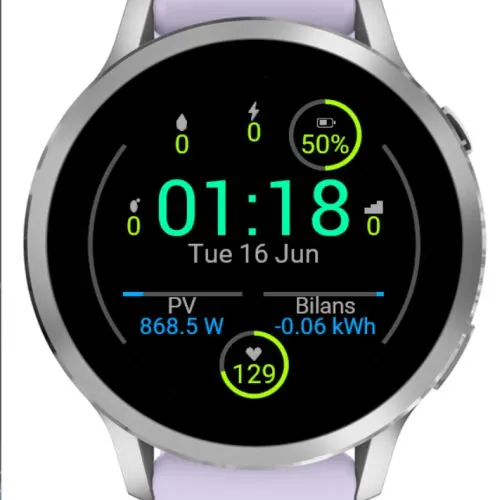
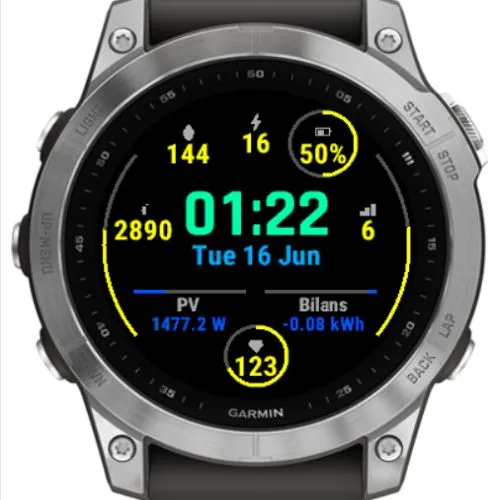
A clean watch face with a central clock and date surrounded by 8 fully
configurable fields. Each field shows either a built-in watch metric or the
live state of a Home Assistant entity - ideal for solar/PV production, hourly
energy balance, and any other sensor you expose. It ships with a ready-made
solar + energy-balance layout that you can fully re-map.
IMPORTANT - read activation info first!
FEATURES
- Central clock + date (with a selectable clock size), 8 independent fields
arranged around it
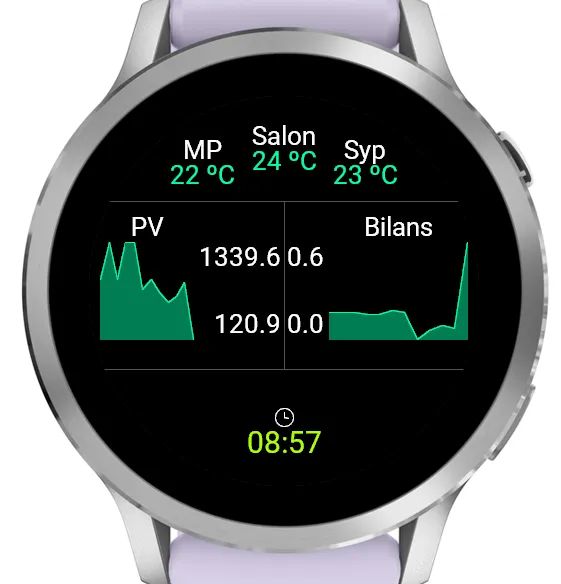
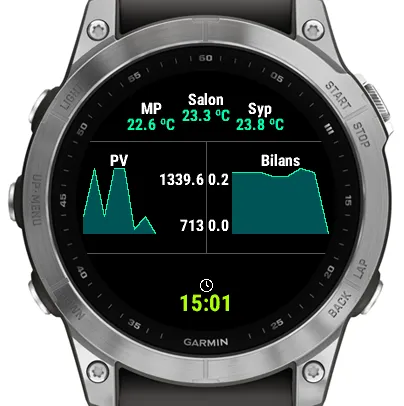
- Optional second screen: a double wrist-raise (or a tap on touch models)
switches to a second page with 6 more fields (F9-F14, 14 in total) and two
mini charts that plot any field's recent history as a line or bars
- Each field: choose a built-in metric OR a Home Assistant entity
- Built-in metrics: Time, Date, Seconds, Battery, Heart Rate, Steps, Calories,
Floors, Distance, Active Minutes, Notifications
- Home Assistant: all entity-backed fields are fetched in a single efficient
request (template API); updates run in the background
- Icons for built-in metrics, or your own text label instead
- Goal / progress visualizations, with the max taken from the system goal or a
manual value:
* Rings around fields
* Two rim arcs that you can assign to any field (with an optional label/icon)
* Horizontal bars that fill left-to-right or right-to-left depending on the
goal's sign - perfect for signed values such as energy import/export
- Adaptive layout: disabling a field lets its neighbours use the freed space,
without ever clipping at the screen edge
- Per-field font size, custom label and unit; optional fixed decimal places for
numeric Home Assistant values
- Configurable colors: labels, standard data, Home Assistant data, clock, date,
and background
- Optional live system seconds with a progress ring
- Configurable refresh interval (5-60 minutes)
- Night mode: on a schedule (default 19:00-08:00), slow the HA refresh to a
separate interval or turn it off entirely to save battery
- Stale-data indicator: out-of-date HA values age automatically - dimmed once
stale, then shown as "--" after an hour - so you always know the data's freshness
- Settings organised into clear groups in Garmin Connect / Garmin Express
ACTIVATION
- Reading Home Assistant data is unlocked with a one-time activation key. Until
then the face runs in demo mode: HA data is shown only 1 minute in every 3; the
rest of the time the HA fields read "***" and the device ID takes over the
lower fields. The device ID needed to obtain a key is shown read-only under
Settings - Activation, and in that demo message. Built-in metrics (battery,
steps, heart rate, etc.) work without a key.
- You are welcome to request the key for free (use "Contact Developer" form, provide device ID). During test period limited quantity of keys will be available for free so I can test the face on multiple devices. I will appreciate feedback for such free version.
- You can also support my work on: https://ko-fi.com/998vsid
CONFIGURATION (in Garmin Connect Mobile or Garmin Express)
- Home Assistant URL and a Long-Lived Access Token; activation key
- Per field: source, entity_id (for HA), label, unit, font size, icon on/off,
gauge on/off, decimal places (for numeric HA values), and goal/max (may be
negative for the bar fields)
- Arcs: pick which field each rim arc shows, plus an optional 3-char label
- Charts (page 2): enable/disable the second page; per chart pick the field
(1-14) it plots and the type (line or bars)
- Night mode schedule and night refresh interval
- Clock size, colors, and refresh interval
REQUIREMENTS - PLEASE READ
- Reading Home Assistant data requires a one-time activation key (see ACTIVATION
above). The rest of the watch face works without it.
- Your Home Assistant must be reachable over HTTPS with a publicly valid
certificate
What is new
- Second screen (charts): a quick double wrist-raise switches to an optional
second page (a tap also works on touch models). It adds 6 more fields
(F9-F14, for 14 in total) and two mini charts that plot the recent history of
any field as a line or bars. Turn it off entirely if you don't want it.
- Demo mode replaces the old lock screen: before activating, Home Assistant data
is now actually shown - but only 1 minute in every 3 (the rest of the time the
HA fields read "***" and the device ID takes over the lower row). Enough to
test your whole setup before you get an activation key.
- HA decimals: choose a fixed number of decimal places, per field, for numeric
Home Assistant values.
- Smarter stale-data handling: out-of-date HA values now age automatically -
dimmed once stale, then shown as "--" after an hour (the old on/off setting is
gone).
(Earlier additions: night mode, activation, assignable rim arcs, clock size, and
adaptive layout when a field is disabled.)
Screenshots
Supported language (1)
Compatible devices (66)
Approach® S50
D2™ Air X15
D2™ Mach 1 Pro
Descent™ G2
Descent™ MK2
Descent™ MK2
Enduro™ 2
Enduro™ 3
epix™ (Gen 2)
epix™ (Gen 2)
epix™ Pro (42mm)
epix™ Pro (47mm)
epix™ Pro (51mm)
fēnix® 7
fēnix® 7
fēnix® 7 Pro
fēnix® 7 Pro – Solar Edition (No Wi-Fi®)
fēnix® 7X
fēnix® 7X
fēnix® 7X Pro
fēnix® 8 AMOLED (43mm)
fēnix® 8 AMOLED (47mm/51mm)
fēnix® 8 Pro
fēnix® 8 Solar (47mm)
fēnix® 8 Solar (51mm)
fenix® 9 - 43 mm
fenix® 9 – 47 mm
fēnix® E
Forerunner® 165
Forerunner® 165 Music
Forerunner® 170
Forerunner® 170 Music
Forerunner® 255
Forerunner® 255 Music
Forerunner® 265
Forerunner® 265S
Forerunner® 570 - 42mm
Forerunner® 955 Dual Power
Forerunner® 965
Forerunner® 970
Mercedes-Benz Venu®
Mercedes-Benz Venu®
Mercedes-Benz Venu® 2
Mercedes-Benz Venu® 2
Mercedes-Benz Venu® 2S
Mercedes-Benz Venu® 2S
tactix® 7
tactix® 7 – AMOLED Edition
tactix® 8 – 47 mm, AMOLED
tactix® 8 – 51 mm, Solar
Venu®
Venu®
Venu® 2
Venu® 2
Venu® 2 Plus
Venu® 2 Plus
Venu® 2S
Venu® 2S
Venu® 3
Venu® 3S
Venu® 4 – 41 mm
Venu® 4 – 45 mm
vívoactive® 4
vívoactive® 4
vívoactive® 5
vívoactive® 6