Description
Data drives further_
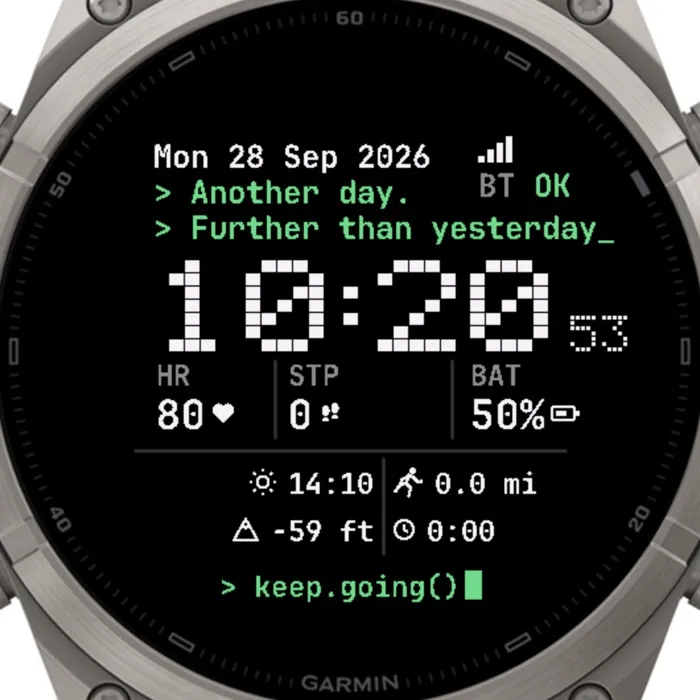
TERMINAL turns your watch into a retro command line. A black screen, white
monospace readouts, green prompt lines and a big pixel-block clock: the look of
a 1980s terminal, drawn for a modern AMOLED display.
Everything you need for the day sits on one screen. Under the date and phone
link status, the clock shows the time in chunky 5x7 pixel digits with running
seconds while the watch is awake. Below it a stats row prints heart rate, steps
and battery, and a second block lists sunrise, altitude, today's distance and
active minutes. The face closes with a prompt and a blinking-style block
cursor: ` keep.going()`.
The always-on mode keeps only the date and the pixel clock, dimmed, so the
display stays easy on the battery. Every value falls back to `--` when the
watch has no data yet, and units follow your device settings (km/mi, m/ft,
12/24 h).
Make the terminal yours from the Connect IQ app: write your own two prompt
lines and the closing command, pick the accent colour of the prompts and
cursor, choose which three stats the row prints (heart rate, steps, battery,
Body Battery, stress, calories, floors, distance or active minutes), swap
altitude for sunset time, floors, distance, calories, Body Battery, stress or active minutes, force 12/24 h, add a leading zero or hide
the seconds.
Free 7-day trial. After that a license key (USD 4.99) is required, available at https://allezfaces.lemonsqueezy.com/checkout/buy/8fbac546-c70e-4a65-8ec1-2f631b58b3fa.
Features:
- Retro terminal look: black background, monospace text, green prompt lines
- Big 5x7 pixel-block time, seconds shown while awake, 12/24 h honoured
- Date with weekday, phone connection status ("BT OK")
- Heart rate, steps and battery with small icons
- Sunrise time (via Garmin weather) and current altitude (m or ft)
- Today's distance (km or mi) and active minutes
- Dimmed always-on mode with date and time only
- Customisable from the Connect IQ phone app: prompt texts, accent colour,
stats row, second detail line, time format, leading zero, seconds
- No permissions beyond sensor history and the user profile
Settings (Garmin Connect IQ app):
- Time format — Same as watch / 12 hour / 24 hour — Same as watch
- Leading zero on hour (12 h) — on / off — off
- Show seconds — small pixel seconds next to the time (awake only) — on
- Accent color — Terminal green, Blue, Cyan, Yellow, Orange, Red, Purple, Pink, White — prompt lines, "OK" and the cursor — Terminal green
- Prompt line 1 / 2 — free text, max 22 characters, — Another day. / Further than yesterday_
- Bottom prompt — free text, max 20 characters, with the block cursor — keep.going()
- Stats row — left / middle / right — Heart rate / Steps / Battery / Body Battery / Stress / Calories / Floors climbed / Distance today / Active minutes today — HR / STP / BAT
- Second detail line — Altitude / Sunset time / Floors climbed / Distance / Calories / Body Battery / Stress / Active minutes (pick another if your watch has no barometer) — Altitude
More photos, compatible watches and the rest of the collection:
https://allezfaces.pages.dev/watch-faces/terminal/?utm_source=connectiq&utm_medium=listing
What is new
When the trial ends, the screen shows a large QR code: scan it with your phone camera to open this face's page and get a license key. Always-on mode keeps showing just the time and date.
Screenshots
Supported language (1)
Compatible devices (63)
Approach® S70 (42mm)
Approach® S70 (47mm)
D2™ Air X15
D2™ Mach 1
D2™ Mach 1 Pro
D2™ Mach 2
D2™ Mach 2 Pro
Descent™ MK3 - 43mm
Descent™ MK3i - 51mm
Enduro™ 2
Enduro™ 3
epix™ (Gen 2)
epix™ (Gen 2)
epix™ Pro (42mm)
epix™ Pro (47mm)
epix™ Pro (51mm)
fēnix® 7
fēnix® 7
fēnix® 7 Pro
fēnix® 7 Pro – Solar Edition (No Wi-Fi®)
fēnix® 7S
fēnix® 7S
fēnix® 7S Pro
fēnix® 7X
fēnix® 7X
fēnix® 7X Pro
fēnix® 7X Pro No Wi-Fi
fēnix® 8 AMOLED (43mm)
fēnix® 8 AMOLED (47mm/51mm)
fēnix® 8 Pro
fēnix® 8 Solar (47mm)
fēnix® 8 Solar (51mm)
fenix® 9 - 43 mm
fenix® 9 – 47 mm
fenix® 9 Pro - 43 mm
fenix® 9 Pro - 47 mm
fenix® 9 Pro - 51 mm
fenix® 9 Pro - Solar 47 mm
fenix® 9 Pro - Solar 51 mm
fēnix® E
Forerunner® 165
Forerunner® 165 Music
Forerunner® 170
Forerunner® 170 Music
Forerunner® 265
Forerunner® 265S
Forerunner® 570 - 42mm
Forerunner® 570 - 47mm
Forerunner® 70
Forerunner® 70
Forerunner® 955 Dual Power
Forerunner® 965
Forerunner® 970
MARQ® (Gen 2)
MARQ® Commander (Gen 2) – Carbon Edition
MARQ™ Aviator (Gen 2)
tactix® 7
tactix® 7 – AMOLED Edition
tactix® 8 – 47 mm, AMOLED
tactix® 8 – 51 mm, Solar
Venu® 4 – 41 mm
Venu® 4 – 45 mm
vívoactive® 6
Recent metric trend
Rating
Reviews
Snapshot dates
2026-10-27 → 2026-10-28