Description
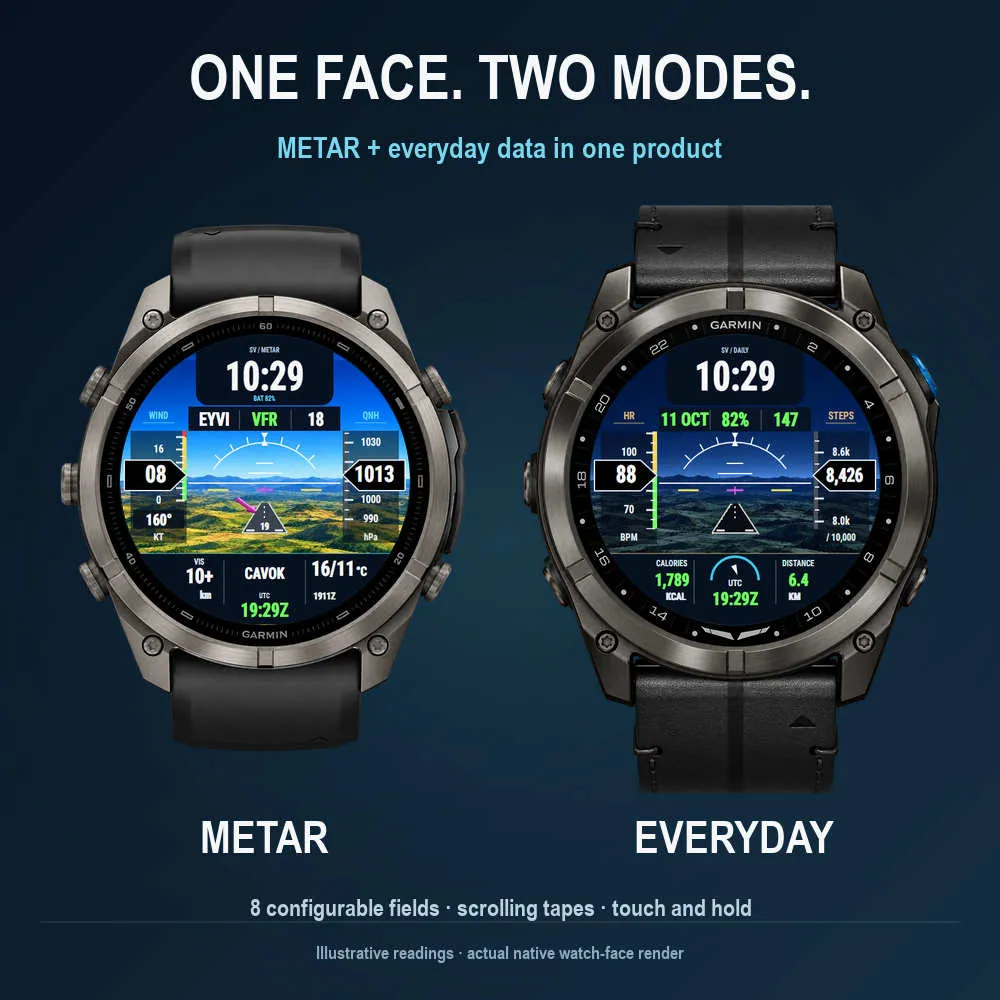
A synthetic-vision-inspired Garmin watch face with METAR and Everyday presets in one product. A detailed landscape, aviation-style tapes and a clean local clock bring a flight-instrument look to your wrist.
TWO PRESETS, EIGHT CONFIGURABLE FIELDS
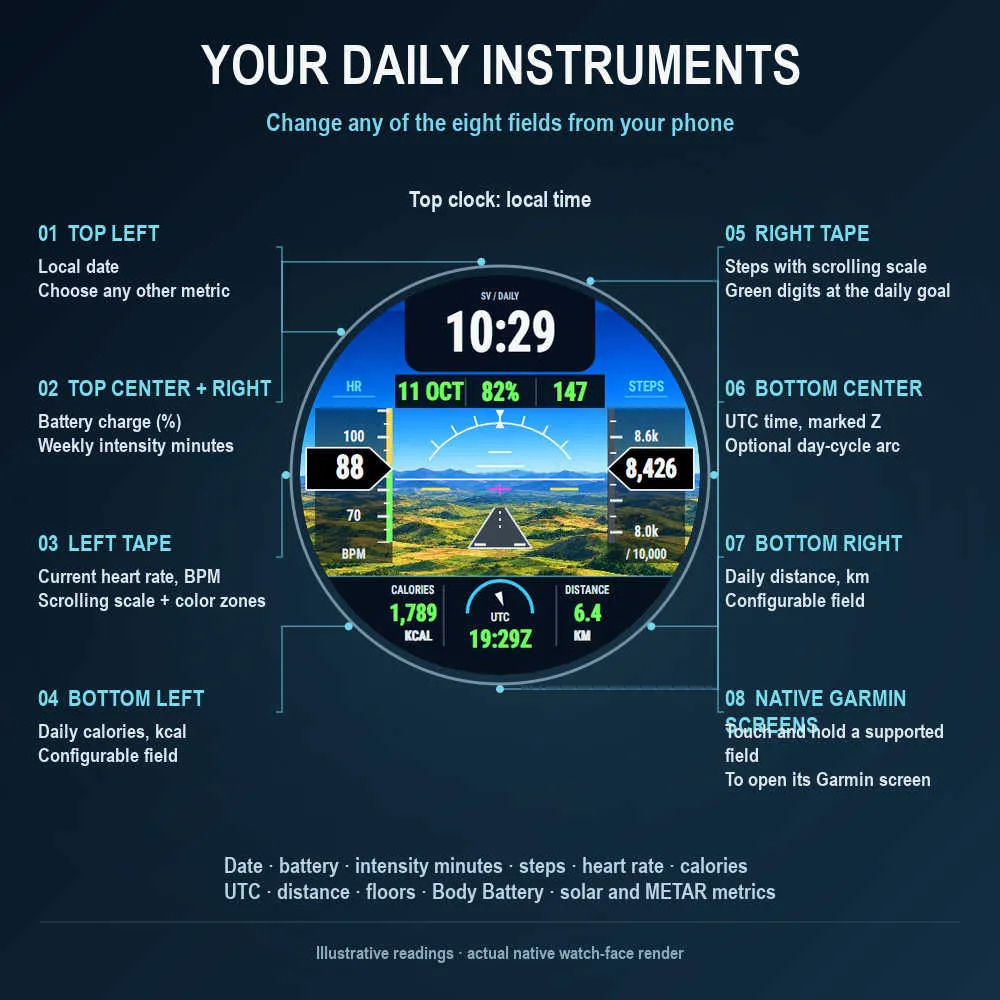
Choose METAR for airport weather or Everyday for Garmin daily metrics. Both presets let you change all eight information fields from the Connect IQ phone app. Restore the full preset whenever you want.
Everyday can show date, battery charge, weekly intensity minutes, steps, heart rate, calories, UTC, distance, floors and Body Battery. Solar and aviation metrics can also be assigned to the fields. Numeric side tapes move around a fixed readout; step digits turn green when the daily goal is reached.
METAR
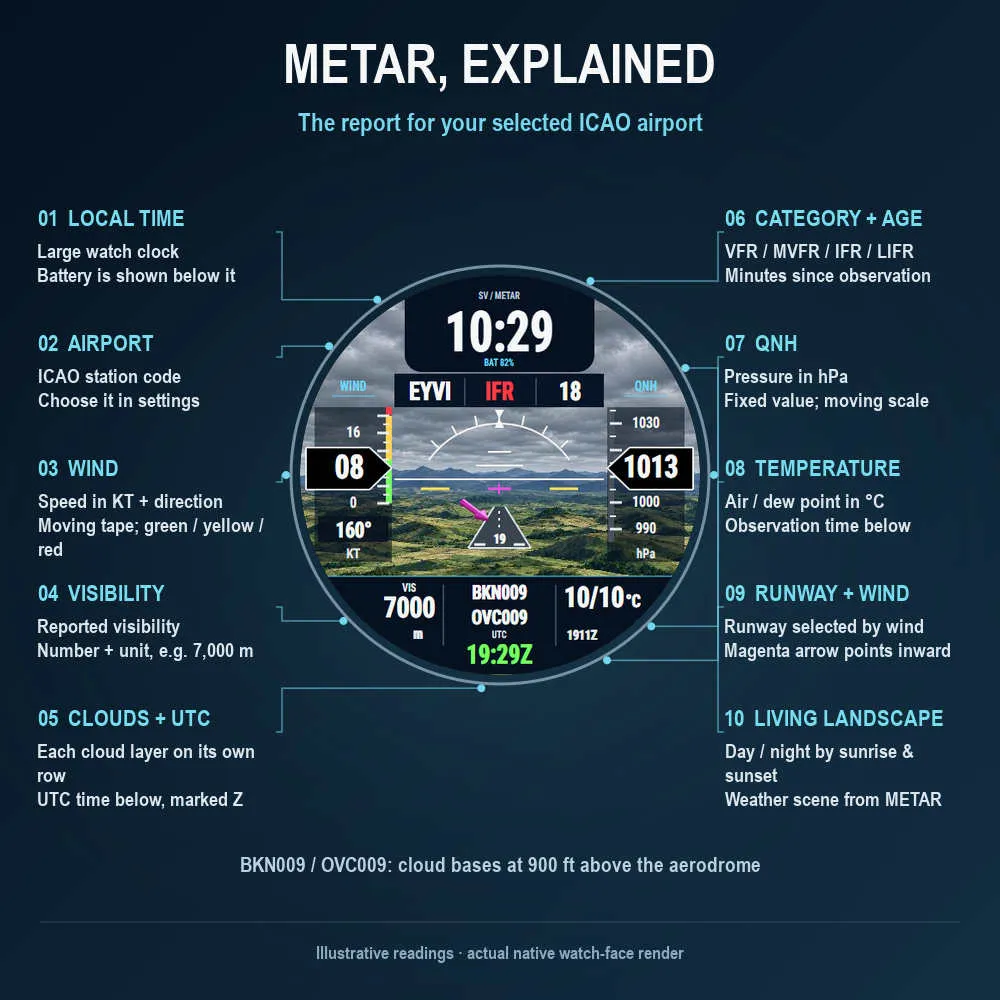
Select an airport by its four-letter ICAO code. The preset shows airport, flight category, report age, wind speed/direction, QNH, visibility, cloud layers, UTC and temperature/dew point. The observation time appears below the temperatures. Each cloud layer has its own line.
Wind bands use green through 10 KT, yellow above 10 through 20 KT and red above 20 KT. A raised magenta arrow shows wind relative to the depicted runway. The runway number is selected using the airport's stored runway directions and the reported wind, minimizing tailwind and then crosswind. This is a wind-based estimate; runway availability and operations are not assessed.
DAY AND NIGHT
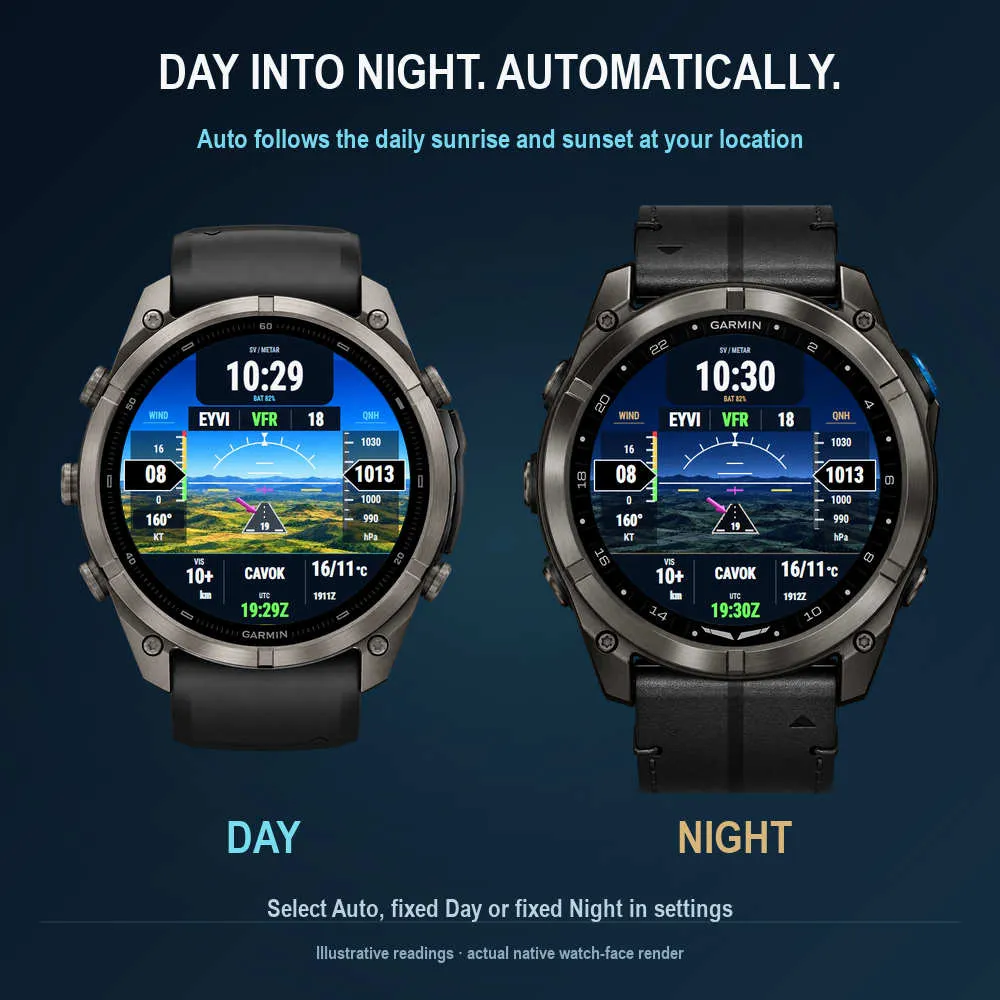
Choose fixed Day, fixed Night or Auto. Auto switches at the daily sunrise and sunset calculated for the last known local Garmin weather position. The location is cached so the calculation can advance to the next day. Selecting a METAR airport does not change the local solar position. The face does not start GPS. If solar information is unavailable, Auto retains the last theme, initially Day.
OPTIONAL METAR WEATHER BACKGROUNDS
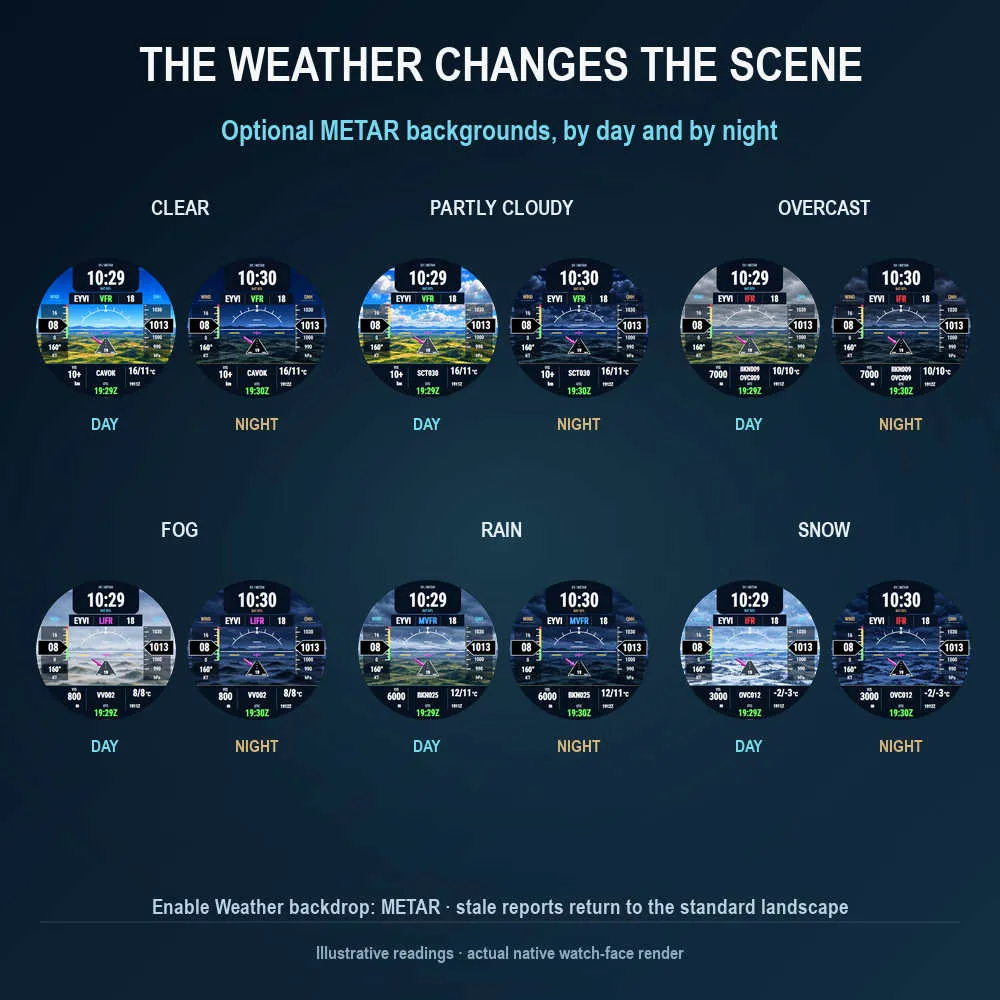
Enable Weather background → From selected METAR for clear, partly cloudy, overcast, fog, rain and snow landscapes. Every scene has a day and a night version, and the feature works with either preset or a mixed field layout. The default setting is the standard landscape. With the default stale-data policy, an outdated METAR returns the background to the standard landscape and shows a stale-data indication.
INTERACTION AND DISPLAYS
On compatible touch devices, touch and hold supported Garmin metric fields to open their native Garmin screen. Availability depends on the device and metric; aviation fields and UTC have no corresponding native screen. AMOLED has a simplified always-on view. MIP retains the full face in standby. Fonts and tape transparency are adapted to the device's graphics capabilities. Taller rectangular screens use a centered square flight display.
SETUP
Connect IQ app - My Device - My Watch Faces - Synthetic Flight - Settings.
Choose the preset, field values, airport, appearance, weather backdrop and METAR refresh interval, then save and sync. Supported watches also provide on-watch settings.
METAR comes from Aviation Weather Center through Garmin-supported networking and requires an internet connection through the watch/phone. A cached report appears immediately when available. A previously uncached airport is requested at the earliest background execution permitted by Garmin; background requests have a five-minute minimum separation. A connection error preserves the last real report with its age. Missing data shows NO METAR DATA; stale data is marked METAR OUTDATED.
Compatibility: the device list for release 0.1.8 covers 69 installed Garmin SDK profiles and 89 hardware variants. Older devices without the required APIs/memory are excluded. Interface language: English. The horizon and terrain are decorative and do not measure aircraft attitude or geographic terrain. Gallery readings are illustrative; installed fields use Garmin values and downloaded METAR reports.
Screenshots
Supported language (1)
Compatible devices (88)
Approach® S50
Approach® S70 (42mm)
Approach® S70 (47mm)
D2™ Air X10
D2™ Air X15
D2™ Mach 1
D2™ Mach 1 Pro
D2™ Mach 2
D2™ Mach 2 Pro
Descent™ G2
Descent™ MK3 - 43mm
Descent™ MK3i - 51mm
Enduro™ 2
Enduro™ 3
epix™ (Gen 2)
epix™ (Gen 2)
epix™ Pro (42mm)
epix™ Pro (47mm)
epix™ Pro (51mm)
fēnix® 7
fēnix® 7
fēnix® 7 Pro
fēnix® 7 Pro – Solar Edition (No Wi-Fi®)
fēnix® 7S
fēnix® 7S
fēnix® 7S Pro
fēnix® 7X
fēnix® 7X
fēnix® 7X Pro
fēnix® 7X Pro No Wi-Fi
fēnix® 8 AMOLED (43mm)
fēnix® 8 AMOLED (47mm/51mm)
fēnix® 8 Pro
fēnix® 8 Solar (47mm)
fēnix® 8 Solar (51mm)
fenix® 9 - 43 mm
fenix® 9 – 47 mm
fenix® 9 Pro - 43 mm
fenix® 9 Pro - 47 mm
fenix® 9 Pro - 51 mm
fenix® 9 Pro - Solar 47 mm
fenix® 9 Pro - Solar 51 mm
fēnix® E
Forerunner® 165
Forerunner® 165 Music
Forerunner® 170
Forerunner® 170 Music
Forerunner® 255
Forerunner® 255 Music
Forerunner® 265
Forerunner® 265S
Forerunner® 570 - 42mm
Forerunner® 570 - 47mm
Forerunner® 70
Forerunner® 70
Forerunner® 955 Dual Power
Forerunner® 965
Forerunner® 970
Instinct® 3 – 45 mm, AMOLED
Instinct® 3 – 50 mm, AMOLED
Instinct® Crossover AMOLED
MARQ® (Gen 2)
MARQ® Adventurer (Gen 3)
MARQ® Commander (Gen 2) – Carbon Edition
MARQ™ Aviator (Gen 2)
Mercedes-Benz Venu® 2
Mercedes-Benz Venu® 2
Mercedes-Benz Venu® 2S
Mercedes-Benz Venu® 2S
tactix® 7
tactix® 7 – AMOLED Edition
tactix® 8 – 47 mm, AMOLED
tactix® 8 – 51 mm, Solar
Venu® 2
Venu® 2
Venu® 2 Plus
Venu® 2 Plus
Venu® 2S
Venu® 2S
Venu® 3
Venu® 3S
Venu® 4 – 41 mm
Venu® 4 – 45 mm
Venu® Sq. 2
Venu® Sq. 2 Music
Venu® X1
vívoactive® 5
vívoactive® 6
Recent metric trend
Rating
Reviews
Snapshot dates
2026-10-27 → 2026-11-04