Description
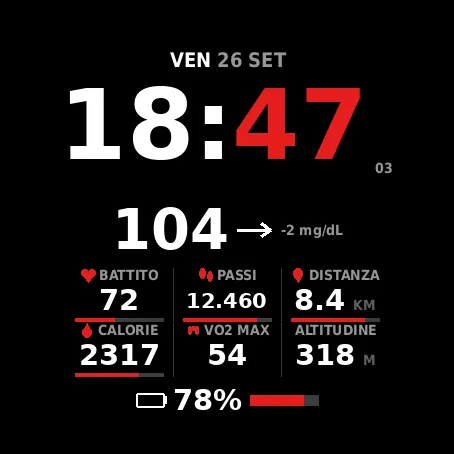
A watch face for the fenix 8 AMOLED, for people who follow their glucose alongside their training data. Same as Pow3r77 CGM, plus one thing: press and hold the watch face and it opens Pow3r77 Control, the companion app that sends commands to your Home Assistant.
WORKS WITH POW3R77 CONTROL
Press and hold anywhere on the watch face and the companion app opens on its four buttons: one tap and the command leaves for your home. If Pow3r77 Control is not installed, the long press does nothing and the system handles it as it normally would, so the watch face is perfectly usable on its own. The shortcut can be switched off in the settings.
Why two separate apps: a Connect IQ watch face cannot make network requests in the foreground, so it can never fire a command the moment you touch it. An app can. The watch face therefore opens the app, which does the talking.
If you do not want the shortcut at all, install Pow3r77 CGM instead: it is the same watch face without this feature.
GLUCOSE
Readings come from Nightscout or LibreLinkUp, your choice, and appear full width under the clock with trend arrow and the change since the previous reading. The colour follows your thresholds: white in range, orange above the high one, bright orange past the urgent one, red below the low one. When a reading gets old the number turns grey and its age replaces the delta. Below the low threshold or past the urgent high one the row can flash on red, switchable in the settings.
SIX CONFIGURABLE FIELDS
Each is chosen from over twenty metrics: heart rate, steps, distance, calories, VO2 max, recovery, altitude, floors, Body Battery, stress, sleep, breathing, weekly run, intensity minutes, pressure, temperature, weather, notifications, SpO2, battery. The bottom row is configurable too.
LOOK
Eight backgrounds, all drawn in code rather than stored as images, so they cost no memory and follow your accent colour: plain black, circuit, industrial, floral, carbon fibre, contour map, aurora, compass. Text colour and accent colour are both selectable. Backgrounds are never drawn in power saving mode, to spare the battery and the AMOLED pixels.
ALSO
A layout that resizes itself to the device fonts, with no clipped or overlapping text. Interface in Italian, English, French and German. 24-hour clock with optional seconds, always-on mode, configurable thresholds and refresh interval.
WARNINGS
Not a medical device and not a replacement for your sensor app's alarms. It reads every five minutes, only while your phone is connected, and shows the value when you look at your watch: it cannot wake you at night or warn you when you are not looking. Treatment decisions belong with your official sensor app.
Your LibreLinkUp password is stored in plain text in the Connect IQ settings and synced to Garmin's servers: it cannot be encrypted. A dedicated LibreLinkUp follower account is strongly advised instead of your main LibreView credentials.
LibreLinkUp is not published by Abbott and may stop working without notice: this is why Nightscout remains available.
This watch face sends your data nowhere: requests go only to the service you chose.
Screenshots
Supported language (1)
Compatible devices (6)
Recent metric trend
Rating
Reviews
Snapshot dates
2026-10-27 → 2026-10-30