Description
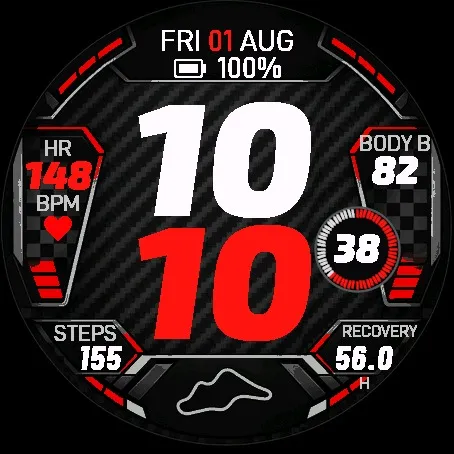
Apex Velocity brings oversized italic time, carbon texture and racing-inspired red accents to your Garmin watch.
This watch face costs USD 4 as a one-time Athlete World license.
How to purchase and activate:
1. Buy Apex Velocity at https://athleteworld.store/en/themes/apex-velocity when the product becomes available. The product is currently hidden from the store.
2. Complete checkout and copy the activation code from your Athlete World confirmation email.
3. Install Apex Velocity from Connect IQ and open its Settings.
4. Paste your code into Activation Code, tap Save and keep your watch connected to your phone. The first background attempt may wait approximately five minutes; temporary connection errors are retried.
One license supports up to three compatible watches.
Features:
- 20 color themes and five independently configurable fields.
- 95 selectable data metrics plus None, subject to device and data availability. Customization is available through Connect IQ app settings.
- Current heart rate with native complication priority and activity fallback.
- BODY B and recovery time in hours are selected by default.
- Respiration, weekly run/bike distance, training status, race time/pace predictions and Solar input on supporting watches.
- Selected native complications subscribe to Garmin updates while visible and awake.
- Current altitude and activity speed in km/h or mph remain selectable.
- System, 12-hour and 24-hour time; six date formats; optional seconds.
- Seven languages for dates and field labels, including Polish.
- Weekly calendar option and native complication shortcuts on supported watches.
- Color Always On and optional masked Full Always On on AMOLED.
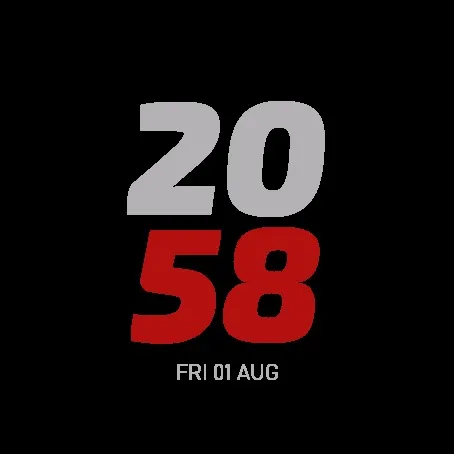
Speed requires an activity timer in progress; paused or unavailable speed displays --. Data availability and update frequency depend on the device. The circuit graphic is decorative and is not a GPS route. MIP/Solar rendering differs from AMOLED. AOD suspends live subscriptions and seconds. Promotional images are illustrations; included simulator screenshots show the implemented design. Colors and appearance vary by device.
Support: [email protected]
Privacy policy: https://athleteworld.store/en/privacy
What is new
Faster display wake and complete redraw after Always-On transitions. Watch-face customization is now available through Connect IQ app settings; the on-watch settings menu has been removed.
Expanded configurable data fields: wheelchair metrics, native training and health data, activity totals, time zones, countdown, sun events and Garmin weather. Availability depends on your watch and recorded data. Totals marked ~ are approximate.
Optimized font loading and Full Always-On memory usage. Athlete World Pass and permanent purchase licenses remain supported.
Screenshots
Supported language (1)
Compatible devices (53)
Approach® S50
Approach® S70 (42mm)
Approach® S70 (47mm)
D2™ Air X15
D2™ Mach 1
D2™ Mach 1 Pro
D2™ Mach 2
D2™ Mach 2 Pro
Descent™ G2
Descent™ MK3 - 43mm
Descent™ MK3i - 51mm
epix™ (Gen 2)
epix™ (Gen 2)
epix™ Pro (42mm)
epix™ Pro (47mm)
epix™ Pro (51mm)
fēnix® 8 AMOLED (43mm)
fēnix® 8 AMOLED (47mm/51mm)
fēnix® 8 Pro
fenix® 9 - 43 mm
fenix® 9 – 47 mm
fenix® 9 Pro - 43 mm
fenix® 9 Pro - 47 mm
fenix® 9 Pro - 51 mm
fenix® 9 Pro - Solar 47 mm
fenix® 9 Pro - Solar 51 mm
fēnix® E
Forerunner® 165
Forerunner® 165 Music
Forerunner® 170
Forerunner® 170 Music
Forerunner® 265
Forerunner® 265S
Forerunner® 570 - 42mm
Forerunner® 570 - 47mm
Forerunner® 70
Forerunner® 70
Forerunner® 965
Forerunner® 970
Instinct® 3 – 45 mm, AMOLED
Instinct® 3 – 50 mm, AMOLED
MARQ® (Gen 2)
MARQ® Adventurer (Gen 3)
MARQ® Commander (Gen 2) – Carbon Edition
MARQ™ Aviator (Gen 2)
tactix® 7 – AMOLED Edition
tactix® 8 – 47 mm, AMOLED
Venu® 3
Venu® 3S
Venu® 4 – 41 mm
Venu® 4 – 45 mm
vívoactive® 5
vívoactive® 6
Recent metric trend
Rating
Reviews
Snapshot dates
2026-10-27 → 2026-10-31