Description
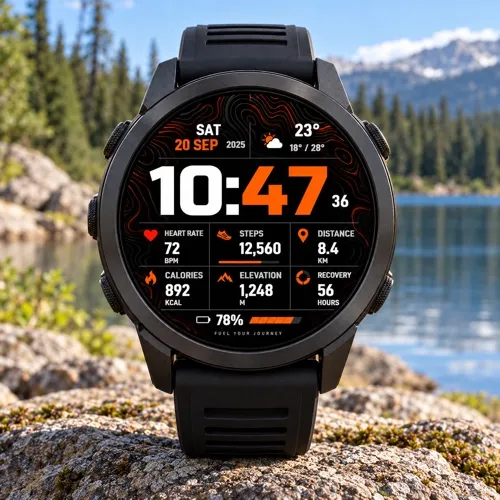
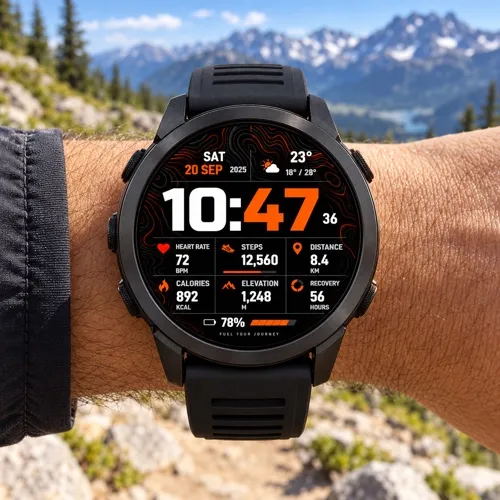
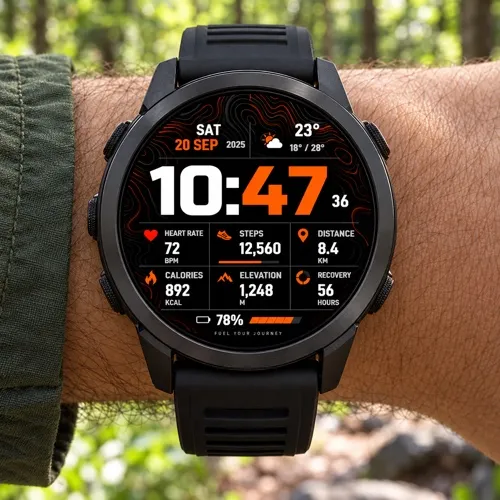
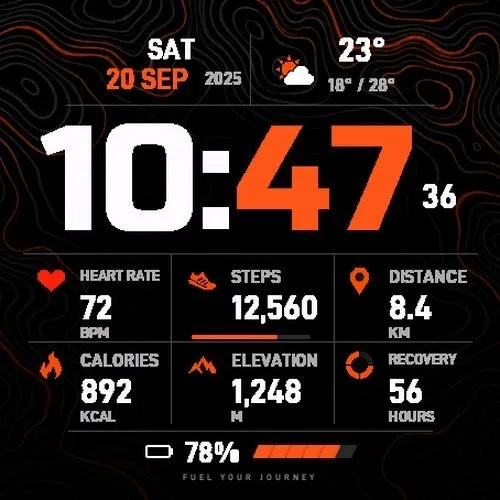
Ember Grid combines bold horizontal digital time, ember-colored topographic contours and a clean six-field data grid for compatible Garmin AMOLED watches.
USD 4, one-time external license for up to 3 compatible watches. Purchasing becomes available when the product is released in Athlete World.
How to purchase and activate:
1. When released, buy Ember Grid at https://athleteworld.store/en/themes/ember-grid
2. Complete checkout and copy the activation code from your Athlete World confirmation email.
3. Install Ember Grid from Connect IQ and open its Settings.
4. Paste the code into Activation Code, tap Save and keep your watch connected to your phone. The first background attempt may wait five minutes; connection errors retry automatically.
Republished edition: install this listing and enter your Athlete World activation code. Settings from the withdrawn app do not transfer automatically.
An individual purchase supports up to 3 watches. Pass access is available only when this watch face is included in the Athlete World Pass catalog. Each Pass license supports 1 watch and remains active only during its paid or promotional subscription period. Existing purchases are preserved.
Features:
- 6 independently configurable data fields. Defaults: heart rate, steps, distance, calories, elevation and recovery time.
- 95 selectable metrics plus None. Availability varies by device and source.
- 20 color themes and 7 languages for dates and data labels, including Polish.
- System, 12-hour and 24-hour time, optional seconds, date formats and units.
- Current heart rate on compatible devices, with guarded fallback when the native source is unavailable.
- Weather, temperature and daily low/high when Garmin data is available.
- Optional weekly calendar and long-press shortcuts to supported Garmin complications.
- Color-filled Always On and optional Full Always On with an adaptive dimming mask on supported AMOLED watches, following the selected theme.
- Settings managed through the Garmin companion app.
Data and shortcuts depend on your exact device, permissions and Garmin services. Weather needs available Garmin weather data and a phone connection. Some activity totals are collected locally after installation and are marked ~; they are not full Garmin Connect history. Manual or external-source fields need their corresponding input; AQI and glucose services are not included. Always On appearance and battery use depend on the device settings.
Support: [email protected]
Promotional images are illustrations. Simulator screenshots show version 1.0.4 with example data. Colors and appearance may vary by device.
Privacy policy: https://athleteworld.store/en/privacy
What is new
Updated AMOLED wake-up handling so the watch face draws before starting live sensor subscriptions and refreshing data.
Pending sensor updates are cancelled when entering Always On, hiding the watch face, or changing settings. Existing settings and activation are preserved.
Screenshots
Supported language (1)
Compatible devices (50)
Approach® S50
Approach® S70 (42mm)
Approach® S70 (47mm)
D2™ Air X15
D2™ Mach 1
D2™ Mach 1 Pro
D2™ Mach 2
D2™ Mach 2 Pro
Descent™ G2
Descent™ MK3 - 43mm
Descent™ MK3i - 51mm
epix™ (Gen 2)
epix™ (Gen 2)
epix™ Pro (42mm)
epix™ Pro (47mm)
epix™ Pro (51mm)
fēnix® 8 AMOLED (43mm)
fēnix® 8 AMOLED (47mm/51mm)
fēnix® 8 Pro
fenix® 9 - 43 mm
fenix® 9 – 47 mm
fenix® 9 Pro - 43 mm
fenix® 9 Pro - 47 mm
fenix® 9 Pro - 51 mm
fēnix® E
Forerunner® 165
Forerunner® 165 Music
Forerunner® 170
Forerunner® 170 Music
Forerunner® 265
Forerunner® 265S
Forerunner® 570 - 42mm
Forerunner® 570 - 47mm
Forerunner® 70
Forerunner® 70
Forerunner® 965
Forerunner® 970
Instinct® 3 – 45 mm, AMOLED
Instinct® 3 – 50 mm, AMOLED
MARQ® (Gen 2)
MARQ® Commander (Gen 2) – Carbon Edition
MARQ™ Aviator (Gen 2)
tactix® 7 – AMOLED Edition
tactix® 8 – 47 mm, AMOLED
Venu® 3
Venu® 3S
Venu® 4 – 41 mm
Venu® 4 – 45 mm
vívoactive® 5
vívoactive® 6
Recent metric trend
Rating
Reviews
Snapshot dates
2026-10-27 → 2026-10-31