Description
Five tabs of your day on one face: time, activity, performance, calories and sleep, each one fully customisable, switched with a touch.
Your whole day, one tap apart.
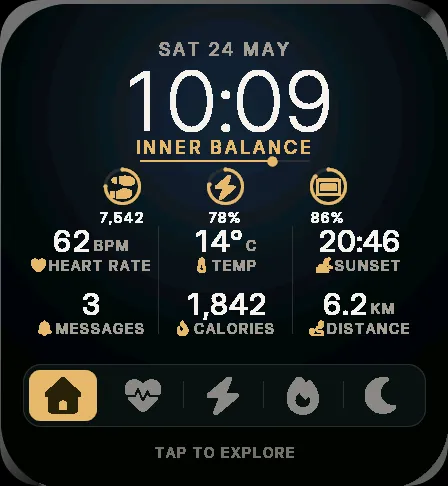
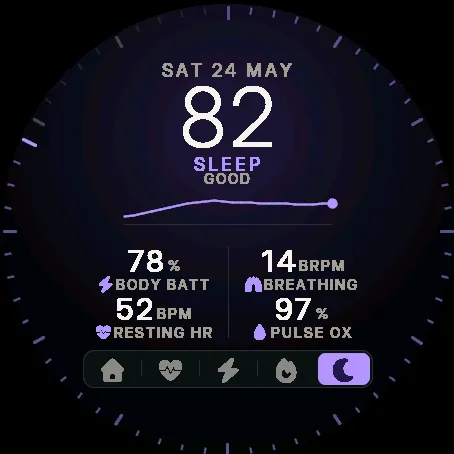
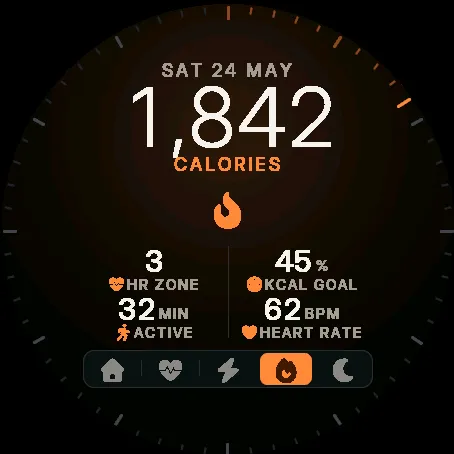
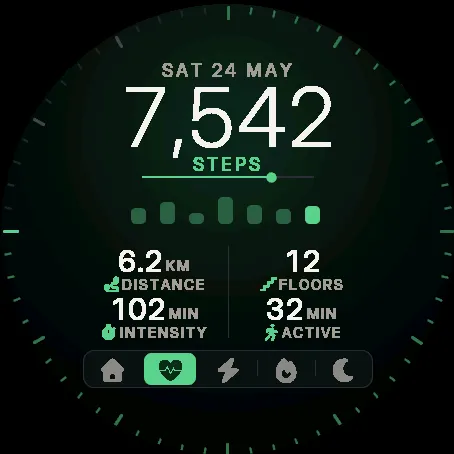
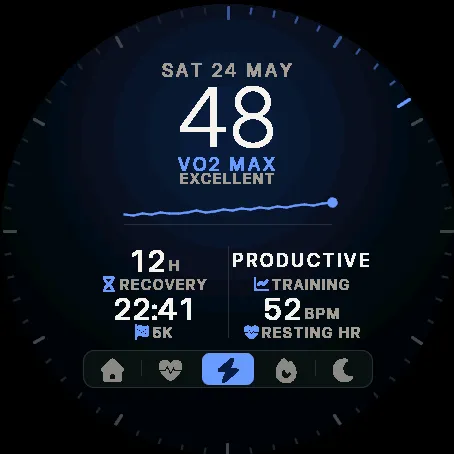
SOTA puts up to five tabs on the face, switched from the bar at the bottom. Each tab has a big hero number, a middle band and a grid of fields, and the date and hero never move as you switch.
• Home: the time, a phrase from your Body Battery and stress, rings for steps, Body Battery and battery, plus heart rate, temperature, sunset and messages
• Activity: steps with the last 7 days, distance, floors, intensity minutes and calories
• Performance: VO2 max, a 4-hour heart rate graph, recovery, training status and race predictions
• Calories: calories with your goal, heart rate zone and active calories
• Sleep: sleep score, a 12-hour Body Battery graph, breathing, Pulse Ox and stress
Make every tab your own in the Connect IQ app:
• Hero number: the time or any of 33 metrics
• Middle: three rings, a big icon, a graph (heart rate, stress, Body Battery, altitude or pressure) or 7 days of steps
• Fields: any of 40 metrics
• 9 colours and 12 bar icons per tab; hide the tabs you don't need
• Dial edge ticks that fill to your goal, a second time zone and a daily calorie goal
Touch the bar to switch tabs, or touch a number to open the watch's own screen for it. When you raise your wrist the hero number decodes in with a kinetic-type effect (it can be turned off). Six fields and a bigger bar on the Venu X1.
Low-power always-on mode: a dim time and date, shifted every minute to protect the screen.
What is new
New Seconds tick option in the Dial edge setting: one tick follows the current second while the screen is awake. Tick marks also appear on the Venu X1.
Screenshots
Supported language (1)
Compatible devices (35)
D2™ Air X15
D2™ Mach 1
D2™ Mach 1 Pro
epix™ (Gen 2)
epix™ (Gen 2)
epix™ Pro (42mm)
epix™ Pro (47mm)
epix™ Pro (51mm)
fēnix® 8 AMOLED (43mm)
fēnix® 8 AMOLED (47mm/51mm)
fēnix® 8 Pro
fenix® 9 - 43 mm
fenix® 9 – 47 mm
fenix® 9 Pro - 43 mm
fenix® 9 Pro - 47 mm
fenix® 9 Pro - 51 mm
fēnix® E
Forerunner® 265
Forerunner® 265S
Forerunner® 570 - 42mm
Forerunner® 570 - 47mm
Forerunner® 965
Forerunner® 970
Instinct® 3 – 45 mm, AMOLED
Instinct® 3 – 50 mm, AMOLED
MARQ® (Gen 2)
MARQ® Commander (Gen 2) – Carbon Edition
MARQ™ Aviator (Gen 2)
tactix® 7 – AMOLED Edition
tactix® 8 – 47 mm, AMOLED
Venu® 3
Venu® 3S
Venu® 4 – 41 mm
Venu® 4 – 45 mm
Venu® X1