Description
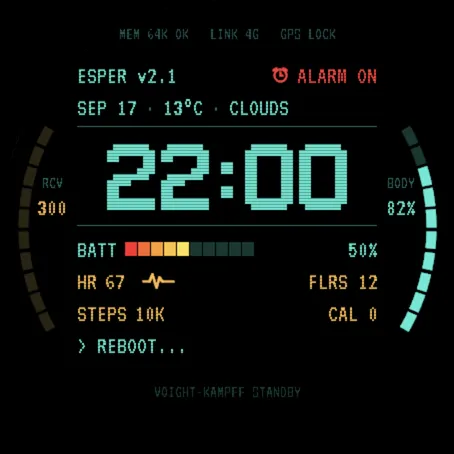
A watch face built as a terminal readout. Phosphor cyan for the system, amber
for the body, one dominant pixel clock, and a rim that works instead of
decorating.
WHAT IS ON IT
Time in a bitmap pixel font, drawn large and centred.
Date, temperature and current conditions on one status line.
Battery as a ten segment bar that runs red through amber to yellow.
Two gauge arcs on the rim, one on each side of the face.
Four data fields across the lower half.
An alarm indicator that turns red when an alarm is armed.
A line of your own text at the bottom, next to a blinking cursor.
SIX METRICS YOU CHOOSE
The two rim arcs and the four data fields are complication slots. On watches
with the on-device watch face editor you reassign any of them from the watch
itself, with no phone in the loop: press and hold on the face, pick the field,
pick the metric.
The arcs default to recovery time and Body Battery, and accept stress, sleep
score, pulse ox and VO2 max. The four data fields default to heart rate, floors,
steps and calories, and accept those plus intensity minutes, respiration,
training status, altitude and notifications.
PRESS AND HOLD TO OPEN
Hold any of the six metrics and the watch opens whatever publishes it. Hold the
heart rate field and you are in the heart rate app, hold Body Battery and you
are in Body Battery.
BUILT FOR AN OLED PANEL
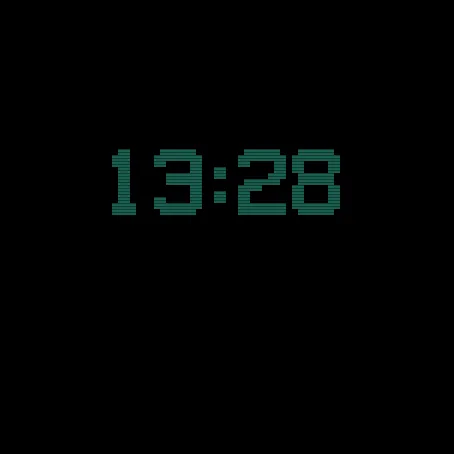
The ground is true black, so unlit pixels really are off. With the wrist down
the face shows the time alone, dimmed, and nothing else: measured at about one
and a half percent of a white screen against Garmin's ten percent ceiling.
ADDITIONAL SETTINGS
One setting, the line of text at the bottom. Set it from the Connect IQ app on
your phone.
NOTES
The face collects nothing and sends nothing anywhere.
What is new
Larger text. Every line of the terminal, the gauge names beside the rim arcs
and the boot log are set one to two sizes bigger on every watch, so the face
reads at a glance on the wrist. The clock digits keep their size. The top
status line is shorter to fit the larger type, and it no longer runs off the
edge of the screen on fenix 8 Solar 47mm and fenix 9 Pro Solar 47mm.
Screenshots
Supported language (1)
Compatible devices (26)
D2™ Air X15
D2™ Mach 2
D2™ Mach 2 Pro
Enduro™ 3
fēnix® 8 AMOLED (43mm)
fēnix® 8 AMOLED (47mm/51mm)
fēnix® 8 Pro
fēnix® 8 Solar (47mm)
fēnix® 8 Solar (51mm)
fenix® 9 - 43 mm
fenix® 9 – 47 mm
fenix® 9 Pro - 43 mm
fenix® 9 Pro - 47 mm
fenix® 9 Pro - 51 mm
fenix® 9 Pro - Solar 47 mm
fenix® 9 Pro - Solar 51 mm
fēnix® E
Forerunner® 570 - 42mm
Forerunner® 570 - 47mm
Forerunner® 970
MARQ® Adventurer (Gen 3)
tactix® 8 – 47 mm, AMOLED
tactix® 8 – 51 mm, Solar
Venu® 4 – 41 mm
Venu® 4 – 45 mm
vívoactive® 6
Recent metric trend
Rating
Reviews
Snapshot dates
2026-10-27 → 2026-11-01