Description
This is an fully configurable watch face with many settings including weather data, oxygen saturation, customizable date with ISO week and much more.
The first version is already quite large. This version is for new logos.
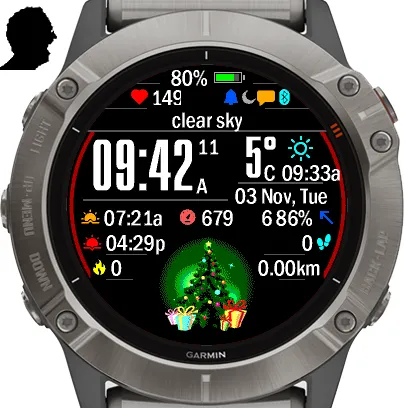
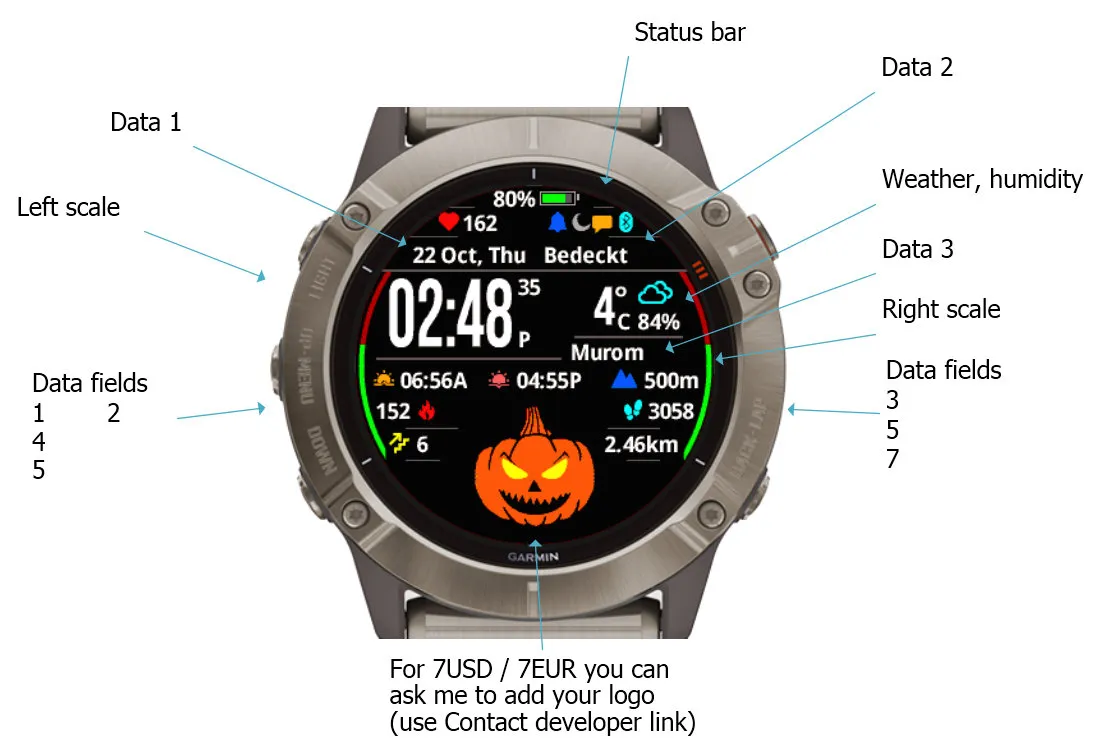
You can ask me to add your picture as a logo (Instead of a Christmas tree...) - use the link "Contact developer"
-
WEATHER API KEY INSTRUCTIONS:
1. Go to openweathermap.org and open a FREE account. Go to API Keys tab - Current Weather Data - Subscribe - FREE plan - Get API key.
2. Paste this 32-digit key in first option of app settings via Garmin Connect app on your phone. If you received the key on your computer, you can save it in your email draft and open it on your phone.
If you have problems, please use contact developer before leaving a review!
For Celsius / Fahrenheit just set your watch - Settings-System-Units-Temperature.
-
Settings in the following languages: english * Deutsch * français * español * italiana * Português * 中文 * русский
-
If you like it, you can support my work with a small donation: https://paypal.me/bine8x8
-
The following letters are used to display the date:
d - day number 1..31
D - day of the week (Sun, Mon etc)
m - month number 1..12
M - name of the month (Jan, Feb etc)
y - Two digits of the year 20
Y - Four digits of the year 2020
W - ISO week number
Other letters will appear in the date bar unchanged.
Leading zero will be displayed when setting its color to a different background color.
For example:
d M, D - 23 Jul, Tue
m / d / Y - 06 / 23.2020
m / d / y wW - 06/23/20 w26
*
To update the weather you need a connection to the phone, running on the phone Garmin Connect App (leave it on him start page) and the presence of the phone’s connection to the Internet.
To display the weather and correct the sunrise/sunset calculations of your area, you need to GPS lock - start any activity with GPS (running etc) outdoor and wait for "Green status".
After that, immediately return to watch face - current coordinates will be stored in memory.
Note that you will need to repeat this after changing your location, otherwise the sun times will reflect your last location.
*
Changing app settings in Garmin Express/GCM/CIQ Mobile Store: https://forums.garmin.com/developer/connect-iq/w/wiki/14/changing-your-app-settings-in-garmin-express-gcm-ciq-mobile-store
What is new
WITHOUT YOUR REWIEW, I WILL NOT BE ABLE TO GET NEW USERS. NO NEW USERS ➟ NO PROGRESS ➟ NO NEW PROJECTS
PLEASE SUPPORT ME WITH A REWIEW IF YOU LIKE MY WORK. IT IS IMPORTANT. THANK YOU!NOTE: Please do not leave suggestions, requests or bug reports in the reviews. Instead, please use the "Contact Developer" link on this page; I will endeavour to reply to everyone (add email for answer)
-
11.11.2024
Minor fixes with SDK 7.3.1
-
05.09.2024
Logos from one of the customers are now available on F8.
-
03.09.2024
Added new devices with SDK7.3.0
-
12.09.2023
Added new devices with SDK6.3.0
Added pictures for individual use
-
21.03.2023
Added new devices with SDK4.2.2
Added modern metrics like "Body battery", "Stress level", etc.
To display national capital letters and hieroglyphs, add the option "Not pure Latin" to the list of the parameter "Language of inscriptions".
*
30.11.2022
Added new devices with SDK 4.1.7
*
26.01.2022
Added new devices
*
03.12.2021
Added option "Display seconds"
Reduced power consumption when "Low power"
SDK 4.0.7
*
22.09.2021
Added option "Display number of notifications"
Added new devices
*
10.05.2021
Added photos for individual use.
*
05.05.2021
Added "Superman" logos for individual use.
Added for all the logos "Oil and gas", "Renewable energy" to the selection list.
Added Garmin Venu2 series
SDK 4.0.1
*
05.04.2021
Added for all the logos "Art of dance", "Rough state" to the selection list.
Added "Trail runnen" logo for individual use.
*
05.04.2021
Added for all the logo "Heart" to the selection list.
Added "Vikings" logos for individual use.
*
02.04.2021
Added "Columna Skadeterapi" and "SpecNaz(СпецНаз)" logos for individual use.
*
01.04.2021
Now, to get weather data, you need to enter the API key from openweathermap.org in the first item of settings.
Added "PentaStar" logo for individual use.
*
26.02.2021
Added "Manchester United" logos for individual use.
*
19.02.2021
Added Garmin Enduro
SDK 3.2.5
Minor fixes
*
27.01.2021
- Added logo:
CLR (Clear Linux Store)
Added option "Display pressure trend" - change of icon when displaying pressure.
*
24.11.2020
- Added logo:
LAR (LUXEMBOURG AIR RESQUE)
Added the originally conceived but missed option "Days of battery life"
Added option "Scale icons color"
*
26.02.2021
Added "Manchester United" logos for individual use.
*
19.11.2020
Fixed display of temperature from the sensor.
Fixed display of scales for VENU Sq
It is now possible to display Chinese letters in names when choosing "Text font" = 0
Small alignments
*
06.11.2020
Added support for "Descend Mk2"
*
05.11.2020
- Added logos:
Sidis Hands Green
Sidis Hands White
- Added display of moon phases
- Small alignments
*
03.11.2020
Fixed display of weather and time
*
02.11.2020
First release
Screenshots
Supported language (1)
Compatible devices (180)
Approach® S60
Approach® S60
Approach® S62
Approach® S62
Approach® S70 (42mm)
Approach® S70 (47mm)
Captain Marvel
Captain Marvel
D2™ Air
D2™ Air X10
D2™ Charlie
D2™ Charlie
D2™ Delta
D2™ Delta PX
D2™ Delta PX
D2™ Delta S
D2™ Mach 1
D2™ Mach 1 Pro
Darth Vader™
Darth Vader™
Descent™ Mk1
Descent™ Mk1
Descent™ MK2
Descent™ MK2
Descent™ Mk2S
Descent™ Mk2S
Descent™ MK3 - 43mm
Descent™ MK3i - 51mm
Enduro™
Enduro™
Enduro™ 2
Enduro™ 3
epix™ (Gen 2)
epix™ (Gen 2)
epix™ Pro (42mm)
epix™ Pro (47mm)
epix™ Pro (51mm)
fēnix® 5
fēnix® 5
fēnix® 5 Plus
fēnix® 5 Plus
fēnix® 5S
fēnix® 5S
fēnix® 5S Plus
fēnix® 5S Plus
fēnix® 5X
fēnix® 5X
fēnix® 5X Plus
fēnix® 5X Plus
fēnix® 6
fēnix® 6
fēnix® 6 Dual Power
fēnix® 6 Pro
fēnix® 6 Pro
fēnix® 6 Pro Dual Power
fēnix® 6 Pro Solar
fēnix® 6 Solar
fēnix® 6S
fēnix® 6S
fēnix® 6S Dual Power
fēnix® 6S Pro
fēnix® 6S Pro
fēnix® 6S Pro Dual Power
fēnix® 6S Pro Solar
fēnix® 6S Solar
fēnix® 6X Pro
fēnix® 6X Pro
fēnix® 7
fēnix® 7
fēnix® 7 Pro
fēnix® 7 Pro – Solar Edition (No Wi-Fi®)
fēnix® 7S
fēnix® 7S
fēnix® 7S Pro
fēnix® 7X
fēnix® 7X
fēnix® 7X Pro
fēnix® 7X Pro No Wi-Fi
fēnix® 8 AMOLED (43mm)
fēnix® 8 AMOLED (47mm/51mm)
fēnix® 8 Solar (47mm)
fēnix® 8 Solar (51mm)
fenix® 9 - 43 mm
fenix® 9 – 47 mm
fēnix® Chronos
fēnix® Chronos
fēnix® E
First Avenger
First Avenger
ForeAthlete 245
ForeAthlete 245 Music
ForeAthlete 645
ForeAthlete 645 Music
ForeAthlete 745
ForeAthlete 935
Forerunner® 165
Forerunner® 165 Music
Forerunner® 245
Forerunner® 245
Forerunner® 245 Music
Forerunner® 245 Music
Forerunner® 255
Forerunner® 255 Music
Forerunner® 255S
Forerunner® 255S Music
Forerunner® 265
Forerunner® 265S
Forerunner® 645
Forerunner® 645 Music
Forerunner® 745
Forerunner® 935
Forerunner® 945
Forerunner® 945
Forerunner® 945 LTE
Forerunner® 955 Dual Power
Forerunner® 965
MARQ® (Gen 2)
MARQ® Commander (Gen 2) – Carbon Edition
MARQ™ Adventurer
MARQ™ Adventurer
MARQ™ Athlete
MARQ™ Athlete
MARQ™ Aviator
MARQ™ Aviator
MARQ™ Aviator (Gen 2)
MARQ™ Captain
MARQ™ Captain
MARQ™ Commander
MARQ™ Commander
MARQ™ Driver
MARQ™ Driver
MARQ™ Expedition
MARQ™ Expedition
MARQ™ Golfer
MARQ™ Golfer
Mercedes-Benz Venu®
Mercedes-Benz Venu®
Mercedes-Benz Venu® 2
Mercedes-Benz Venu® 2
Mercedes-Benz Venu® 2S
Mercedes-Benz Venu® 2S
quatix® 6
quatix® 6X
Rey™
Rey™
tactix® 7
tactix® 7 – AMOLED Edition
tactix® 8 – 47 mm, AMOLED
Venu®
Venu®
Venu® 2
Venu® 2
Venu® 2 Plus
Venu® 2 Plus
Venu® 2S
Venu® 2S
Venu® 3
Venu® 3S
Venu® Sq.
Venu® Sq.
Venu® Sq.
Venu® Sq.
Venu® Sq. Music
Venu® Sq. Music
Venu® Sq. Music
Venu® Sq. Music
vívoactive® 3
vívoactive® 3
vívoactive® 3
vívoactive® 3 Mercedes-Benz® Collection
vívoactive® 3 Mercedes-Benz® Collection
vívoactive® 3 Music
vívoactive® 3 Music
vívoactive® 3 Music
vívoactive® 4
vívoactive® 4
vívoactive® 4S
vívoactive® 4S
vívoactive® 5
vívolife
Recent metric trend
Rating
Reviews
Snapshot dates
2026-10-27 → 2026-10-31