Description
TrainBud puts your training and recovery numbers on your wrist and lets you ask
an AI assistant about them without reaching for your phone.
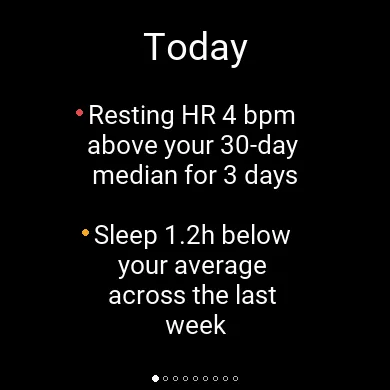
It opens on Today: not a grid of numbers, but what actually stands out —
measured against your own baseline, not a population average.
• "Resting heart rate 4 bpm above your 28-day baseline, 3 days running"
• "5.6 h of sleep short of your usual 6.3 h over the last 7 nights"
It says when it does not have enough history to compare anything yet, rather
than pretending everything is fine.
A glance shows your recovery score and last night's sleep without opening
anything. Open it and swipe or tap through the cards you switched on:
• Today — what stands out, in plain language
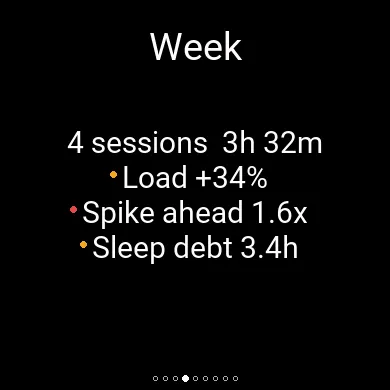
• Week — this week against last, and where your training load is heading
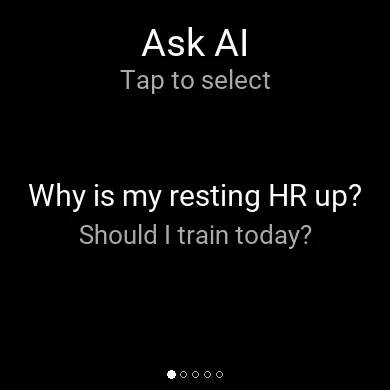
• Ask AI — questions drawn from what actually fired, plus up to five of your
own that you write in the dashboard
• AI Insight — a daily one-line tip built from your own numbers
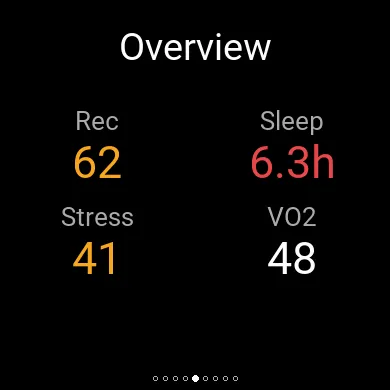
• Overview — recovery, sleep, stress and VO2 max in one grid
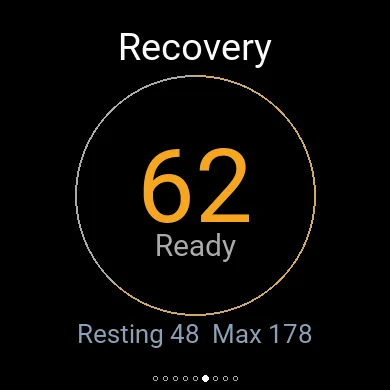
• Recovery — score with a colour-coded ring, plus resting and maximum heart rate
• Sleep — hours and quality score
• Activity — latest workout with duration, distance, average heart rate and VO2 max
• Stress — daily average
Which cards appear, and in what order, is yours to set in the dashboard. Values
are colour-coded against thresholds you can change. If the server is briefly
unreachable, the app shows your last cached summary with an "updated X ago"
marker.
SETUP REQUIRED — THIS APP NEEDS YOUR OWN SERVER
TrainBud is the watch front end for a free, open-source companion server that
you run yourself. It does not work standalone.
1. Install and configure the server (Node.js 20+): npx trainbud setup
2. Run: trainbud serve
3. Expose it over HTTPS with a tunnel (Cloudflare Tunnel or ngrok both work)
4. In the app's settings, enter that HTTPS URL as Server URL
5. Open the dashboard link the server prints, and approve the six-digit code
shown on your watch — this pairs the watch, so no API key is ever typed on
the device
AI features are optional and off by default. They require your own Anthropic API
key, entered once in the companion dashboard, and every call is metered there
with an optional monthly cap. No AI runs on the watch: your question is sent to
your own server, which calls the AI provider on your behalf and returns the text.
HEALTH DISCLAIMER
TrainBud is for general wellness and training information only. It is not a
medical device, it does not diagnose, treat or prevent any condition, and its
output — including AI-generated text — is not medical advice. Consult a
qualified professional before making decisions about your health or training
load.
TrainBud is an independent open-source project, not affiliated with, endorsed by
or sponsored by any device or platform vendor.
Setup guide and source: https://github.com/Zsadigzade/trainbud
What is new
2.1.0 — why a finding fired, and mute it from the watch
• Why a finding fired. Press START (or tap) on the Today card and the top finding opens to the rule it fired on, with your own numbers: "Each of the last 3 days was at least 3 bpm and 2 deviations above your 28-day median of 48 bpm". UP and DOWN step through findings. The rules themselves can be changed in the companion dashboard.
• Mute a finding from the watch. From that screen, START again and confirm to silence that one finding for three days — for when you know why and the watch does not.
• What moved last night. The Sleep card names the part of the night that was unusual for you, with your usual in brackets: "Deep 40m (1h24m)".
• The age of stale numbers sits beside the card title ("Today 6m ago") instead of over it, and is given in hours or days once it is that old.
• Fixed: BACK on an AI answer closed the app instead of returning to the question list.
These need companion server 0.8.0 or later. On an older server the watch behaves as 2.0.4. On the Forerunner 55 the finding detail, mute and sleep line are left out to keep the app within that watch's memory; everything else in this release applies.
Screenshots
Supported language (1)
Compatible devices (59)
D2™ Mach 1 Pro
Enduro™ 2
epix™ (Gen 2)
epix™ (Gen 2)
epix™ Pro (42mm)
epix™ Pro (47mm)
epix™ Pro (51mm)
fēnix® 7
fēnix® 7
fēnix® 7 Pro
fēnix® 7S
fēnix® 7S
fēnix® 7S Pro
fēnix® 7X
fēnix® 7X
fēnix® 7X Pro
fēnix® 8 AMOLED (43mm)
fēnix® 8 AMOLED (47mm/51mm)
fēnix® 8 Pro
fēnix® 8 Solar (47mm)
fēnix® 8 Solar (51mm)
fēnix® E
ForeAthlete 55
ForeAthlete 745
Forerunner® 265S
Forerunner® 55
Forerunner® 55
Forerunner® 570 - 42mm
Forerunner® 570 - 47mm
Forerunner® 70
Forerunner® 70
Forerunner® 745
Forerunner® 955 Dual Power
Forerunner® 965
Forerunner® 970
Instinct® 3 – 45 mm, AMOLED
Instinct® 3 – 45 mm, Solar
Instinct® 3 – 50 mm, AMOLED
Instinct® 3 – 50 mm, Solar
MARQ® (Gen 2)
MARQ® Commander (Gen 2) – Carbon Edition
Mercedes-Benz Venu® 2
Mercedes-Benz Venu® 2
Mercedes-Benz Venu® 2S
Mercedes-Benz Venu® 2S
tactix® 7
tactix® 7 – AMOLED Edition
tactix® 8 – 47 mm, AMOLED
tactix® 8 – 51 mm, Solar
Venu® 2
Venu® 2
Venu® 2 Plus
Venu® 2 Plus
Venu® 2S
Venu® 2S
Venu® 3
Venu® 3S
vívoactive® 5
vívoactive® 6
Recent metric trend
Rating
Reviews
Snapshot dates
2026-10-27 → 2026-10-29