Description
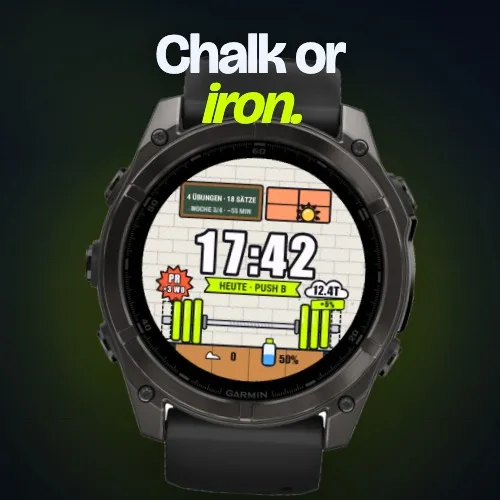
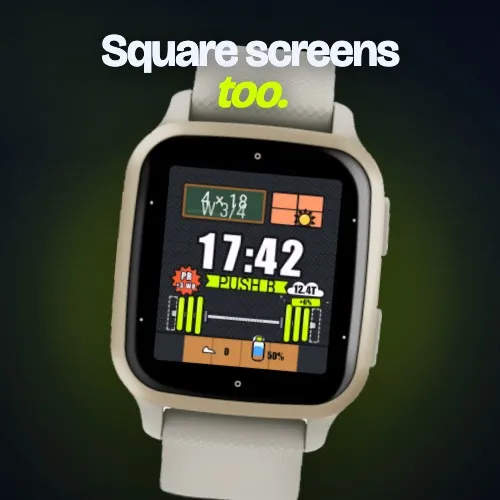
Your training week, drawn as one scene. Look at your wrist and see the bar: how loaded your week is, what today's plan is, and whether it is a rest day.
The face is free. It works without an account and fills with your training once you pair it with LiftSync (liftsync.fit).
WHAT YOU SEE
• The week's sessions as plates on the barbell: loaded means done, dashed means still open
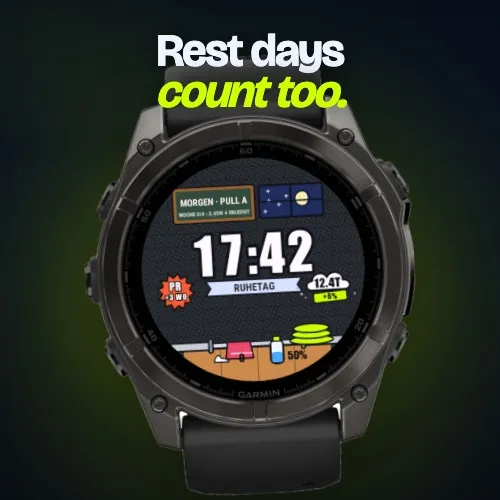
• Today's plan day as a ribbon under the clock (PUSH A, PULL B, REST DAY)
• The chalkboard with the exercises and sets of the day
• Your weekly volume as a cloud of chalk dust, in your unit (kg or lb, as set in LiftSync)
• Your PR streak as a starburst
• Steps and battery, drawn as part of the gym
WITHOUT AN ACCOUNT
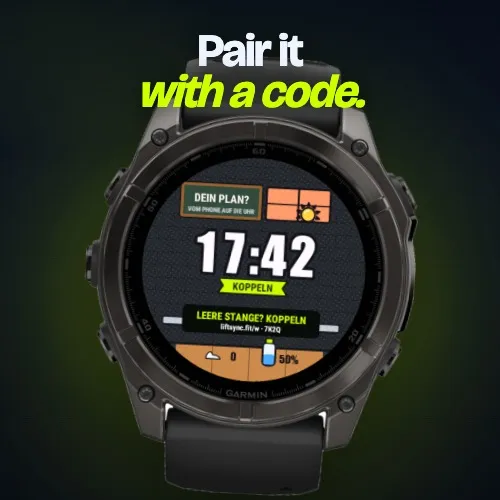
The clock, the date, your steps and the battery come from the watch. The ribbon shows a short pairing code (liftsync.fit/w, then the code) instead of a plan. Never an empty face.
WITH LIFTSYNC
Pair once with the code, or paste your API token in the settings. The face then fetches your week every 15 minutes by default (5, 15, 30 or 60 in the settings). Some details, such as the volume trend and the PR streak, come with LiftSync Premium; the face itself stays free.
LOOK
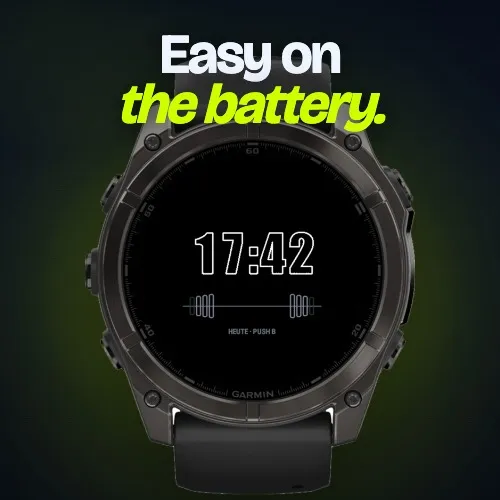
Iron (dark) or Chalk (light), or Automatic. AMOLED watches get a dim Always-On face with an outline clock that shifts every minute against burn-in.
DRAWN FOR EVERY SCREEN
Round screens from 218 to 466 px, AMOLED and transflective, and the square Venu Sq 2 and Venu X1. Instinct and other 1-bit screens are not supported.
SET UP
1. Install the watch face
2. Open liftsync.fit/w and type the code the face shows (or copy your API token from the LiftSync app)
3. Wait a minute: the bar loads
Support: [email protected]
Privacy: https://liftsync.fit/privacy-policy
What is new
On small watches the pairing code now fits on the screen in its own line. The pairing lines are spaced by font height and the hint is shorter on compact devices.
Screenshots
Supported languages (2)
Compatible devices (82)
Approach® S50
Approach® S70 (42mm)
Approach® S70 (47mm)
D2™ Air X10
D2™ Air X15
D2™ Mach 1
D2™ Mach 1 Pro
D2™ Mach 2
D2™ Mach 2 Pro
Descent™ G2
Descent™ MK3 - 43mm
Descent™ MK3i - 51mm
Enduro™ 2
Enduro™ 3
epix™ (Gen 2)
epix™ (Gen 2)
epix™ Pro (42mm)
epix™ Pro (47mm)
epix™ Pro (51mm)
fēnix® 7
fēnix® 7
fēnix® 7 Pro
fēnix® 7 Pro – Solar Edition (No Wi-Fi®)
fēnix® 7S
fēnix® 7S
fēnix® 7S Pro
fēnix® 7X
fēnix® 7X
fēnix® 7X Pro
fēnix® 7X Pro No Wi-Fi
fēnix® 8 AMOLED (43mm)
fēnix® 8 AMOLED (47mm/51mm)
fēnix® 8 Pro
fēnix® 8 Solar (47mm)
fēnix® 8 Solar (51mm)
fēnix® E
Forerunner® 165
Forerunner® 165 Music
Forerunner® 170
Forerunner® 170 Music
Forerunner® 255
Forerunner® 255 Music
Forerunner® 255S
Forerunner® 255S Music
Forerunner® 265
Forerunner® 265S
Forerunner® 570 - 42mm
Forerunner® 570 - 47mm
Forerunner® 70
Forerunner® 70
Forerunner® 955 Dual Power
Forerunner® 965
Forerunner® 970
Instinct® 3 – 45 mm, AMOLED
Instinct® 3 – 50 mm, AMOLED
Instinct® Crossover AMOLED
MARQ® (Gen 2)
MARQ® Commander (Gen 2) – Carbon Edition
MARQ™ Aviator (Gen 2)
Mercedes-Benz Venu® 2
Mercedes-Benz Venu® 2
Mercedes-Benz Venu® 2S
Mercedes-Benz Venu® 2S
tactix® 7
tactix® 7 – AMOLED Edition
tactix® 8 – 47 mm, AMOLED
tactix® 8 – 51 mm, Solar
Venu® 2
Venu® 2
Venu® 2 Plus
Venu® 2 Plus
Venu® 2S
Venu® 2S
Venu® 3
Venu® 3S
Venu® 4 – 41 mm
Venu® 4 – 45 mm
Venu® Sq. 2
Venu® Sq. 2 Music
Venu® X1
vívoactive® 5
vívoactive® 6
Recent metric trend
Rating
Reviews
Snapshot dates
2026-10-27 → 2026-11-04