Description
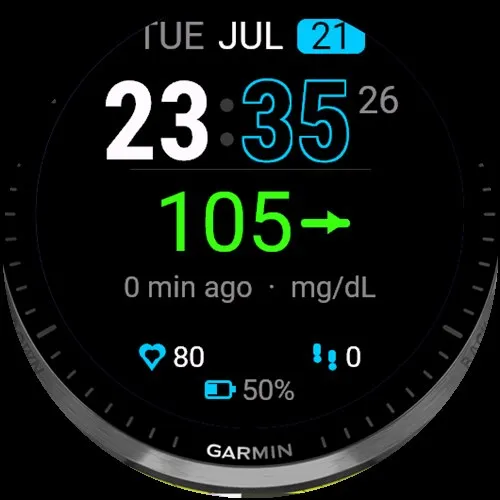
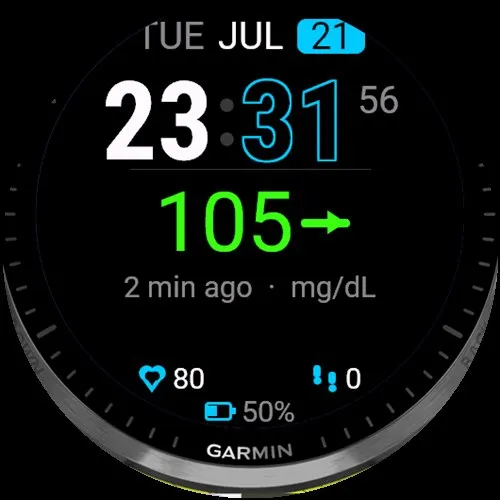
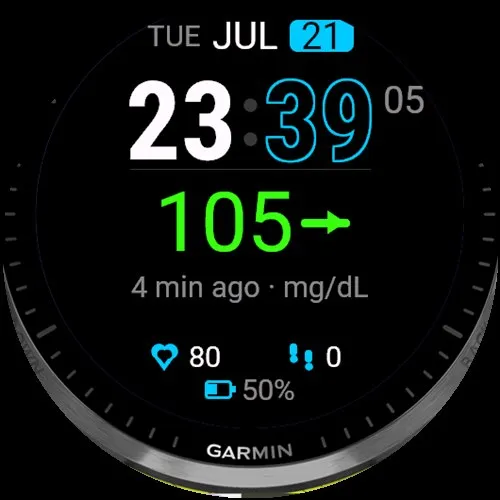
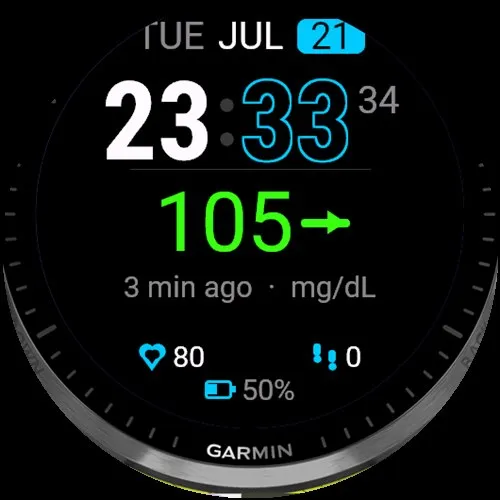
GlucoFlex shows your latest glucose, trend arrow and reading age on the watch face.
Works with Dexcom Share / Follow (G6, G7, ONE), LibreLinkUp (Libre 2 / 3), Nightscout-family bridges (Gluroo, xDrip, Juggluco, AAPS, Spike, Loop), and CamAPS FX via a Nightscout-style bridge.
Phone must stay nearby with Bluetooth on so GlucoFlex can refresh in the background.
--------------------------------------------------
DEXCOM SETUP (G6 / G7 / ONE via Share)
--------------------------------------------------
HOW IT WORKS
GlucoFlex reads Dexcom Share over the internet (same family of data Dexcom Follow uses). It does not talk to the sensor over Bluetooth directly.
WHY A FOLLOWER ACCOUNT IS RECOMMENDED
Dexcom often blocks the main / sensor-wearer Share API login (browser / uam2 challenge). A dedicated Follower account that receives Share from the wearer is much more reliable in GlucoFlex.
STEP BY STEP
1. On the wearer's Dexcom app, turn Share ON and invite a Follower (email of an account you control).
2. On the phone, open Dexcom Follow, sign in (or create) that Follower account, and accept the invite.
3. On Garmin Connect IQ: My Device - GlucoFlex - Settings
- Data source: Dexcom Share / Follow
- Account email: the FOLLOWER email (not a one-time code)
- Password: that Follower account password
- Dexcom Region: USA or Outside USA - must match where that account was created
4. Wait for the next refresh (keep phone nearby, Bluetooth on).
DEXCOM TIPS
- Trim spaces before/after email and password (GlucoFlex also auto-trims).
- Wrong region often shows User Not Found - flip USA / Outside USA.
- If you see Browser Login Required at uam2.dexcom.com: open that site once in a phone browser, sign in for that account, then retry GlucoFlex.
- Main-account Share logins may work for some users, but if Auth Failed keeps appearing, switch to a Follower account.
--------------------------------------------------
LIBRE SETUP (Libre 2 / 3 via LibreLinkUp)
--------------------------------------------------
HOW IT WORKS
GlucoFlex uses LibreLinkUp Follow (not LibreView hospital/clinic login, and not the LibreLink patient account alone). Someone must Share to a LibreLinkUp Follower; GlucoFlex logs in as that Follower.
STEP BY STEP
1. Wearer: LibreLink / Libre 3 app - connected sensor - enable sharing / invite a Follower.
2. Follower: install LibreLinkUp, create or sign in, accept the invite from the wearer.
3. Confirm the Follower can already see live glucose in LibreLinkUp on the phone.
4. On Garmin Connect IQ: My Device - GlucoFlex - Settings
- Data source: LibreLinkUp (Libre 2 / 3 Follow)
- Account email: the LibreLinkUp FOLLOWER email
- Password: that Follower password
- LibreLinkUp Region: Auto (try US or EU only if Auto fails or readings look stale)
5. Keep the phone nearby with Bluetooth on.
LIBRE TIPS
- Use the Follower LibreLinkUp login - not the LibreView patient portal email.
- If the number looks right but age/grey stale is wrong (common on some US Libre setups), try Timestamp mode: Always treat as fresh.
- No connections / empty follow list usually means the invite was not accepted yet.
--------------------------------------------------
OTHER SOURCES (brief)
--------------------------------------------------
Nightscout family / CamAPS FX: set Data source accordingly and paste your Nightscout / Gluroo / xDrip bridge URL (plus secret or token if required). CamAPS has no public Follow API - use a bridge.
--------------------------------------------------
QUICK SETUP CHECKLIST
--------------------------------------------------
1. Install GlucoFlex and set it as your watch face.
2. Connect IQ - My Device - GlucoFlex - Settings.
3. Pick Dexcom or LibreLinkUp (or Nightscout / CamAPS bridge).
4. Enter the correct Follower credentials and region.
5. Phone nearby, Bluetooth on, wait for refresh.
ON-SCREEN DIAGNOSTICS
- Format Error: Check Spaces in Credentials - trim email/password
- Auth Failed: Try Dexcom Follower Account
What is new
Day and battery % are now white and easier to read.
mmol/L low and high alerts: switch Glucose Units and the numbers convert automatically (e.g. 70/180 to 4/10) so you can edit them. Clearer alert settings.
Dexcom setup text and on-watch error messages are clearer (login, region, Share, phone connection).
Instinct Solar / Instinct 2: layout clears the top-right circle; battery shows in that circle.
NEW BUG FIXES
Screenshots
Supported language (1)
Compatible devices (185)
Approach® S50
Approach® S70 (42mm)
Approach® S70 (47mm)
Captain Marvel
Captain Marvel
D2™ Air
D2™ Air X10
D2™ Air X15
D2™ Mach 1
D2™ Mach 1 Pro
D2™ Mach 2
D2™ Mach 2 Pro
Darth Vader™
Darth Vader™
Descent™ G1
Descent™ G1
Descent™ G2
Descent™ MK2
Descent™ MK2
Descent™ Mk2S
Descent™ Mk2S
Descent™ MK3 - 43mm
Descent™ MK3i - 51mm
Enduro™
Enduro™
Enduro™ 2
Enduro™ 3
epix™ (Gen 2)
epix™ (Gen 2)
epix™ Pro (42mm)
epix™ Pro (47mm)
epix™ Pro (51mm)
fēnix® 5 Plus
fēnix® 5 Plus
fēnix® 5S Plus
fēnix® 5S Plus
fēnix® 5X Plus
fēnix® 5X Plus
fēnix® 6
fēnix® 6
fēnix® 6 Dual Power
fēnix® 6 Pro
fēnix® 6 Pro
fēnix® 6 Pro Dual Power
fēnix® 6 Pro Solar
fēnix® 6 Solar
fēnix® 6S
fēnix® 6S
fēnix® 6S Dual Power
fēnix® 6S Pro
fēnix® 6S Pro
fēnix® 6S Pro Dual Power
fēnix® 6S Pro Solar
fēnix® 6S Solar
fēnix® 6X Pro
fēnix® 6X Pro
fēnix® 7
fēnix® 7
fēnix® 7 Pro
fēnix® 7 Pro – Solar Edition (No Wi-Fi®)
fēnix® 7S
fēnix® 7S
fēnix® 7S Pro
fēnix® 7X
fēnix® 7X
fēnix® 7X Pro
fēnix® 7X Pro No Wi-Fi
fēnix® 8 AMOLED (43mm)
fēnix® 8 AMOLED (47mm/51mm)
fēnix® 8 Pro
fēnix® 8 Solar (47mm)
fēnix® 8 Solar (51mm)
fēnix® E
First Avenger
First Avenger
ForeAthlete 245
ForeAthlete 245 Music
ForeAthlete 55
ForeAthlete 645 Music
ForeAthlete 745
Forerunner® 165
Forerunner® 165 Music
Forerunner® 170
Forerunner® 170 Music
Forerunner® 245
Forerunner® 245
Forerunner® 245 Music
Forerunner® 245 Music
Forerunner® 255
Forerunner® 255 Music
Forerunner® 255S
Forerunner® 255S Music
Forerunner® 265
Forerunner® 265S
Forerunner® 55
Forerunner® 55
Forerunner® 570 - 42mm
Forerunner® 570 - 47mm
Forerunner® 645 Music
Forerunner® 70
Forerunner® 70
Forerunner® 745
Forerunner® 945
Forerunner® 945
Forerunner® 945 LTE
Forerunner® 955 Dual Power
Forerunner® 965
Forerunner® 970
Instinct® 2
Instinct® 2
Instinct® 2S
Instinct® 2S
Instinct® 2X
Instinct® 3 – 45 mm, AMOLED
Instinct® 3 – 45 mm, Solar
Instinct® 3 – 50 mm, AMOLED
Instinct® 3 – 50 mm, Solar
Instinct® Crossover
Instinct® Crossover AMOLED
Instinct® E – 40 mm
Instinct® E – 45 mm
MARQ® (Gen 2)
MARQ® Commander (Gen 2) – Carbon Edition
MARQ™ Adventurer
MARQ™ Adventurer
MARQ™ Athlete
MARQ™ Athlete
MARQ™ Aviator
MARQ™ Aviator
MARQ™ Aviator (Gen 2)
MARQ™ Captain
MARQ™ Captain
MARQ™ Commander
MARQ™ Commander
MARQ™ Driver
MARQ™ Driver
MARQ™ Expedition
MARQ™ Expedition
MARQ™ Golfer
MARQ™ Golfer
Mercedes-Benz Venu®
Mercedes-Benz Venu®
Mercedes-Benz Venu® 2
Mercedes-Benz Venu® 2
Mercedes-Benz Venu® 2S
Mercedes-Benz Venu® 2S
quatix® 6
quatix® 6X
Rey™
Rey™
tactix® 7
tactix® 7 – AMOLED Edition
tactix® 8 – 47 mm, AMOLED
tactix® 8 – 51 mm, Solar
Venu®
Venu®
Venu® 2
Venu® 2
Venu® 2 Plus
Venu® 2 Plus
Venu® 2S
Venu® 2S
Venu® 3
Venu® 3S
Venu® 4 – 41 mm
Venu® 4 – 45 mm
Venu® Sq.
Venu® Sq.
Venu® Sq.
Venu® Sq.
Venu® Sq. 2
Venu® Sq. 2 Music
Venu® Sq. Music
Venu® Sq. Music
Venu® Sq. Music
Venu® Sq. Music
Venu® X1
vívoactive® 3 Music
vívoactive® 3 Music
vívoactive® 4
vívoactive® 4
vívoactive® 4S
vívoactive® 4S
vívoactive® 5
vívoactive® 6
Recent metric trend
Rating
Reviews
Snapshot dates
2026-10-27 → 2026-10-29