Popis
See your squadrats around you while you're out.
Highlight new squadrats when you enter them.
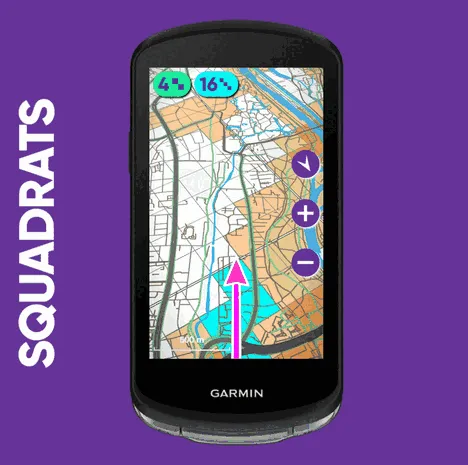
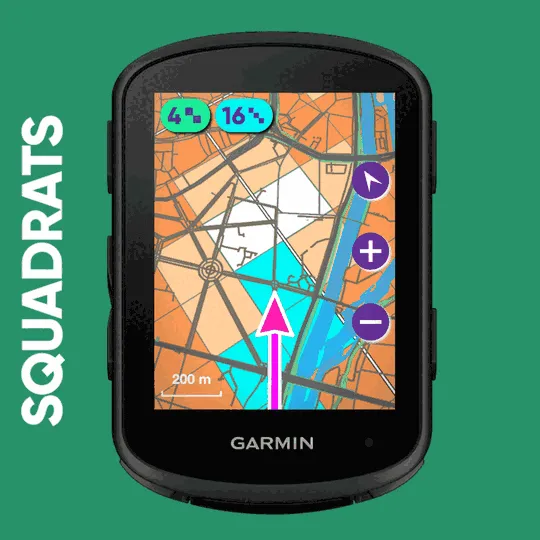
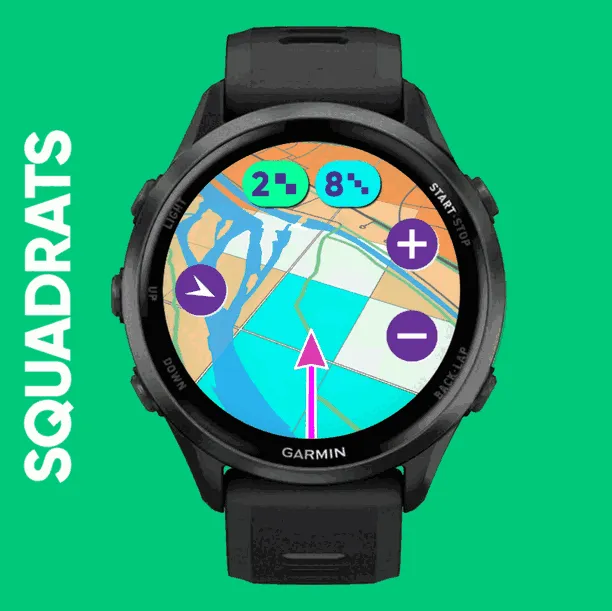
Squadrats draws the squadrat grid on your Garmin, live, centred on where you are. The ones you already own are shaded, and the roads and water under the grid come from our map. You can see the edge of your coverage coming before you reach it, and plan the detour to the next new squadrat without taking out your phone.
WHAT YOU SEE
• Squadrats and squadratinhos around your position, shaded by what you already own
• Roads, rails and water under the grid, in the Squadrats map style, so an empty squadratinho becomes "that lane on the far bank"
• Your track drawn behind you
• Each new squadrat and squadratinho lit up as you enter it, with a running count for the activity
• A tone, and a buzz on watches, the moment you enter a squadratinho you did not have (both can be turned off)
• Heading-up or north-up, and a zoom that opens at a sensible width for your area. Tap + / − on touchscreen devices.
• In your device's language: English, Czech, Dutch, French, German, Polish or Spanish
WHAT YOU NEED
• A Squadrats Pro account (squadrats.com). Using a Garmin device is a Pro feature.
• Your phone with you, Bluetooth on, and Garmin Connect running in the background. The field reaches Squadrats through your phone.
• A data screen of its own for the field (1-field layout). It is a map, and in a quarter of the screen it might get unreadable.
GETTING STARTED
1. Add Squadrats to a data screen in your activity profile (e.g. ride, run, walk), from the Connect IQ fields. Many devices offer to do this right after the install.
2. Open the activity and go to that screen. The field shows a short code and a QR code.
3. Scan the QR code, or open the link shown under the code and type the code in. Approve while signed in to your Squadrats account. The field starts drawing within seconds. You only do this once.
Settings (what to show, zoom, orientation, sound, vibrate, unlink) are in the activity settings → Connect IQ Settings → Squadrats.
WHAT IT IS NOT
• Not a tracker. Your Garmin records the activity exactly as before. The field does not change your activity file or what reaches Garmin Connect or Strava.
• Not how squadrats are credited. What you see is a live preview. Squadrats are still awarded from your uploaded activity, as always. If the screen and the website disagree, the website is right.
• Not navigation. No routing and no turn prompts. Garmin does not allow apps to draw on its own map page, so Squadrats is a separate page next to your map, not a layer on top of it.
ON SCREEN
• Red NO PHONE stripe: the device cannot see your phone. Check Bluetooth and Garmin Connect.
• Red NO INTERNET stripe: the phone is connected but has no data connection.
• On a touchscreen, tap the stripe for what to check.
• Waiting for GPS: no fix yet. Give it a minute of open sky.
• Squadrats link expired: the device has not reached Squadrats for a long time. Stop the activity and the field shows a new code to approve.
• Pro required: the account this device is linked to has no Squadrats Pro.
Čo je nové
b343: Now in Czech, Dutch, French, German, Polish and Spanish too, following your device's language; watches buzz on each new squadratinho; support for Forerunner 255 and 255S; no Sound setting on vívoactive 5 and 6, which have no speaker
b335: Lowered location pointer on some watches; added support for new devices
b330: QR code fix for watches
b328: vívoactive fix
Snímky obrazovky
Podporovaných jazykov (7)
Kompatibilných zariadení (89)
Approach® S50
Approach® S70 (42mm)
Approach® S70 (47mm)
Approach® S72 - 43 mm
Approach® S72 - 47 mm
D2™ Air X15
D2™ Mach 1
D2™ Mach 1 Pro
D2™ Mach 2
D2™ Mach 2 Pro
Descent™ G2
Descent™ MK3 - 43mm
Descent™ MK3i - 51mm
Edge® 1040
Edge® 1040
Edge® 1050
Edge® 1060
Edge® 540
Edge® 550
Edge® 840
Edge® 850
Edge® Explore 2
Edge® MTB
Enduro™ 2
Enduro™ 3
Enduro™ 4
epix™ (Gen 2)
epix™ (Gen 2)
epix™ Pro (42mm)
epix™ Pro (47mm)
epix™ Pro (51mm)
fēnix® 7
fēnix® 7
fēnix® 7 Pro
fēnix® 7 Pro – Solar Edition (No Wi-Fi®)
fēnix® 7S
fēnix® 7S
fēnix® 7S Pro
fēnix® 7X
fēnix® 7X
fēnix® 7X Pro
fēnix® 7X Pro No Wi-Fi
fēnix® 8 AMOLED (43mm)
fēnix® 8 AMOLED (47mm/51mm)
fēnix® 8 Pro
fēnix® 8 Solar (47mm)
fēnix® 8 Solar (51mm)
fenix® 9 - 43 mm
fenix® 9 – 47 mm
fenix® 9 Pro - 43 mm
fenix® 9 Pro - 47 mm
fenix® 9 Pro - 51 mm
fenix® 9 Pro - Solar 47 mm
fenix® 9 Pro - Solar 51 mm
fēnix® E
Forerunner® 165
Forerunner® 165 Music
Forerunner® 170
Forerunner® 170 Music
Forerunner® 255
Forerunner® 255 Music
Forerunner® 255S
Forerunner® 255S Music
Forerunner® 265
Forerunner® 265S
Forerunner® 570 - 42mm
Forerunner® 570 - 47mm
Forerunner® 70
Forerunner® 70
Forerunner® 955 Dual Power
Forerunner® 965
Forerunner® 970
Instinct® 3 – 45 mm, AMOLED
Instinct® 3 – 50 mm, AMOLED
Instinct® Crossover AMOLED
MARQ® (Gen 2)
MARQ® Adventurer (Gen 3)
MARQ® Commander (Gen 2) – Carbon Edition
MARQ™ Aviator (Gen 2)
tactix® 7
tactix® 7 – AMOLED Edition
tactix® 8 – 47 mm, AMOLED
tactix® 8 – 51 mm, Solar
Venu® 3
Venu® 3S
Venu® 4 – 41 mm
Venu® 4 – 45 mm
vívoactive® 5
vívoactive® 6
Nedávny trend metrík
Hodnotenie
Recenzie
Dátumy snímok
2026-10-27 → 2026-11-01