Popis
Your Garmin Edge was built for cycling. Stock activity types and data fields are made for bikes — not kayak, surfski, canoe or SUP. Paddlers still want stroke rate, distance per stroke, how hard each pull was, left versus right, and whether the boat is leaning as they tire. Those numbers are not on a standard Edge screen.
Paddle Stroke Power turns that same Edge — or a Garmin watch — into a paddling computer. Live metrics while you paddle. A kayaking FIT in Garmin Connect when you finish. Optional review in Paddle Stroke Lab.
WHY PADDLERS INSTALL IT
Garmin devices are excellent hardware with a cycling-first software story. Edge computers do not offer a proper paddling activity type the way they do for road and mountain bike. Built-in fields will not show impulse, power estimates, side balance or boat lean. Paddle Stroke Power fills that gap without asking you to replace the unit you already mount on the boat.
Sea kayak and touring. Surfski and ocean ski. Sprint and marathon kayak. Canoe and multisport. Coaches and self-coached athletes who want the session on Connect afterwards — not only a speed and distance trace that looks like a bike ride.
WHAT YOU SEE ON THE WATER
Live stroke rate and distance per stroke to pace a piece. Impulse and power estimates for each pull. Left and right once the sides lock. Roll and LEAN as the boat sits through the piece — next to speed, distance and heart rate.
EDGE
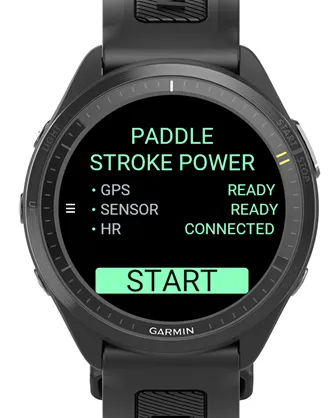
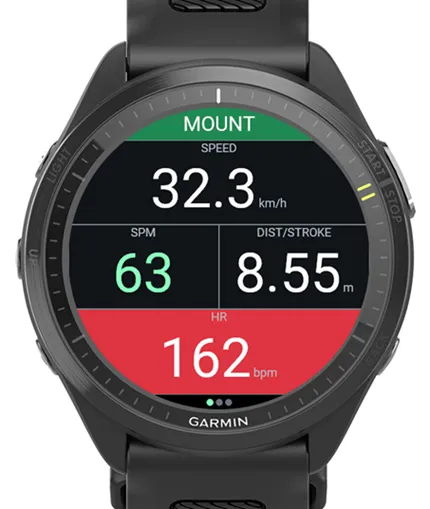
Mount in your paddling cradle, then START. Edge is always boat-mounted. GPS, SENSOR and HR show when they are live.
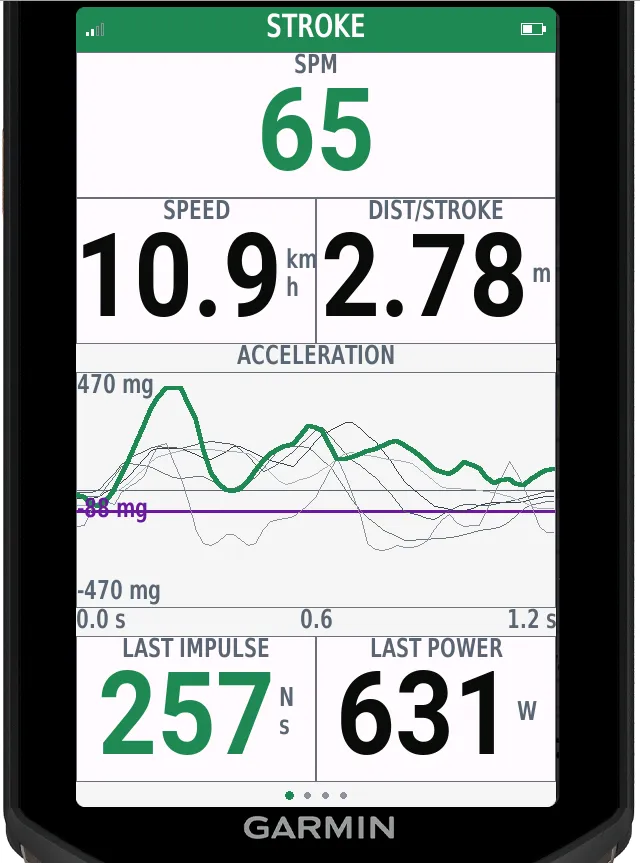
• STROKE — rate, speed, distance per stroke, last impulse and power, live stroke picture
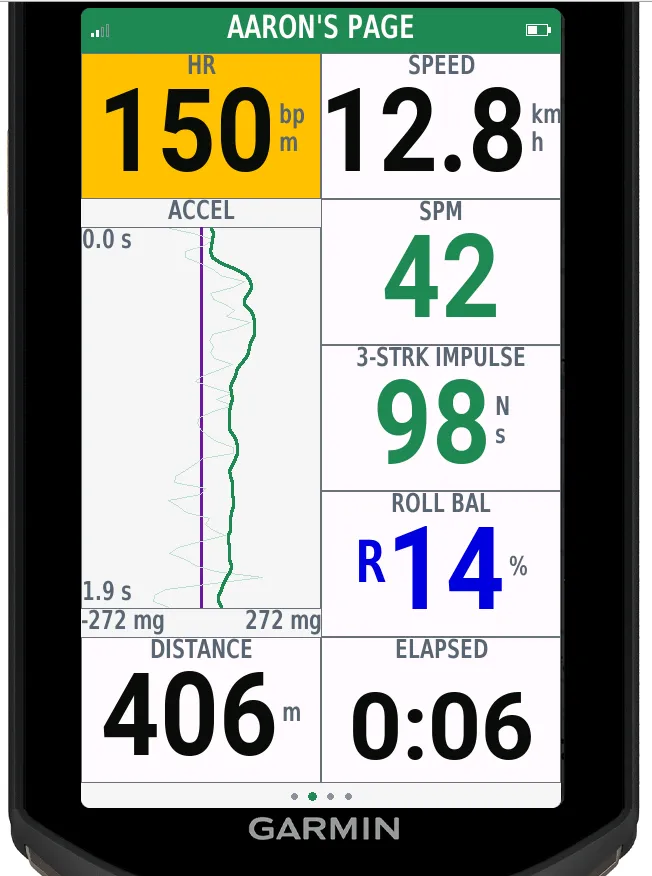
• AARON’S PAGE — race glance: heart rate and speed, stroke rate, three-stroke impulse, LEAN, distance and time
• ROLL — heel through each stroke, with LEAN
• NAV — hero speed with distance, time, rate, distance per stroke, impulse, LEAN, heart rate and clock
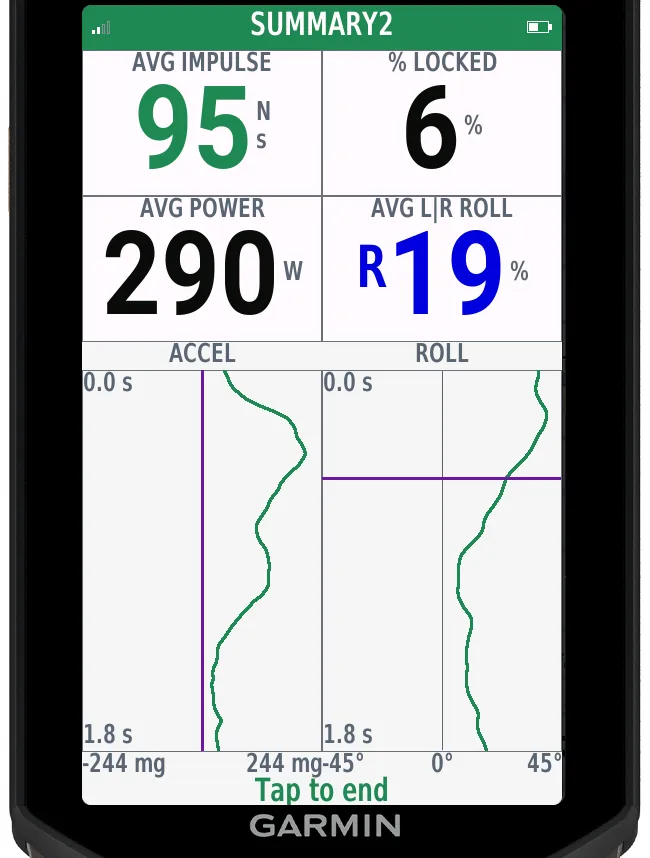
• SUMMARY / SUMMARY2 — session averages; locked left/right averages when coverage is high
STROKE and ROLL for technique. AARON’S PAGE and NAV for race pieces and long legs. Hide pages you do not need — NAV always stays. If LEFT and RIGHT look swapped after lock, set Left/Right Lock to Reverse Lock.
WATCH
Configuration before START: Mounted on boat or Worn on Wrist. START shows the choice so the wrong mode is obvious before you commit.
• Mounted on boat — same hull metrics as Edge: impulse, power and LEAN
• Worn on Wrist — kayak or canoe stroke rate from Activity Type
Activity Type tags Kayaking, Canoeing or SUP for the FIT sport — the paddling activity label Edge stock software will not give you — and on the wrist it chooses the stroke math.
AFTER YOU STOP
Save a kayaking FIT to Garmin Connect with stroke rate, distance per stroke, impulse, power and LEAN (boat-mounted). Review trends over weeks, not only one glance on the water.
On Edge, optional upload sends a compact SUMMARY archive to Paddle Stroke Lab — Send, Keep or Discard — with UPLOAD SUCCESS and a Lab QR, or recovery on failure. Settings → Lab QR reopens the last successful link.
Set paddler and boat mass for effort estimates. Day and Night colours follow the device, or force one mode for glare or pre-dawn launches.
Impulse and power are training estimates from accelerometer, GPS and mass — not a calibrated paddle power meter. Left and right labels come from boat roll once the sides lock. Not a medical device.
Built by The Spearers — a Brisbane paddling community. Layout credit: Aaron M. Try it on the phone: https://spearers.com.au/psp/
Čo je nové
2.6.2
• SUMMARY2 locked L/R means (impulse, power, accel/roll curves, lean, peak force, exit, period) keep building across polarity flips — only the last 6 strokes before each flip are dropped
2.6.1
• Roll and LEAN polarity aligned across Edge, watch and phone (Explore 2 full native→W3C frame)
• MOUNT gravity / tilt warm double-check so boat-forward metrics stay honest after mount
• Phone DeviceMotion remap for Android and iOS matched to Lab analysis
2.5.7
• L/R Flip Tracking (Off by default) — full-screen L/R FLIPPED alert and sticky FLIPS count on ROLL and SUMMARY2 when polarity changes mid-piece
• Boat-forward acceleration aligned across Edge, watch and phone companion
• ROLL mid-plot L/R cues only after lock
• Matching left/right lock and flip tracking in the phone companion and Paddle Stroke Lab
2.4.5
• Left/Right Lock — Lock, Reverse Lock or No Lock
• Locked AARON’S PAGE, ROLL and SUMMARY2 share a longer-side time axis for side-to-side comparison
2.3.x
• Save-time Lab upload — Send the queue with UPLOAD SUCCESS and a Lab QR, or Try again / Keep for later
• Settings → Lab QR restores the last successful Lab link
• Dedicated UPLOADING progress (no return to START mid-send)
• Quiet-HR fields: DIST/STROKE on AARON, 3-STRK POWER on NAV, STROKES and AVG K on SUMMARY
• Boat-forward surge polarity corrected after mount-frame adaptation
Snímky obrazovky
Podporovaný jazyk (1)
Kompatibilných zariadení (70)
D2™ Air X15
Descent™ MK3 - 43mm
Descent™ MK3i - 51mm
Edge® 1030
Edge® 1030
Edge® 1030 Plus
Edge® 1030 Plus
Edge® 1040
Edge® 1040
Edge® 1050
Edge® 530
Edge® 530
Edge® 540
Edge® 550
Edge® 830
Edge® 830
Edge® 840
Edge® 850
Edge® Explore 2
Edge® MTB
Enduro™ 2
Enduro™ 3
fēnix® 7
fēnix® 7
fēnix® 7 Pro
fēnix® 7 Pro – Solar Edition (No Wi-Fi®)
fēnix® 7S
fēnix® 7S
fēnix® 7S Pro
fēnix® 7X
fēnix® 7X
fēnix® 7X Pro
fēnix® 7X Pro No Wi-Fi
fēnix® 8 AMOLED (43mm)
fēnix® 8 AMOLED (47mm/51mm)
fēnix® 8 Pro
fēnix® 8 Solar (47mm)
fēnix® 8 Solar (51mm)
fenix® 9 - 43 mm
fenix® 9 – 47 mm
fenix® 9 Pro - 43 mm
fenix® 9 Pro - 47 mm
fenix® 9 Pro - 51 mm
fenix® 9 Pro - Solar 47 mm
fenix® 9 Pro - Solar 51 mm
ForeAthlete 745
Forerunner® 255
Forerunner® 255 Music
Forerunner® 255S
Forerunner® 255S Music
Forerunner® 265
Forerunner® 265S
Forerunner® 570 - 42mm
Forerunner® 570 - 47mm
Forerunner® 745
Forerunner® 945
Forerunner® 945
Forerunner® 945 LTE
Forerunner® 955 Dual Power
Forerunner® 965
Forerunner® 970
Instinct® 3 – 45 mm, AMOLED
Instinct® 3 – 50 mm, AMOLED
tactix® 7
tactix® 8 – 47 mm, AMOLED
tactix® 8 – 51 mm, Solar
Venu® 3
Venu® 3S
Venu® 4 – 41 mm
Venu® 4 – 45 mm
Nedávny trend metrík
Hodnotenie
Recenzie
Dátumy snímok
2026-10-27 → 2026-10-30