Popis
In the 18th century, sailors could only find their longitude at sea with a precise clock. The answer was the marine chronometer: a watch set in a wooden box on a brass gimbal, with an enamel dial and a power reserve gauge that showed how much energy was left in the spring.
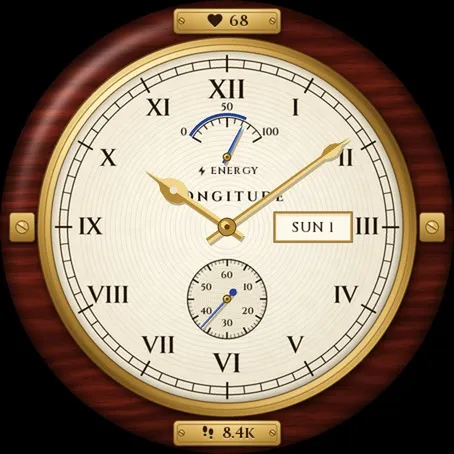
LONGITUDE brings that instrument to your wrist. The lacquered wooden box, the brass gimbal with its pivots, the enamel dial with black Roman numerals and spade hands are all here, and the power reserve gauge now shows your own energy.
THE RESERVE GAUGE
At twelve o'clock, the gauge shows Body Battery by default, labelled ENERGY with a lightning icon. You can switch it to watch battery, stress, or a goal: steps, intensity minutes, floors, weekly run distance, weekly ride distance, calories or daily distance.
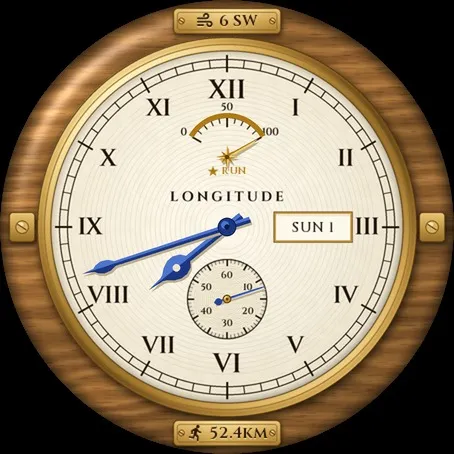
When you reach a goal, the gauge turns gold: a thick gold arc, a gold needle and a compass rose on the pivot.
THREE WOODS, TWO KINDS OF HANDS
- Mahogany - deep red lacquered mahogany
- Teak - golden ship's teak
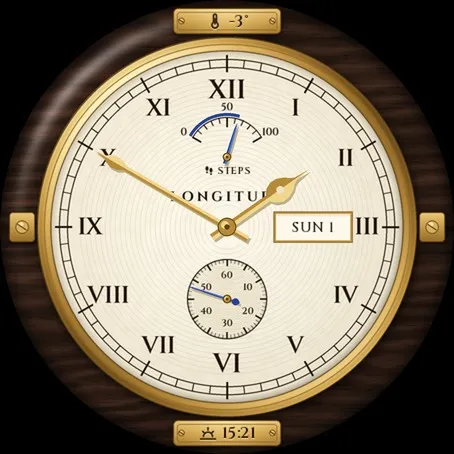
- Ebony - near-black ebony
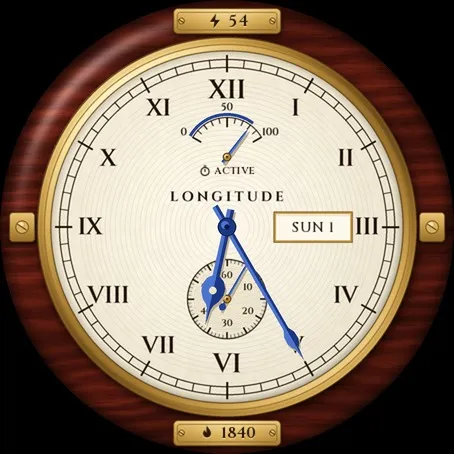
Hands in polished brass or blued steel.
ON THE DIAL
- Small seconds at six o'clock
- Date window at three o'clock with the day of the week in your language
- Two engraved brass plaques for the data you choose
YOUR DATA, YOUR WAY
Choose any of 20 options for each plaque:
heart rate, steps, watch battery, Body Battery, recovery time, stress, Pulse Ox, calories, distance today, intensity minutes, floors climbed, ascent, altitude, temperature, sunrise / sunset, notifications, wind (speed and direction), weekly run distance, weekly ride distance, or leave the plaque empty.
By default: heart rate and steps.
GOALS
Set your weekly run and ride goals, calories goal and daily distance goal in the settings. Distances follow your watch units (km or mi). Steps, intensity minutes and floors use the goals from Garmin Connect.
HOLD TO OPEN
Press and hold a plaque or the gauge to open the matching Garmin view: heart rate, Body Battery, stress, steps, weekly run distance, weather and more. Works on touchscreen watches with Connect IQ 4.2 or newer, and can be switched off in the settings.
CHANGE IT ON THE WATCH
Wood, hands, gauge, plaques, goals and wind unit can be changed in the Connect IQ app on your phone or directly on the watch from the watch face settings menu.
ALWAYS-ON
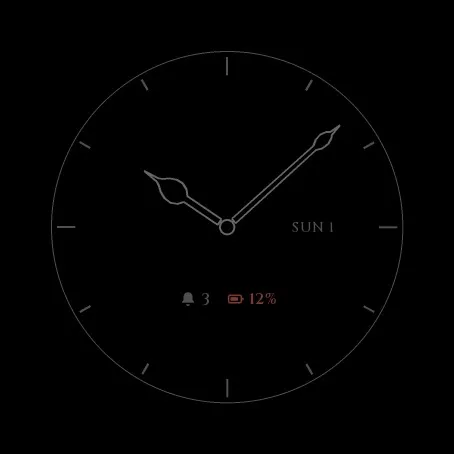
A thin outline of the dial edge, hour markers, hands and date. A notification count and a battery warning appear only when needed. Pixel shifting every minute protects your AMOLED screen.
FEATURES
- Marine chronometer design: lacquered wood box, brass gimbal ring, enamel dial
- Reserve gauge with 10 options, gold effect when a goal is reached
- Three woods, brass or blued steel hands
- Two data plaques, 20 options each
- Weekly run and ride distance with your own goals
- Wind speed and direction (m/s, km/h, mph or knots)
- Small seconds, date window
- Press and hold a plaque or the gauge to open the matching Garmin view (can be switched off)
- Battery turns red when low
- Settings on the phone or directly on the watch
- Always-on display with burn-in protection
- 9 languages: English, Finnish, German, French, Spanish, Italian, Swedish, Norwegian, Danish
- 12 / 24 h, metric / imperial
NOTES
Temperature and wind come from your phone through Garmin Connect weather.
Weekly run and ride distances come from the watch; on older watches they are counted from your saved activities since the first day of your week, so the distance appears once the activity is saved.
Altitude uses the barometric altimeter; on watches without one the field shows "--".
Recovery time, Body Battery, stress and Pulse Ox are shown on watches that support them.
LONGITUDE is made by Kaamos Studio.
Snímky obrazovky
Podporovaných jazykov (9)
Kompatibilných zariadení (58)
Approach® S70 (42mm)
Approach® S70 (47mm)
Approach® S72 - 43 mm
Approach® S72 - 47 mm
D2™ Air X15
D2™ Mach 1
D2™ Mach 1 Pro
D2™ Mach 2
D2™ Mach 2 Pro
Descent™ MK3 - 43mm
Descent™ MK3i - 51mm
epix™ (Gen 2)
epix™ (Gen 2)
epix™ Pro (42mm)
epix™ Pro (47mm)
epix™ Pro (51mm)
fēnix® 8 AMOLED (43mm)
fēnix® 8 AMOLED (47mm/51mm)
fēnix® 8 Pro
fenix® 9 - 43 mm
fenix® 9 – 47 mm
fenix® 9 Pro - 43 mm
fenix® 9 Pro - 47 mm
fenix® 9 Pro - 51 mm
fēnix® E
Forerunner® 165
Forerunner® 165 Music
Forerunner® 170
Forerunner® 170 Music
Forerunner® 265
Forerunner® 265S
Forerunner® 570 - 42mm
Forerunner® 570 - 47mm
Forerunner® 965
Forerunner® 970
Instinct® 3 – 45 mm, AMOLED
Instinct® 3 – 50 mm, AMOLED
MARQ® (Gen 2)
MARQ® Adventurer (Gen 3)
MARQ® Commander (Gen 2) – Carbon Edition
Mercedes-Benz Venu® 2
Mercedes-Benz Venu® 2
Mercedes-Benz Venu® 2S
Mercedes-Benz Venu® 2S
tactix® 7 – AMOLED Edition
tactix® 8 – 47 mm, AMOLED
Venu® 2
Venu® 2
Venu® 2 Plus
Venu® 2 Plus
Venu® 2S
Venu® 2S
Venu® 3
Venu® 3S
Venu® 4 – 41 mm
Venu® 4 – 45 mm
vívoactive® 5
vívoactive® 6
Nedávny trend metrík
Hodnotenie
Recenzie
Dátumy snímok
2026-11-17 → 2026-11-28